von | Nov. 7, 2024 | Nachrichten
Was sich ändert
Beginning today, all users* can use Gemini in the side panel of Google Docs, Google Sheets, Google Drive, and Gmail, in seven additional languages:
- French
- German
- Italian
- Japanese
- Korean
- Portuguese
- Spanish
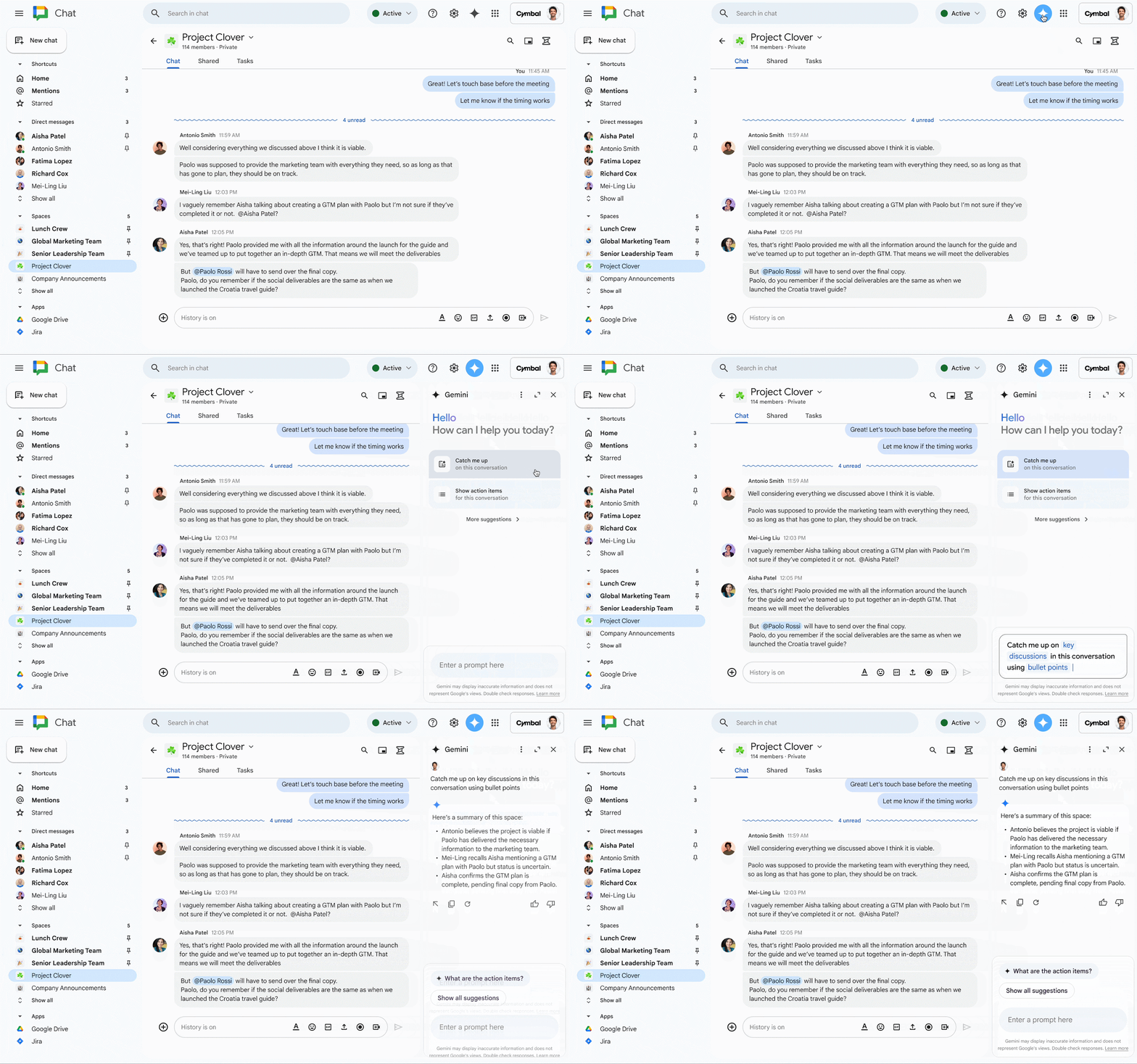
Gemini in the side panel of Gmail in Spanish
With Gemini in the side panel of your Workspace apps, you can get help summarizing, analyzing, and generating content by utilizing insights gathered from your emails, documents, and more—all without switching applications or tabs. Check out our original announcements for Gemini in the side panel of
Docs, Sheets, and Driveund
Google Mail for even more information.
*Available for Workspace customers with a Gemini Business, Gemini Enterprise, Gemini Education, and Gemini Education Premium add-on.
Zusätzliche Details
- While Gemini in the side panel of Docs, Sheets, Drive, and Gmail, is generally available in these additional languages – as we keep rolling out more Gemini alpha features in the side panel, end users with Gemini alpha features turned on may continue to see the “Alpha” badge.
- Image generation is not supported yet in these additional languages.
- Gemini in the side panel of Slides is only available in English at this time.
Erste Schritte
- Admins: There is no admin control for this feature.
- Endverbraucher: You can access the side panel by clicking on “Ask Gemini” (spark button) in the top right corner of Docs, Sheets, Drive, and Gmail on the web. Visit the Help Center to learn more about collaborating with Gemini in Dokumente, Sheets, Driveund Google Mail. Note that for accessing other Gemini for Google Workspace features that are supported in English only, you will need to set your Google Account language to English.
Tempo der Einführung
Verfügbarkeit
Available for Google Workspace customers with a:
- Zwillinge Business or Enterprise add-on
- Zwillinge Education or Education Premium add-on
Ressourcen
von | Nov. 6, 2024 | Nachrichten
Was sich ändert
Starting today, when you’re viewing a Google Meet live stream, you will be able to see chat messages that are sent by participants who have joined via the meeting link. This update helps ensure that information shared through Meet chat messages — like links to relevant documents, time-keeping messages, and more — are also visible to live-stream attendees, making meetings more equitable. Previously, in-call chat messages were only visible to hosts, co-hosts, participants and viewers who were in the main meeting. Once you receive the update, you’ll see a notification the next time chat messages are sent during a live stream. When you click the notification, the chat panel will open.
Chat messages viewed from a live stream
Erste Schritte
Tempo der Einführung
Important note: this feature will roll out at a much slower pace than usual as we approach the end of the year. We will update this post to confirm when rollout has completed for Fast and Rapid release tracks respectively.
- Rapid-Release-Bereiche: Extended rollout (potentially longer than 15 days for feature visibility) starting on November 18, 2024. We anticipate that rollout will be completed sometime during the week of December 5, 2024.
- Geplante Freigabedomänen: Extended rollout (potentially longer than 15 days for feature visibility) starting on January 6, 2024. We anticipate that rollout will be completed by end of Q1 2025.
Verfügbarkeit
- The following Google Workspace editions can initiate a live stream:
- Enterprise Starter, Standard, Plus and Enterprise Essentials Plus
- Education Plus, and the Teaching & Learning upgrade
- Anyone can view a live stream.
Ressourcen
von | Nov. 1, 2024 | Nachrichten
4 Neue Aktualisierungen
Sofern nicht anders angegeben, stehen die unten aufgeführten Funktionen allen Google Workspace-Kunden zur Verfügung und sind vollständig eingeführt oder werden gerade eingeführt. Die Einführung sollte nicht mehr als 15 Werktage in Anspruch nehmen, wenn die Einführung sowohl für Schnelle und planmäßige Freigabe zur gleichen Zeit. Andernfalls sollte jede Phase der Einführung nicht mehr als 15 Arbeitstage in Anspruch nehmen.
Apply black & white filter to Google Drive scans on Android devices
In August, we announced that you can now save files scanned in the Google Drive Android app as a .JPEG. This week, we’re excited to introduce an additional scanning option that gives you the ability to apply a black & white filter on your document scans. This new filter helps enhance texts and other important elements, ensuring they are sharply defined when compared to the background region. | Rolling out now to
Bereiche für schnelle Freigabe und planmäßige Freigabe. | Available to all Google Workspace customers, Workspace Individual Subscribers, and users with personal Google accounts. | Visit the Help Center to learn more about
Scannen von Dateien mit Ihrem mobilen Gerät.
AI Classification now supports Field Selection for Model Training
Wenn
AI Classification first launched, Labels eligible for model training needed to have a single field of either a badge or option-list field type, and Labels with multiple fields were ineligible. Now, customers that use AI Classification will be able to select which badge or option list field they would like to train a model for after identifying the target label. Once trained and enabled, the AI model will automatically apply the label and will only populate the selected field. | Roll out to
Bereiche für schnelle Freigabe und planmäßige Freigabe is complete. | Available to customers with the AI Security add-on, Gemini Enterprise add-on, and Gemini Education Premium. | Visit the Help Center to learn more about
Label Google Drive files automatically using AI classification. Reducing noise from unfollowed threads in Google Chat
In order to make it easier to identify which unread threads are most relevant to you, we’re reducing the noise by removing visual cues from threads that you do not follow in Google Chat. Starting this week, new activity, such as unread messages from threads you
do not follow, will no longer bold and appear at the top of your conversation lists. | Rolling out now to
Bereiche für schnelle Freigabe und planmäßige Freigabe on web and mobile at an extended rollout pace (potentially longer than 15 days for feature visibility). | Available to all Google Workspace customers.
Introducing a better filter by condition experience for tables in Google Sheets
Tables in Google Sheets will now provide users with a smarter
filter by condition experience. Sheets offers 21 options for users to filter by condition, such as “Date is” or “Text ends with”. However, we know there are scenarios in which certain filters might not be applicable based on the type of data in a spreadsheet. Based on the set column type, users will now only see relevant filter by condition options. For example, if your column type is set to number, the filter options will be number-based only. | Roll out to
Bereiche für schnelle Freigabe und planmäßige Freigabe is complete. | Available to all Google Workspace customers, Workspace Individual Subscribers, and users with personal Google accounts. | Visit the Help Center to learn more about
sorting & filtering your data.

Frühere Ankündigungen
Die folgenden Ankündigungen wurden Anfang dieser Woche im Blog Workspace Updates veröffentlicht. Die vollständigen Details finden Sie in den ursprünglichen Blogbeiträgen.
Refine emails faster with updates to the “Polish” shortcut in Gmail
We’re expanding the Help me write shortcut to web and introducing a Polish shortcut on web and mobile that helps you refine emails even faster. | Learn more about
email shortcuts in Gmail. Google Classroom now supports exporting missing and excused grades to select Student Information Systems (SIS)
New density setting in Google Chat
To give users more control over how they see information in Google Chat, we’re introducing a new setting that allows you to control the visual density of screen elements. Choose between “Comfortable” or “Compact” on chat.google.com. | Learn more about
density settings in Chat.Context Aware Access insights and recommendations are now generally available
We’re making it easier to apply context-aware access (CAA) policies with new insights and recommendations. We’ll proactively surface potential security gaps and suggest pre-built CAA levels which admins can deploy to remediate the security gaps. | Learn more
Context Aware Access insights.
FedRAMP High authorization for Gemini for Workspace
As recently announced, we submitted our package to obtain FedRAMP High authorization for Gemini for Workspace, including the Gemini app. A FedRAMP High certification assures federal agencies in the United States that a cloud service provides the highest level of protection for their most sensitive data, enabling them to confidently leverage cloud technologies for critical operations. | Learn more about
FedRAMP High authorization for Gemini.
Gemini in the side panel of Google Chat is now available
We’re expanding Gemini in Chat to help users collaborate more effectively in their spaces, group messages and direct messages. | Learn more about
Gemini in the side panel of Chat. Data classifications labels for Gmail are now available in open beta
In addition to Google Drive, we’re expanding data classification labels to now include Gmail. Classification labels are used to classify and audit content according to organizational guidelines (“Sensitive”, “Confidential”, etc.) and apply policies, such as data loss prevention (DLP) rules, to protect sensitive information in email messages. Classification labels will be available when using Gmail on the web – support for Gmail on mobile devices will be introduced in the coming months. | Learn more about the
beta for data classifications labels for Gmail.
Abgeschlossene Einführungen
Rapid Release Domains:
Geplante Freigabe-Domänen:
Rapid und Scheduled Release Domains:
Einen Überblick über die Ankündigungen der letzten sechs Monate finden Sie unter Was ist neu in Google Workspace (aktuelle Versionen)).
von | Nov. 1, 2024 | Nachrichten
Was sich ändert
In addition to Google Drive, we’re expanding data classification labels to now include Gmail. Classification labels are used to classify and audit content according to organizational guidelines (“Sensitive”, “Confidential”, etc.) and apply policies, such as Regeln zum Schutz vor Datenverlust (DLP), to protect sensitive information in email messages. Classification labels will be available when using Gmail on the web – support for Gmail on mobile devices will be introduced in the coming months.
Wer ist davon betroffen?
Admins und Endnutzer
Warum es wichtig ist
Data breaches are increasingly common and costly across all sectors, including enterprises, public sectors, and government institutions. To minimize data exfiltration and better understand the data being shared, organizations need to differentiate between various types of information and their sensitivity levels to apply data protection policies accordingly. By expanding data classification labels to Gmail, Google Workspace provides admins with a more flexible and robust system integrated with data protection capabilities to help organizations effectively categorize and protect sensitive information.
Specifically, admins can create:
- New classification labels or extend existing ones enabled in Drive labels for Gmail from the Label-Manager. Labels can be used to denote department names, document types, document status, and other custom categories.
The Label Manager tool can be accessed in the Admin console by going to Security > Access and data control
- Data protection rules with classification label as a condition, to apply actions to a message based on its classification. For example, a message will be blocked if it’s classified as ‘Internal’ and is being sent to an external recipient.
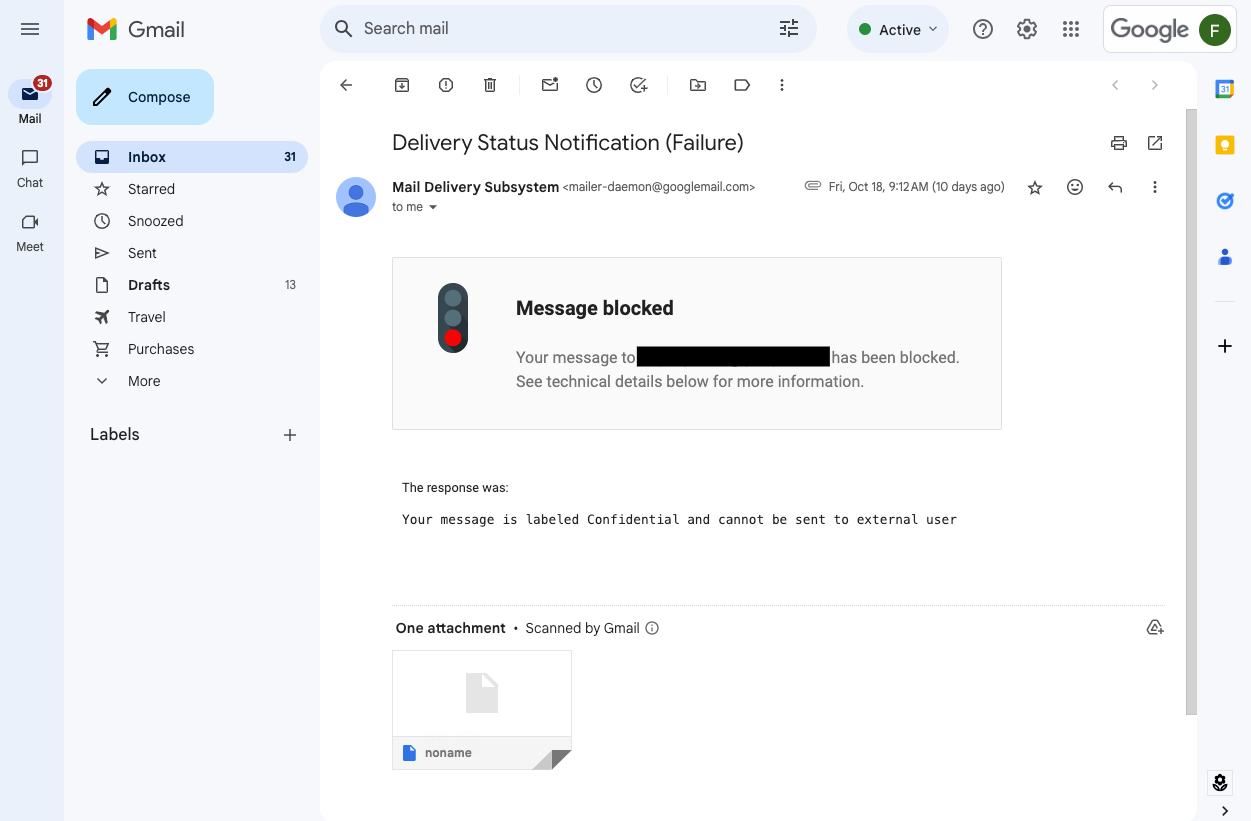
Notification about delivery failure due to DLP policy, blocking messages labeled as ‘Confidential’ to be sent to recipients outside of the organization
- Data protection rules to automatically apply classification labels to a message, based on its content. For example, a ‘Confidential’ label can be applied to a message if it contains sensitive financial information, such as credit card or bank account numbers.
Data protection rule with ‘Apply a label’ action. Classification label specified in the rule will be applied to a message, if message contains information matching conditions of the rule
- DLP rules with Confidential Mode as a condition to prevent sending messages with sensitive information, if it is not encrypted (Confidential Mode is not enabled)
Data protection rule is set up to detect messages with sensitive information (credit card or passport numbers) and confidential mode disabled in order to enforce sending such info with enhanced protection measures
- Endverbraucher can view and apply Classification Labels when using Gmail on the web.
Users can apply classification labels to a message, according to the organization’s data governance policies
Zusätzliche Details
- When Data loss prevention (DLP) rules for Gmail using classification labels either as a condition or as an action, messages are scanned asynchronously. This means that the message is classified, blocked or quarantined after it leaves the sender’s mailbox) and before being dispatched to the recipient. In a future release, we plan to provide synchronous support with instant notifications consistent with our synchronous support of instant DLP enforcement for Gmail.
- If the message is blocked as a result of the classification label applied to it, the sender will get a bounce back message.
- If the message is automatically labeled by a DLP rule, the sender will not see the label reflected in the sent message. The recipient will see the automatically applied label the same way as any other classification label applied manually by the sender.
- Only Badged options list and Multiple Options list (Single select) field types are supported in Gmail. If classification labels are enabled for usage in both Gmail and Drive, and it contains fields that are not supported in Gmail, such as date or persona, Gmail users will see the label only with fields of the supported types.
Erste Schritte
- Admins:
- Endverbraucher: If configured by your admin, you’ll see the “Classification” option when composing a new messaging or replying to an existing message — when you open the menu, you can select labels relevant to your message. We’ll share the end user Help Center article on Monday, November 3, 2024.
Tempo der Einführung
Verfügbarkeit
- The Label Manager and manual classification is available to Google Workspace:
- Frontline Starter and Standard
- Business Standard and Plus
- Enterprise Standard and Plus
- Education Standard and Education Plus
- Essentials, Enterprise Essentials, and Enterprise Essentials Plus
- Data loss prevention rules with labels as a condition or labels as an action are available to:
- Enterprise Standard and Plus
- Education Fundamentals, Standard, Plus und das Teaching & Learning Upgrade
- Frontline Standard
- Cloud Identity Premium (in combination with a Workspace Edition eligible for Gmail)
Ressourcen
von | Nov. 1, 2024 | Nachrichten
Was sich ändert
For the last few months, users with the
Gemini for Google Workspace add-ons and Gemini Education add-ons have used Gemini in the
side panel of Gmail, Docs, Sheets, Slides, and Drive to assist them with summarizing, analyzing, and generating content through insights gathered from their emails, documents, and more. Earlier this month, Gemini add-on subscribers began using Gemini in Google Chat for
summaries of unread conversations in the home view.
Today, we’re expanding Gemini in Chat to help users collaborate more effectively in their spaces, group messages and direct messages. With Gemini in the side panel of Chat, you can:
- Summarize a space or conversation. Examples include asking Gemini the following:
- “Summarize this conversation.”
- “What are the key takeaways in this conversation?”
- After an initial summary is generated, you can ask for a longer summary, “Give me a detailed summary of [topic] discussed in this space.”
- Generate a list of action items from that space or conversation, such as:
- “What are the action items in this conversation?”
- “Are there any action items for me in this conversation?”
- “Summarize [person’s] action items in this space”
- Answer specific questions about that space or conversation by asking:
- “What did [person] say about the timeline extension in this space?”
- “What’s the decision on the project discussed in this conversation?”
Wer ist davon betroffen?
Endverbraucher
Warum Sie es verwenden sollten
Gemini in the side panel of Chat enables you to better collaborate with your team by helping you quickly catch up on missed conversations, capture action items, or search for key details that are easy to miss in a fast-moving space.
Zusätzliche Details
At this time, Gemini in the side panel of Chat can summarize and analyze messages in the conversation that you are currently viewing. It will not summarize or analyze context across your entire Chat conversation history, your Gmail inbox or your Drive files.
Erste Schritte
Tempo der Einführung
Verfügbarkeit
Available for Google Workspace customers with a:
- Zwillinge Business and Enterprise add-on
- Zwillinge Education and Education Premium add-on
Ressourcen
von | Nov. 1, 2024 | Nachrichten
Was sich ändert
As recently
angekündigt, we submitted our package to obtain FedRAMP High authorization for Gemini for Workspace, including the Gemini app. A FedRAMP High certification assures federal agencies in the United States that a cloud service provides the highest level of protection for their most sensitive data, enabling them to confidently leverage cloud technologies for critical operations.
Zusätzliche Details
- Our current FedRAMP submission does not include Data Location. We’re targeting FedRAMP High with Data Location at a later date.
- The package is pending review by the Joint Authorization Board (JAB), who does not provide guidance on review timelines. Refer to the FedRAMP compliance page to view a copy of our submission.
Verfügbarkeit
Verfügbar für Google Workspace-Kunden mit diesen Add-Ons:
- Zwillinge Business
- Gemini Unternehmen
- Gemini Education
- Gemini Education Premium
Available for Google Workspace customers accessing the Gemini app as a core service with these editions:
- Business Starter, Business Standard, Business Plus
- Enterprise Starter, Enterprise Standard, Enterprise Plus
- Frontline Starter, Frontline Standard
- Essentials, Enterprise Essentials, Enterprise Essentials Plus
- Google Workspace for Nonprofits
- Education Standard, Education Plus
von | Okt. 31, 2024 | Nachrichten
Was sich ändert
We’re making it easier to apply context-aware access (CAA) policies with new insights and recommendations. We’ll proactively surface potential security gaps and suggest pre-built CAA levels which admins can deploy to remediate the security gaps. These insights will be surfaced to customers, if they have not deployed any CAA policies to their users. When you deploy a recommendation, it will first be placed in Monitor Mode, so you can understand how the policy will block user access over time, and can be reviewed in the CAA audit logs.
With this release, we’ve also added the ability for admins to customize the recommendations as they see fit before they’re applied broadly. Additionally, we’ll send primary admins an email on a quarterly basis with insights and actionable recommendations.
Wer ist davon betroffen?
Admins
Warum es wichtig ist
Using Context-Aware Access, admins can set up different access levels based on a user’s identity and the context of the request (location, device security status, IP address). This can help provide granular access controls without the need for a VPN, and give users access to Google Workspace resources based on organizational policies. Insights and recommendations help admins improve the cybersecurity posture of their organization by proactively identifying areas that need attention, significantly reducing the need for admins to identify these risks themselves. For example, if we detect devices with outdated operating system versions accessing corporate Workspace data, we can surface this as an Insight & pair it with a recommendation to block such devices from accessing Workspace data with a few clicks.
Erste Schritte
- Endverbraucher: There is no end user impact or action required.
Tempo der Einführung
Verfügbarkeit
Verfügbar für Google Workspace
- Unternehmen Standard and Plus
- Education Standard and Plus
- Unternehmen Essentials Plus
- Also available to Cloud Identity Premium customers
Ressourcen
von | Okt. 7, 2024 | Nachrichten
Was sich ändert
To add to the list of
question types that users can respond to in Google Forms and enable the collection of feedback in a more engaging way, we’re introducing a rating question type.
This new question type enables you to customize rating questions by setting a rating scale level and include rating icons, such as stars or hearts, to offer a more intuitive way to gather opinions from an audience.
With this update, you’ll be able to analyze responses to these questions (e.g. average rating of responses and visual distributions of ratings) using the summary tab of the responses section.
Erste Schritte
Admins: There is no admin control for this feature.End users: Go to “create a new form” at
forms.google.com or an existing form and add a new “Rating” question from the dropdown of different question types. Add the scale for the rating question, such as 1-5, and choose between the different icons supported: stars, hearts and thumbs up. Visit the Help Center to learn more about
asking responders to provide a rating on a scale. Tempo der Einführung
Verfügbarkeit
Verfügbar für alle Google Workspace-Kunden, Workspace-Einzelabonnenten und Nutzer mit persönlichen Google-Konten
Ressourcen
von | Okt. 14, 2024 | Nachrichten
Was sich ändert
Zu Beginn dieses Jahres, we introduced a new migration solution from Google Workspace partner
CloudFuze that enables customers to import data from Slack into Google Chat. Today, we’re announcing an additional solution from CloudFuze that enables companies using
Workplace for Meta to migrate their data to Google Chat.
This functionality is particularly useful following
Meta’s announcement that Workplace will be available in read-only mode starting in September 2025 and fully unavailable in June 2026.
With this integration, you can move existing communities, groups, individual members, and admins into Chat spaces. In addition, all of the community posts, attachments, reactions, and more will be moved into Chat with the original historical timestamps to ensure that your knowledge repository is available for users in Chat.
Wer ist davon betroffen?
Admins und Entwickler
Warum Sie es verwenden sollten
This CloudFuze solution imports your team collaboration data and knowledge repository from Meta Workplace into Google Chat.
Erste Schritte
Admins, end users and developers: Visit the
CloudFuze Ressourcen-Seite to learn how to get started with migrating Meta Workplace data into Google Chat.
Tempo der Einführung
Verfügbarkeit
Verfügbar für alle Google Workspace-Kunden. Beachten Sie, dass eine separate CloudFuze-Lizenzierung erforderlich ist, um Datenmigrationen zu ermöglichen.
Ressourcen
von | Okt. 7, 2024 | Nachrichten
Was sich ändert
Today, we’re excited to announce new and improved widgets for Chat app cards, including:
Modern and sleek style
buttons in line with the
Google Material Design 3.
Die ChipList widget that provides a versatile and visually appealing way to display information. You can use chips to represent tags, categories, or other relevant data, to make it easier for users to navigate and interact with your content.
An Overflow Menu that can be used in Chat cards to offer additional options and actions, without cluttering the card’s interface to ensure a clean and organized design.
The option to customize the control button so that it collapses and expands sections within your Chat cards. You can choose from a range of icons or images to visually represent the section’s content, making it easier for users to understand and interact with the information. Collapsible text paragraphs that let users reveal more information on demand. This widget is perfect for presenting lengthy content or additional details that can be explored when selected, creating a dynamic and interactive user experience.
Erste Schritte
Tempo der Einführung
Verfügbarkeit
Available to all Google Workspace customers
Ressourcen



.png)