by | Aug 13, 2024 | News
What's changing
Following the introduction of
tables in Google Sheets and the recently announced
improvements to tables, we're excited to support a new automated way for users to transform their data into a well-formatted table, with rich data types.
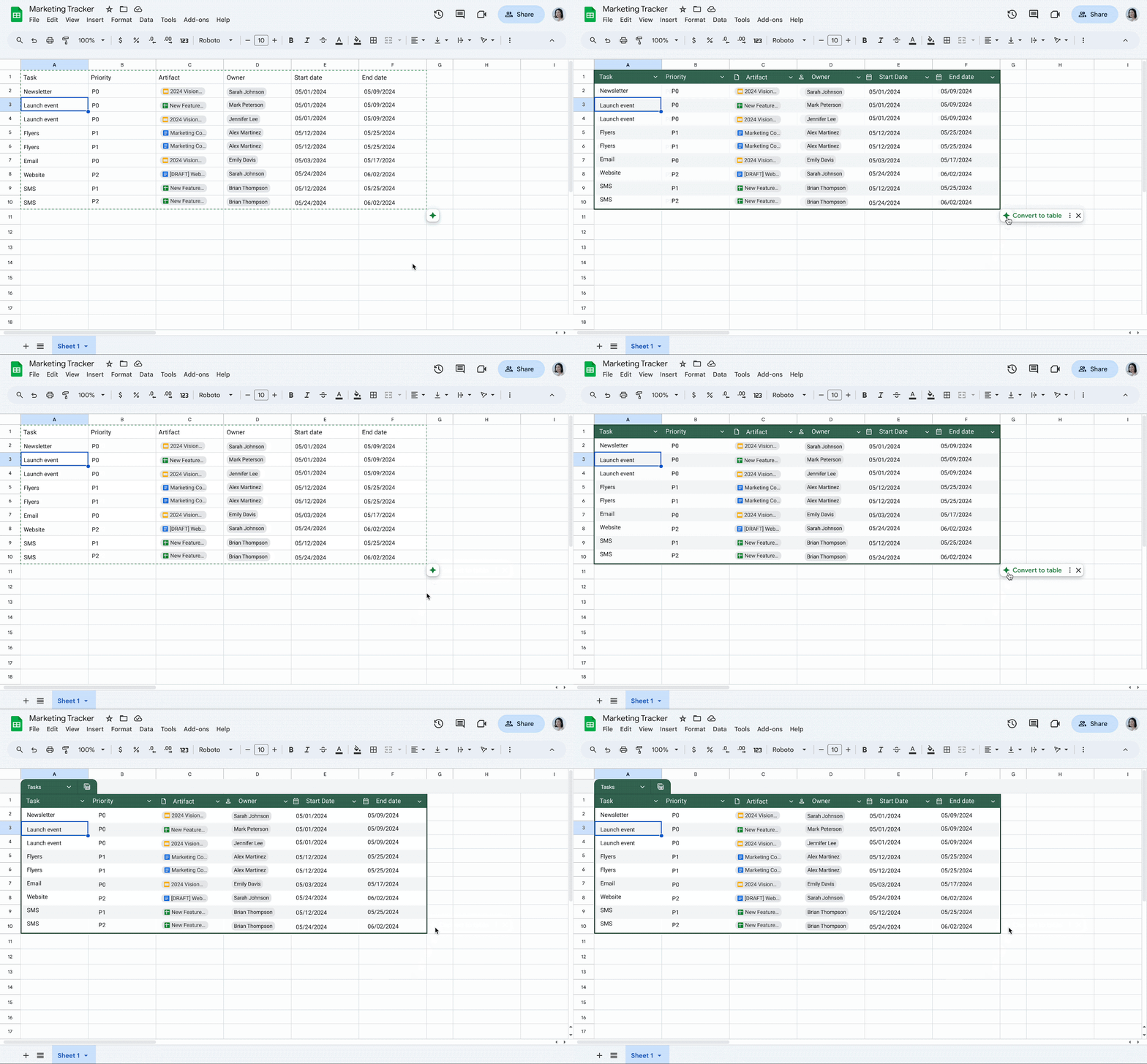
If you have a meaningful range of data, Sheets will show a "Convert to table" suggestion when you click into your data range. By hovering over that indicator, you can preview the suggestion and then convert your range to a table in one click.
Who's impacted
End users
Why you'd use it
This update encourages the use of tables, a feature that enables users to transform the way they organise their data, simplify data creation, and reduce the repetitive tasks needed to format, input, and update data in Sheets.
Getting started
Admins: There is no admin control for this feature. End users: This feature will be on by default and can be disabled by going to Tools > Suggestion controls > (deselect) Enable table suggestions. While the suggestion to convert to table will likely appear automatically, you can also convert data to a table manually by selecting a data range and going to Format > Convert to table. Visit the Help Centre to learn more about
using tables in Google Sheets. Rollout pace
Rapid Release domains: Extended rollout (potentially longer than 15 days for feature visibility) starting on August 13, 2024
Scheduled Release domains: Gradual rollout (up to 15 days for feature visibility) starting on September 4, 2024
Availability
Available to all Google Workspace customers, Google Workspace Individual Subscribers, and users with personal Google accounts
Resources
by | Aug 13, 2024 | News
What's changing
We're introducing a new setting that enables education admins to restrict which users can create and manage members in Google Chat conversations.
This can be useful for admins who want to prevent groups of students from initiating or adding users to a conversation.
Who's impacted
Admins and end users
Why it's important
This is a highly-requested feature that restricts the creation of unsupervised activity among K-12 students and helps provide a safer and easier way for teachers to communicate with students.
Getting started
Admins: To restrict users from accessing features in Chat, go to the Admin console > Apps > Google Workspace > Google Chat > click the Chat and Space restrictions setting > Inside the Google Chat box, search for the group of users you'd like to apply Chat restrictions to > check the box for Restrict creating direct messages, group messages, and spaces > hit Save. Note: groups can be restricted at the group level only.We recommend admins enable the "
automatically accept chat invitations" setting for their OU. This will ensure teachers can easily initiate messages to students that instantly deliver without the need to accept an invitation. We also recommend
turning OFF Chat with external users.Visit the Help Centre to learn more about
setting up Chat restrictions for Education accounts.End users: There is no end user setting for this feature.
Rollout pace
Admin setting:
Chat UI:
Availability
Available for Google Workspace:
Education Fundamentals, Standard, Plus, the Teaching & Learning Upgrade
Resources
by | Aug 15, 2024 | News
What's changing
We're introducing a new feature that enables users to more easily view and structure their Google Form data in Sheets.
Starting today, when a user initiates the creation of a new sheet using their Forms data, Sheets will automatically open the data as a table, bringing format and structure to your data. If a user opens a pre-existing sheet connected to a Form, there will be no change and the user will need to convert the data to a table by going to Format > Convert to table.
Getting started
Admins: There is no admin control for this feature. End users: For pre-existing spreadsheets connected to Form data, you can convert the data to a table manually by selecting the data range and going to Format > Convert to table. Visit the Help Centre to learn more about
using tables in Google Sheets.
Rollout pace
Rapid Release domains: Extended rollout (potentially longer than 15 days for feature visibility) starting on August 15, 2024
Scheduled Release domains: Extended rollout (potentially longer than 15 days for feature visibility) starting on September 5, 2024
Availability
Available to all Google Workspace customers, Google Workspace Individual subscribers, and users with personal Google accounts
Resources
by | Aug 15, 2024 | News
What's changing
As we continue to make improvements for managing Meet Hardware fleets, we're pleased to announce eighteen additional filters in the Admin console, which include:
Alert silence expiration timeBoot modeCameraChrome versionContent camera (i.e., whiteboard cameras)Controller (i.e., MIMO, Logitech Tap, Juno Remote, etc.)Device IDDisplayEnrollment dateHas userCamera home position modeMicrophoneNoise cancellation (denoising state)NotesOperating system versionPrimary framing strategySpeakerSoftware audio processing mode
The new filters can be added as chips to filter the device table:
From Menu > Devices > Google Meet hardware > Devices, select "Add a filter". Any filters you select will be added to the URL so you can save the link or share it with others.
New data columns have been added that enable you to view additional device info at a glance, which include:
Boot modeCameraCamera home positionChrome versionContent cameraControllerDevice IDDisplayEnd of Meet supportEnrollment dateMicrophoneNoise cancellationNotesOperating system versionPrimary framing strategyVolumeSpeaker
From Menu > Devices > Google Meet hardware > Devices, select the gear icon to add columns. Any columns you select will be added to the URL so you can save the link or share it with others.
Increasing the number of searchable fields makes it easier and faster to find specific groups of devices, which is particularly helpful when managing a large fleet of devices. Quickly finding groups of devices allows you to save time and resources managing and troubleshooting your devices.
Getting started
Admins: Visit the Help Centre to learn more about using
filters to show devices that meet specific criteriaEnd users: There is no end user impact or action required.
Rollout pace
Availability
Available to all Google Workspace customers with Google Meet hardware devices
Resources
by | Aug 16, 2024 | News
What's changing
In the era of generative AI, building helpful, secure products that give users choice and control over their data remains Google's core principle. When commercial customers adopt Gemini for Google Workspace they get the same robust data protection and security standards that come with all Google Workspace services, with specific protections for businesses, education, and public-sector customers.
We're pleased to announce for Gemini for Workspace licensed users that:
Gemini for Google Workspace-including Gemini in the side panel of Gmail, Drive, Docs, Sheets, and Slides-is now
SOC 1,
SOC 2, and
SOC 3 Chatting with Gemini at
gemini.google.com is now
SOC 2 and
SOC 3 compliant. We plan to achieve SOC 1 compliance later this year.
With SOC 1, 2 and 3 compliance awarded by a stringent third party (American Institute of Certified Public Accountants (AICPA)) customers can be confident that Workspace meets the industry standard for handling financial data, data security, availability, processing integrity, confidentiality and privacy.
Getting started
Rollout pace
Available now.
Availability
Available for Gemini Business, Enterprise, Education and Education Premium add-ons
Resources
by | Aug 16, 2024 | News
2 New updates
Unless otherwise indicated, the features below are available to all Google Workspace customers, and are fully launched or in the process of rolling out. Rollouts should take no more than 15 business days to complete if launching to both Rapid and Scheduled Release at the same time. If not, each stage of rollout should take no more than 15 business days to complete.
Save files scanned in the Google Drive Android app as a .JPEG
Google Meet on Android is now available for Logitech Rally Bar Huddle
Google Meet on Android is now officially supported on Logitech's Rally Bar Huddle appliance for small collaboration rooms and huddle spaces. After initial setup, admins can easily enroll, manage, and monitor these devices using the Google Admin console. Google Meet on Android for Logitech Rally Bar Huddle is supported on CollabOS v1.13. | Visit Logitech's website for more information on
purchasing a room kit.Previous announcements
The announcements below were published on the Workspace Updates blog earlier this week. Please refer to the original blog posts for complete details.
Manage all Calendar interop settings from the Admin console
All Calendar interoperability settings will now be housed in the Admin console at Apps > Google Workspace > Settings for Calendar > Calendar Interop management. This will make it easier for admins to view and manage their interop setups. | Learn more about
Calendar Interop. Google Meet hardware event logs are now available in the security investigation tool and BigQuery
We're pleased to announce a new set of features to help you conduct deeper analysis and more flexible issue detection within your Google Meet hardware fleet. | Learn more about
event logs for Meet hardware.Chat safer with new settings for students in Google Chat
We're introducing a new setting that enables education admins to restrict which users can create and manage members in Google Chat conversations. | Learn more about
admin controls for Chat. Use intelligent suggestions for table conversion in Google Sheets
If you have a meaningful range of data, Sheets will show a "Convert to table" suggestion when you click into your data range. By hovering over that indicator, you can preview the suggestion and then convert your range to a table in one click. | Learn more about
suggestions for table conversion in Sheets. View and structure Google Form data as a table in Google Sheets
We're introducing a new feature that enables users to more easily view and structure their Google Form data in Sheets. | Learn more about
Form data in Sheets. Save time managing your Meet Hardware fleet with new device filters
As we continue to make improvements for managing Meet Hardware fleets, we're introducing eighteen additional filters in the Admin console. | Learn more about
new Hardware device filters.
SOC compliance for Gemini
We're pleased to announce for Gemini for Workspace licensed users that: 1) Gemini for Google Workspace-including Gemini in the side panel of Gmail, Drive, Docs, Sheets, and Slides-is now SOC 1, SOC 2, and SOC 3 compliant. 2) Chatting with Gemini at gemini.google.com is now SOC 2 and SOC 3 compliant. We plan to achieve SOC 1 compliance later this year. | Learn more about
SOC compliance for Gemini.
Completed rollouts
Rapid Release Domains:
Scheduled Release Domains:
Rapid and Scheduled Release Domains:
Paused rollouts
We have paused the rollout for this feature while we evaluate performance and quality. We will provide an update with new rollout information as soon as possible.
For a recap of announcements in the past six months, check out What's new in Google Workspace (recent releases).
by | Aug 19, 2024 | News
What's changing
Earlier this year, we announced
multi-party approvals for sensitive actions taken in the admin console, specifically requiring one admin to approve actions taken by another. At launch, these protections applied to several settings, including 2-step verification, account recovery, and more.
Today, we're expanding multi-party approvals to include
domain-wide-delegation. Domain-wide-delegation is a powerful feature which allows admins to grant third-party applications permission to access your Workspace users' data. Bringing this feature under the umbrella of multi-party-approvals helps mitigate the risk of data exfiltration by internal bad actors or if admin credentials have been compromised.
Overall, multi-party-approvals help ensure no sensitive action happens in a silo and, most importantly, helps prevent unauthorised or accidental changes from being made. This added layer of approval helps ensure actions are being taken appropriately and not too broadly or too often. For more information, see our
original announcement.
When domain-wide-delegation changes are attempted, admins will be required to submit the change to a super admin for approval.
Super admins can review and take action on these requests in the Admin console by navigating to Security > Multi-party approval. Super admins will also receive email alerts when a change is requested or any other protected action is attempted.
Getting started
Admins: The multi-party approvals feature is available for eligible Workspace customers with two or more super admin accounts. Multi-party approvals are OFF by default and can be turned on in the Admin console by going to Security > Multi-party approval settings. Visit the Help Centre to learn more about
multi-party approvals for sensitive actions.
Rollout pace
Availability
Available for all Google Workspace customers
Resources
by | Aug 20, 2024 | News
What's changing
We're excited to introduce a new feature in Google Classroom that enables teachers to create groups of students to make assigning differentiated content easier. This update will allow them to quickly assign classwork to pre-defined sets of students without having to tediously select individual students.
Now, teachers can differentiate content across sub-sections of their class based on their students' needs. For example, teachers can create groups based on reading levels and as their class adapts, they can edit members of a group or delete groups within their class.
Who's impacted
End users
Why you'd use it
Groups in Classroom will help teachers organise, manage and understand performance in their class.
Additional details
Group names and members are only visible to teachers or
co-teachers, not students.
Getting started
Rollout pace
Availability
Available for Google Workspace:
Education Plus and the Teaching & Learning Upgrade
Resources
by | Aug 30, 2024 | News
2 New updates
Unless otherwise indicated, the features below are available to all Google Workspace customers, and are fully launched or in the process of rolling out. Rollouts should take no more than 15 business days to complete if launching to both Rapid and Scheduled Release at the same time. If not, each stage of rollout should take no more than 15 business days to complete.
The AppSheet Admin Console is now available in public preview
For the first time, Workspace admins will have visibility into the users, apps and licences associated with their AppSheet users via the AppSheet Admin Console. Previously, these advanced monitoring capabilities were limited to AppSheet Enterprise customers. Now all Workspace admins with the
AppSheet service privilege can use this data to gain a deeper understanding about how their users are interacting with AppSheet. With the AppSheet Admin Console, you can view all the app users across any of your organisation's apps, review the most popular apps and creators, and more. Admins can also take actions like exporting a list of accounts, users, apps, and licenses for their organisation or set the role of users in their organisation. Eligible customers can access the AppSheet Admin Console using this
direct link or clicking out from Apps > Google Workspace > Settings for AppSheet in the Workspace Admin Console. | The open beta for the AppSheet Admin Console is available now for AppSheet Enterprise customers and
AppSheet Core entitled customers. | Visit the Help Centre to learn more about
using the AppSheet Admin Console.
Google Workspace for Education users can now set and share personal pronouns and name pronunciation
Google Workspace for Education admins of K-12 and higher education institutions can now give their students the option to set their pronouns from their Google Account at
aboutme.google.com. This option is OFF by default and can be enabled for all users or a subset of them (such as for a specific location or class). User-defined pronouns will appear in personal information cards displayed when hovering over or clicking someone's profile photo across Workspace apps like Gmail, Calendar, Docs, Sheets, Slides, Chat, and Drive. Pronouns will also appear in
Google Contacts, accessed by clicking "Open detailed view" from the personal information cards. | Pronouns are rolling out now to
Rapid Release and Scheduled Release domains. | The ability to add name pronunciation will be available by the end of Q3, 2024. | Available to all Google Workspace for Education customers. | Visit the Help Centre to learn more about
allowing Directory users to change their pronouns and
changing pronouns in your Google Account settings.
Previous announcements
The announcements below were published on the Workspace Updates blog earlier this week. Please refer to the original blog posts for complete details.
Automate your workflows on Google Chat with IFTTT and UKG Flow integrations
Picture-in-picture in Google Meet will now open automatically when switching tabs
Picture-in-picture mode will now automatically trigger when you switch tabs during a meeting. | Learn more about
picture-in-picture in Meet. Business Starter customers will soon have access to shared drives
Business Starter will officially have access to shared drives starting mid-September. When shared drives are made available to Business Starter customers, all users will be able to create shared drives by default. If this default behaviour is undesired, admins can update their settings before Business Starter users gain access to the feature starting on September 23, 2024. | Learn more about
shared drives for Business Starter. Reply to emails in Gmail faster on Android devices
You can now reply to emails directly from the bottom of the conversation, without opening a new screen, making it easier to reference the email you're replying to. | Learn more about
replying to emails on Android. Upload additional types of documents to Gemini (gemini.google.com) for insights and analysis
Google Workspace users with a Gemini Business, Enterprise, Education or Education Premium licence can now upload a variety of files from Google Drive or locally from your device into Gemini. | Learn more about
document upload with Gemini. "Take notes for me" in Google Meet is now available
"Take notes for me" is an AI-powered feature in Google Meet that automatically takes notes, allowing you to focus on discussion, collaboration, and presentation during your meetings. | Learn more about
"Take notes for me" Google Meet provides consolidated email for all meeting artifacts
Currently, Google Meet sends an email for each type of meeting artifact initiated in a meeting, including meeting recordings, meeting transcripts, Gemini notes with "take notes for me," live streams and more. Going forward, you'll receive one email consolidating these artifacts. | Learn more about
Meet's meeting artifacts.
Customise Gemini (gemini.google.com) for your specific needs with Gems
Gems are now available to Google Workspace customers with a Gemini Business, Enterprise, Education, or Education Premium add-on. | Learn more about
Gems.
Gmail Q&A: A new way of searching your inbox with Gemini on Android devices
Gmail Q&A feature is rolling out now on Android devices and coming soon to iOS. | Learn more about
Gemini in Gmail.
Additional data protection in Gemini (gemini.google.com) when using a school account is now available
Earlier this year, we brought Gemini for Google Workspace to education communities with two new paid add-ons. At that time, we announced that educators and students 18 years and older who did not have a Gemini Education licence would soon get added data protection when using Gemini (gemini.google.com) as an Additional Service with their school accounts. Beginning this week, that added data protection is now available - free of charge. | Learn more about
data protection in Gemini.
by | Sep 5, 2024 | News
What's changing
Starting today, you can access additional information on topics directly in Gemini's (
gemini.google.com) responses to your prompts. Specifically, you'll see links to related content in responses to fact-seeking prompts - you can click the arrow chips to dive deeper into the topic. If you have a Gemini for Workspace licence and
Google Workspace extensions in Gemini are enabled, Gemini will also now include inline links to relevant emails referenced in responses where the Gmail extension is used.
Including this information offers another easy way to dig deeper into Gemini's responses. You can also use Gemini's
double-check feature to verify responses by using Google Search to highlight which statements are corroborated or contradicted on the web.
Additional details
At this time, this feature is limited to English prompts only.This feature is available in most countries where Gemini (
gemini.google.com) is available
Getting started
Rollout pace
Availability
Available to any Google Workspace users with access to
gemini.google.comUsers with a Gemini Business, Enterprise, Education, Education Premium add-on licence will see Gmail citations if Google Workspace extensions in Gemini are enabled by their admin.