por | Ago 27, 2024 | Noticias
What’s changing
We’re making it easier to respond to emails in the Gmail app on your Android device with a new quick reply experience.
Previously, there were only options to Reply, Reply all or Forward a message when in the conversation view of an email on your Gmail app. Upon selecting one of those options, you’d be directed to a full screen compose view to send your reply.
Starting today, you can reply to emails directly from the bottom of the conversation, without opening a new screen, making it easier to reference the email you’re replying to. We know this new option is best for quick, lightweight responses, so for longer, more formal responses, you can simply expand the text box to access more formatting options.
Additional details
This feature will be available on iOS devices later this year.
Getting started
Admins: There is no admin control for this feature. End users: Using the Gmail app on your Android device, open an email > click into the text box at the bottom > type your reply > tap the send icon. Clicking the “Expand to full screen” icon allows you to switch to the full screen compose view. Visit the Help Center to learn more about
replying to messages in Gmail.Rollout pace
Workspace Customers:
Users with personal Google accounts and Workspace Individual Subscribers:
This feature is available now.
Availability
Available to all Google Workspace customers, Google Workspace Individual subscribers, and users with personal Google accounts
Resources
por | Set 20, 2024 | Noticias
3 New updates
Unless otherwise indicated, the features below are available to all Google Workspace customers, and are fully launched or in the process of rolling out. Rollouts should take no more than 15 business days to complete if launching to both Rapid and Scheduled Release at the same time. If not, each stage of rollout should take no more than 15 business days to complete.
Ability to create announcement spaces using the Google Chat API is now generally available
Additional improvements to tables in Google Sheets
1. Insert a blank table from the pre-built table sidebar
2. Reference tables successfully via IMPORTRANGE. For example, if you had a table named Table1 with column header values of of Column 1, Column 2, Column 3, etc.:
To import the table range, including header cells, you would input: =IMPORTRANGE(spreadsheet_url, “Table1[#ALL]”) To import only the footers of the table range, you would input: =IMPORTRANGE(spreadsheet_url, “Table1[“#TOTALS]”) To import the table range, excluding header cells, you would input: =IMPORTRANGE(spreadsheet_url, “Table1[“#DATA]”) To import the first two columns of the table range, including header cells, you would input: =IMPORTRANGE(spreadsheet_url, “Table1[[Column 1]:[Column 2],[#ALL]]”) 3. Use the following keyboard shortcuts to easily convert ranges to tables:
Introducing Dual Screen on Meet
Following
the recent announcement of an improved user experience for Google Meet on Android devices, we’re excited to introduce an additional feature, available on the
Pixel 9 Pro Fold device, that provides you with a more immersive video call experience. Through the use of the front and inner cameras, you can now show both yourself and what you’re looking at at the same time. Additionally, the person you’re video chatting with can be seen on both the inner and outer screens to include everyone around you in the call. | Rollout to
Rapid Release domains is complete; rolling out now to
Scheduled Release domains. | Available to all Google Workspace customers, Workspace Individual Subscribers, and users with personal Google accounts. | Visit the Help Center to learn how
Dual Screen on Google Meet works.
Use both screens during a Meet call – rear screen view of foldable
Use both screens during a Meet call – front screen view of foldable
Previous announcements
The announcements below were published on the Workspace Updates blog earlier this week. Please refer to the original blog posts for complete details.
Adding multi-monitor support to Google Slides
We’re making it easier to view your Google Slides presentation controls on your computer while presenting to an audience using a connected external monitor or projector. | Learn more about
multi-monitor support in Slides. New beta available that restricts access to folders in Google Drive
We’ve introduced a beta that allows shared drive managers to restrict folders to specific users within a shared drive. This provides shared drive managers with greater flexibility to keep relevant content within a single shared drive, while restricting access to shared folders with sensitive information. | Learn more about
restricting folder access.New design and accessibility improvements for embedded Google Calendars
Starting this week, you’ll notice a refreshed look and feel for embedded calendars that is in line with Google Material Design 3 and now includes enhanced accessibility features, such as the ability to use an embedded calendar with a screen reader and keyboard shortcuts to navigate more easily, and more. | Learn more about
embedded Google Calendars.
NotebookLM now available as an Additional Service
Last year, we introduced an Early Access App called NotebookLM, an experimental product using some of Google’s most advanced models, like Gemini 1.5 Pro, that helps you gain critical insights grounded in the content of source documents you trust. We’re excited to announce that NotebookLM is officially available as an Additional Service. | Learn more about
NotebookLM.
Admin features for space management via the Chat API are now generally available
Earlier this year, we introduced a series of space management capabilities for Workspace admins in the Google Chat API via the Google Workspace Developer Preview Program. These API features are now generally available for all Google Workspace customers and developers. | Learn more about
space management via the Chat API. Create birthdays in Google Calendar
To ensure a birthday is never missed, we’re introducing the ability to create and modify birthday events in Google Calendar on Android devices. | Learn more about
birthdays in Calendar. Additional iOS data exfiltration enhancement: account level data sharing between Google Workspace apps and non-Google Workspace apps on or off
Admins can now enable content sharing on personal Workspace accounts while preventing data sharing from corporate Workspace accounts on iOS devices. | Learn more about
iOS data exfiltration enhancements.
Completed rollouts
Rapid Release Domains:
Rapid and Scheduled Release Domains:
For a recap of announcements in the past six months, check out What’s new in Google Workspace (recent releases).
por | Set 23, 2024 | Noticias
What’s changing
Today, we’re excited to officially introduce a new Gemini Education tab in Classroom that grants quick access to the following AI tools:
Outline a lesson plan: Use a scaffolded experience to generate lesson plan ideas based on what you’d like students to be able to demonstrate Craft a compelling hook: Spark curiosity and engage your students with a compelling start for your class Generate a quiz: Generate a quiz and export to Forms based on target grade level, length, and the types of questions you want to include Re-level text: Generate a new version of your text based on target grade level We are working closely with schools and educators globally to develop additional helpful tools. If you’re interested in joining the pilot program, learn more
here.
Who’s impacted
Admins and end users
Why it’s important
Gemini in Google Classroom provides educators with a suite of generative AI tools that can generate new and unique content and make learning more personal and engaging for students.
Additional details
Gemini in Classroom is only available in English for education users over the age of 18.
Getting started
Admins: Learn more about
available pricing and discounts for the Gemini Education add-ons or contact your existing Google Workspace for Education reseller or a Google for Education sales specialist. Note that Education customers who have already purchased Gemini Enterprise will have the choice to transition to either Gemini Education or Gemini Education Premium. End users: If your admin has assigned you a
Gemini Education license, navigate to the Gemini Education tab in the navigation bar in Google Classroom. When using generated content, you should always review the outputs as AI can make mistakes and refine the output so that it fits your context and local policies before assigning to students. Visit the Help Center to learn more about
Gemini in Classroom and feel free to
take this course to learn more about generative AI for Educators.
Rollout pace
Available for Google Workspace customers with these add-ons:
Gemini Education and Education Premium
Resources
por | Set 24, 2024 | Noticias
What’s changing
Using the new “Feature preview” setting, specific Google Meet hardware devices can be configured to test upcoming features prior to general availability. This is especially beneficial for testing purposes, gathering user feedback, creating training materials, and raising awareness before the feature is released broadly to your users.
Menu > Devices > Google Meet hardware > Settings > Feature preview
Who’s impacted
Admins and end users
Why you’d use it
Prior to the launch of the “Feature preview” setting, there was no way for admins to preview upcoming features before they roll out to hardware devices, which can be potentially confusing to end users when they see new features unexpectedly. Now, customers have the opportunity to preview changes in advance, which gives them time to inform and educate their users about upcoming changes, prepare their IT help desks, and more. Overall, this update aims to increase awareness and adoption of helpful meeting features while reducing the risk of end user confusion.
Getting started
Admins: The “Feature preview” setting is configured to “General availability” by default. When “Early preview” is selected, devices will receive new features when they are released to the “preview” stage. Visit the Help Center to learn more about
trying features early on your devices. We recommend that 10% or less of your fleet adopts “Early preview” to try new experiences in conference rooms before they roll out to General availability.
End users: Depending on your organization’s configuration, you may be able to preview new features on select Google Meet hardware devices.
When enabled, the device screen displays a “Preview” banner indicating the device is currently in “Early preview” mode
Rollout pace
Availability
Available to all Google Workspace customers with Google Meet hardware devices
Resources
por | Set 24, 2024 | Noticias
What’s changing
We’re making it easy for you to personalize and differentiate documents with full-bleed cover images that extend from one edge of your document to the other.
Whether you’re customizing a document for a customer with industry themes, personalizing an onboarding document for a new employee or building a virtual brochure for your company’s products, cover images help set the tone for a document by adding relevant visuals.
You can add cover images from our curated gallery or upload your own image. To insert, you can either:
Click the new “Cover image” chip at the top of your Doc (
similar to the ones introduced last year). Go to Insert > Cover image > Upload from computer or Choose from stock images. Type “@” followed by Cover image > Upload from computer or Choose from stock images.
Additional details
Cover images can only be added to documents set to
pageless mode, allowing the image to span the entire width of the document. To set up the more immersive experience of pageless mode, go to File > Page setup > Pageless or Format > Switch to Pageless format.
Getting started
Rollout pace
Availability
Available to all Google Workspace customers, Workspace Individual Subscribers, and users with personal Google accounts
Resources
por | Set 24, 2024 | Noticias
What’s changing
The cyber threat landscape is evolving and there’s been an increase in the sophistication and volume of malicious threats. Small businesses frequently lack the time, resources, and expertise that larger organizations have to implement robust security measures. As a result, threat actors often perceive these organizations as easier targets.
To help small businesses, we’re introducing security advisor, a set of new insights and tools designed to enhance security for small businesses – including threat defense, account security, and data protection capabilities. Security advisor offers tailored security insights, actionable guidance in the admin console, and simplified data protection controls — all to help businesses keep their customer data safe.
With security advisor, applying security settings is easier than before and the recommended settings can be easily adopted and customized to meet the specific needs of each organization in just a few steps. This helps organizations elevate their security posture, helps their IT team be more efficient by simplifying admin work, and helps reduce the risk of misconfigured security settings with a guided, in-app experience in the Admin console.
In addition to security insights in the Admin console, the security advisor feature set includes the following:
Chrome Enhanced Safe BrowsingGmail Enhanced Safe BrowsingGmail Security SandboxData protectionApp access protection
Admin console > Security > Security advisor
Getting started
Rollout pace
Availability
Available for Google Workspace Business Starter, Standard, and Plus
Resources
por | Set 24, 2024 | Noticias
What’s changing
Since 2021,
Brand Indicators for Message Identification (BIMI) has been critical in building trust between email senders and email recipients. To qualify for BIMI, senders must adopt best practices and have their domains and brand logos verified by a third party. Together, this helps foster trust among recipients, allowing them to easily identify emails for legitimate sources. Today, we’re pleased to announce two additional updates for BIMI that will continue to keep inboxes safe:
Gmail now supports Common Mark Certificates (CMC), a new type of BIMI certificate being issued by Certificate Authorities (CA). CMCs allow a broader range of senders to utilize BIMI, who might not have the registered trademark required for a Verified Mark Certificate (VMC). With a CMC, the sender’s brand avatar will be displayed without the Gmail verified checkmark that’s displayed for VMCs.
BIMI verified check marks are now displayed on Android and iOS.
Currently, Gmail on the web will display a verified checkmark for senders who have adopted BIMI with a registered trademark (VMC). Over the next few weeks, users will also see those verified checkmark icons while using the Gmail application on Android and iOS (Apple Mail or other mail applications are not supported). Note that this update is applicable for VMCs only.
Who’s impacted
Admins and end users
Why it’s important
BIMI promotes another layer of security to Gmail by requiring strong authentication and verification of logos before they’re displayed in Gmail as avatars. Strong email authentication helps users and email security systems identify and stop spam, and also enables senders to leverage their brand trust. This increases confidence in email sources and gives readers an immersive experience, creating a better email ecosystem for everyone.
Getting started
Admins:Visit the Help Center to learn more about
setting up BIMI. To learn more about BIMI and see the latest news, visit the
working group’s website. To take advantage of BIMI for your outgoing emails to Gmail and other platforms, ensure that your organization has adopted
DMARC, and that you have validated your logo with a VMC, issued by a Certification Authority.
End users: Users will see verified brand logos, and sometimes a checkmark icon, for senders who have adopted BIMI.
Rollout pace
Availability
Available to all Google Workspace customers and users with personal Google accounts
Resources
por | Set 25, 2024 | Noticias
What’s changing
Earlier this year, we introduced
tables in Google Sheets, a feature that accelerates spreadsheet building by formatting and organizing your data into a polished design with column types, filters, color coding, dropdown menus and more. A month later, we added
conditional notifications to provide you with greater visibility into spreadsheet changes most relevant to your workflow via email notifications.
To bring these features closer together, we’re excited to announce a new integration between conditional notifications and tables in Sheets.
As a result:
Conditional notification rules can now be directly applied to tables and will recognize table column names. All tables now come with a new, easy entry point to conditional notifications in the controls header. Common conditional notifications will now be built-in to pre-built tables by default and can be enabled with a single click.
Notified users will receive a detailed email that shows changes made to a Sheet:
Getting started
Admins: There is no admin control for this feature. End users: If you own or have edit-access to a Sheet, you can add or view conditional notifications on your table by clicking on the lightning bolt icon on the table header. From here, you can view and choose to enable, disable, delete, or edit any existing rules. Up to 10 rules can be added to a spreadsheet. The rules are assigned default names automatically. However, you can update the name of the rule by utilizing the text editor. Please note: we group notifications for a better experience and they may take up to 30 minutes to send. Visit the Help Center to learn more about how to use
conditional notifications and
tables in Sheets.
Rollout pace
Rapid Release domains: Gradual rollout (up to 15 days for feature visibility) starting on September 25, 2024
Scheduled Release domains: Gradual rollout (up to 15 days for feature visibility) starting on October 16, 2024
Availability
Available for Google Workspace:
Business Standard, Plus Enterprise Starter, Standard, Plus Education Plus Enterprise Essentials, Enterprise Essentials Plus
Resources
por | Set 27, 2024 | Noticias
What’s changing
In 2017, we introduced Smart Reply in Gmail, a feature that utilizes machine learning to suggest three quick responses to emails based on the email’s content. Thanks to this feature, users have saved time, especially when on the go, by easily responding to emails with minimal effort.
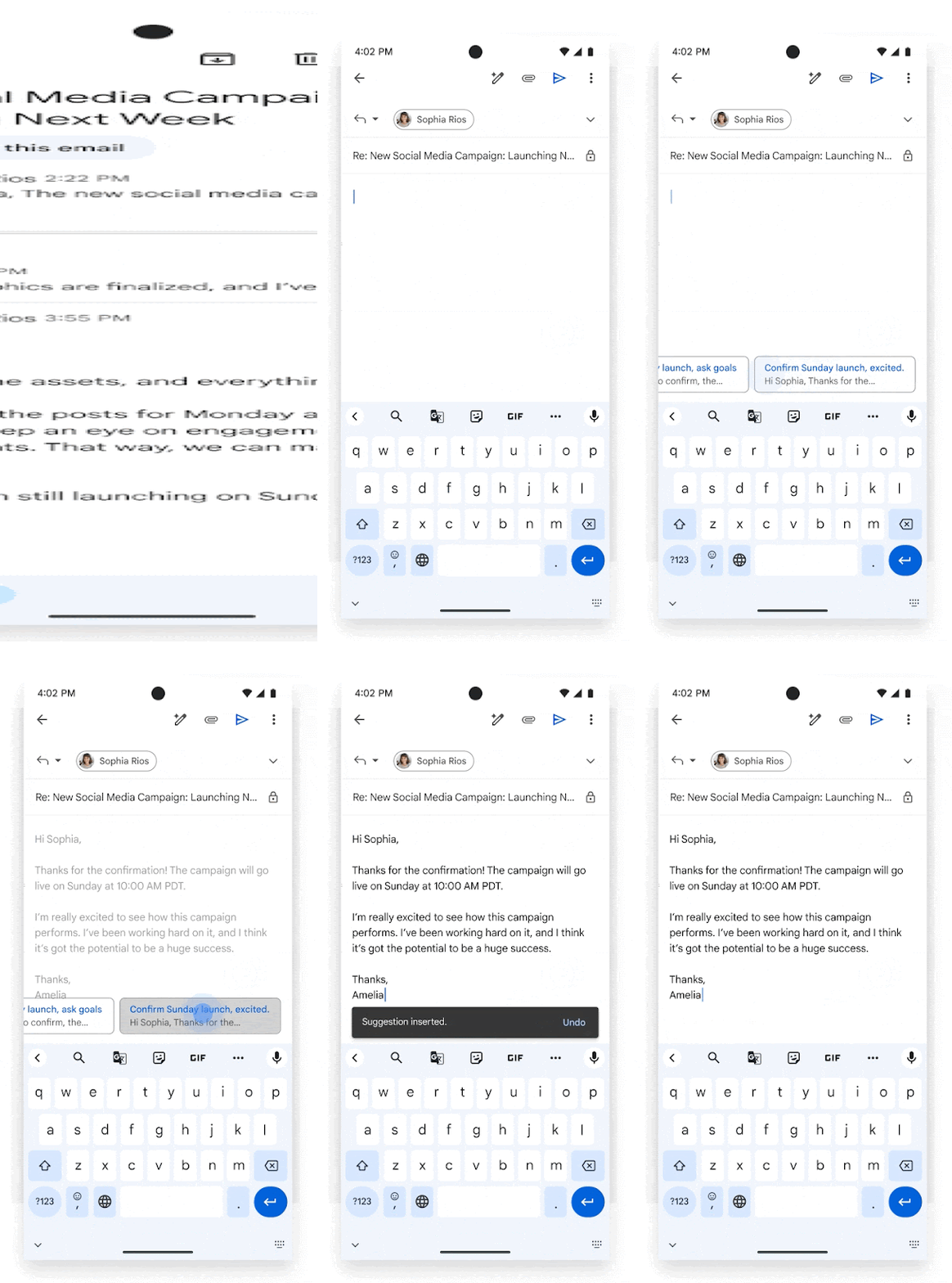
However, we realize there are scenarios in which users would like to respond with more than a simple “Sounds good to me!” or a “Yes, I’m working on it”. As a result, we’re excited to announce a new Gemini in Gmail feature, contextual Smart Replies, that will offer more detailed responses to fully capture the intent of your message.
After initiating an email reply, users will see a few response options at the bottom of their screen that take the full content of the email thread into consideration. Hover over each response to get a quick preview of the text, select the one that feels right for the situation, and edit it as you see fit or send the response immediately.
Who’s impacted
End users
Why it’s important
The contextual Smart Reply feature saves time and makes inbox management easier.
Getting started
Rollout pace
Web & Mobile:
Availability
Available for Google Workspace customers with these add-ons:
Gemini Business, Enterprise, Education, Education Premium Google One AI Premium
Resources
por | Set 27, 2024 | Noticias
3 New updates
Unless otherwise indicated, the features below are available to all Google Workspace customers, and are fully launched or in the process of rolling out. Rollouts should take no more than 15 business days to complete if launching to both Rapid and Scheduled Release at the same time. If not, each stage of rollout should take no more than 15 business days to complete.
Use Gemini in Google Sheets to generate structured tables
We’re excited to announce that users can now generate
structured tables with
Gemini in the side panel of Google Sheets. Prior to this update, tables were output as plain text ranges without set column types or structure. Now, Gemini can help you simplify and accelerate spreadsheet building by bringing format and structure to unorganized ranges through table generation. | Rolling out to
Rapid Release domains now; launch to
Scheduled Release domains planned for October 17, 2024. | Available for Google Workspace customers with Gemini Business, Enterprise, Education, Education Premium add-ons and users with the Google One AI Premium subscription. | Visit the Help Center to learn more about
using tables in Google Sheets.
Refreshed illustrations in the Google Calendar app on Android and iOS devices
We’re introducing more modern illustrations for Google Calendar events like coffee, lunch or doctors appointments on Android and iOS. You’ll also notice updated monthly illustrations for background images in the schedule view on your mobile device or tablet. | Rolling out now to
Rapid Release and Scheduled Release domains. | Available to all Google Workspace customers, Workspace Individual Subscribers, and users with personal Google accounts.
New “Gemini Advanced” branding for Gemini for Google Workspace add-on users
The Gemini app (gemini.google.com) will now display a “Gemini Advanced” label for users with a Gemini Enterprise, Business, Education, Education Premium add-on or a Google One AI Premium subscription. This will better indicate to users the advanced capabilities of the app included in these plans. We’re also updating this branding across our Help Center to better indicate which features and settings are specific to these add-ons. | Rollout to
Rapid Release and Scheduled Release domains is complete. | Visit the Help Center to learn more about
Gemini for Google Workspace.
Previous announcements
The announcements below were published on the Workspace Updates blog earlier this week. Please refer to the original blog posts for complete details.
Kickstart ideas, brainstorm activities, and differentiate content with the help of Gemini in Google Classroom
This week, we officially introduced a new Gemini Education tab in Classroom that grants quick access to numerous AI tools. | Learn more about
Gemini in Classroom. Introducing security advisor, a new set of tools and insights to help small businesses protect their organization against cyber attacks
To help small businesses, we’re introducing security advisor, a set of new insights and tools designed to enhance security for small businesses – including threat defense, account security, and data protection capabilities. | Learn more about
security advisor. Customize your Google Docs with polished cover images
We’re making it easy for you to personalize and differentiate documents with full-bleed cover images that extend from one edge of your document to the other. | Learn more about
cover images. Preview and test upcoming features on Google Meet hardware devices
Using the new “Feature preview” setting, specific Google Meet hardware devices can be configured to test upcoming features prior to general availability. | Learn more about
testing Meet hardware features. Gmail allows more senders to protect their brand using BIMI Common Mark Certificates
We introduced two additional updates for BIMI that will continue to keep inboxes safe: Gmail now supports Common Mark Certificates (CMC) and BIMI verified check marks are now displayed on Android and iOS. | Learn more about
BIMI Common Mark Certificates. Google Sheets tables are now integrated with conditional notifications
Gemini in Gmail will now provide contextual Smart Replies
We’re excited to announce a new Gemini in Gmail feature, contextual Smart Replies, that will offer more detailed responses to fully capture the intent of your message. | Learn more about
contextual Smart Replies.
Completed rollouts
Rapid Release Domains:
Scheduled Release Domains:
Rapid and Scheduled Release Domains:
For a recap of announcements in the past six months, check out What’s new in Google Workspace (recent releases).