by trace-admin | Nov 12, 2023 | News
What's changing
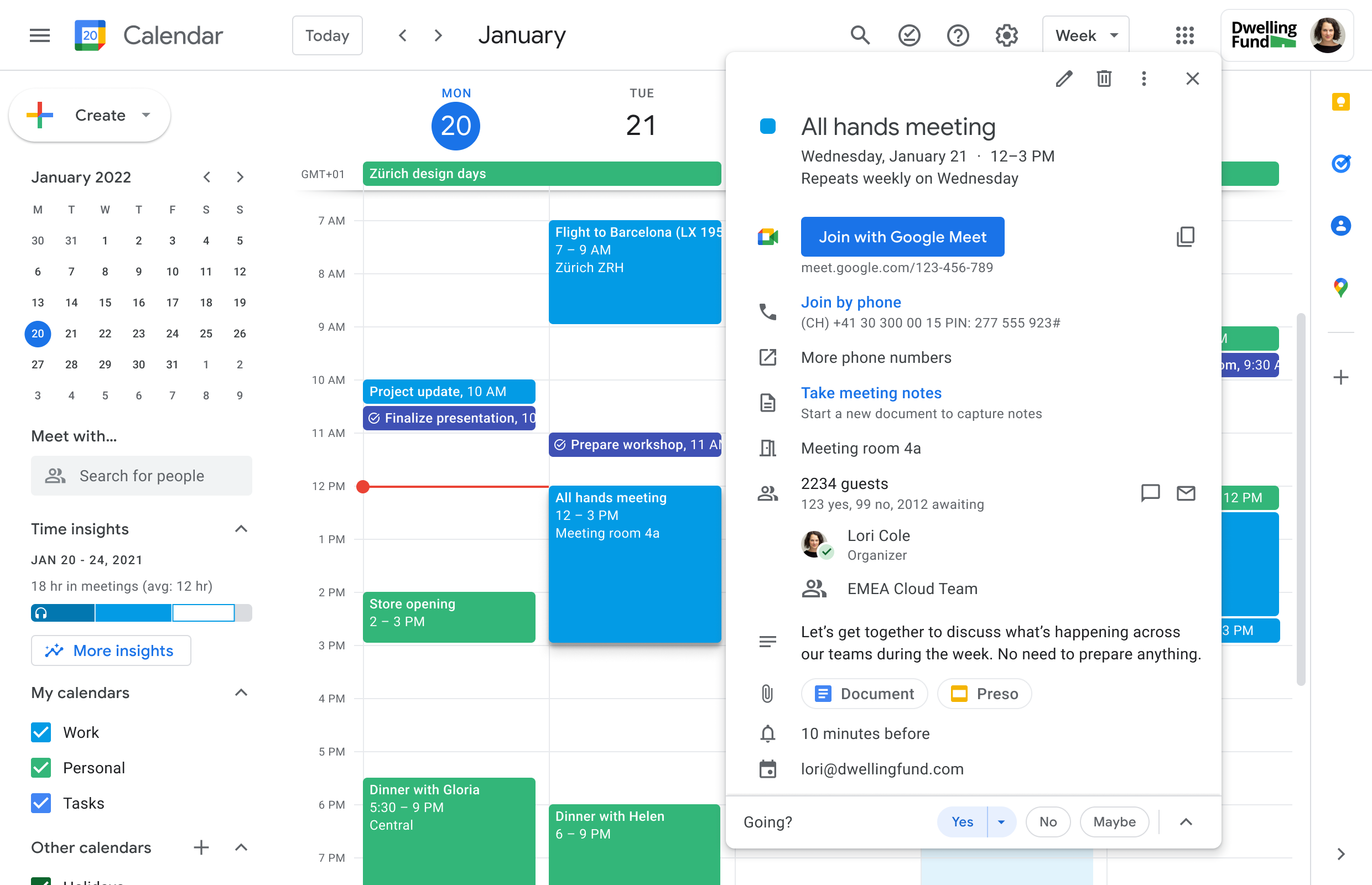
We're making several changes which will make scheduling large scale meetings (up to 100k guests per event) easier and guide schedulers through the process with more context. Once you've created and saved a Calendar event which contains a large group of attendees, you can open the event to check on the invitation progress. As groups are successfully added, they will appear in the guest list and you will see an "invitation in progress" message as invitations are being sent.
Note the "invitation in progress" message as invitations are being sent.
As groups are successfully added, they will appear in the guest list
You'll see these updates when using Calendar on the web and as such we recommend using Calendar on the web to schedule larger events.
Who's impacted
End users
Why it's important
Coordinating events with a large number of attendees can be complex - including ensuring that all attendees have been successfully invited. We've introduced these updates to help you more confidently schedule large group events. Specifically, you will now have clarity whether the event was successfully saved and invitations sent to all participants, or still in progress. If the scheduling fails, you'll be informed of the exact status including who has been invited and who has not, to make it easy for you to fix the issue. We hope this improved experience helps you confidently schedule larger meetings, like all-hands meetings or town halls.
Additional details
If there's a problem inviting guests, you'll see an error message when you open the Calendar event, as well as a notification via email. In both cases, we'll share more context regarding the error and how to fix it. For example, we'll let you know if you've exceeded the Calendar event limit of 100k guests and recommend that you add smaller groups or duplicate the event to accommodate more attendees.
Getting started
Admins: There is no admin impact or action required for this update.End users: You'll notice these improvements automatically. Visit the Help Centre to learn more about inviting groups to calendar events.
Rollout pace
Rapid Release domains: Gradual rollout (up to 15 days for feature visibility) starting on November 10, 2023
Scheduled Release domains: Extended rollout (potentially longer than15 days for feature visibility) starting on November 20, 2023
Availability
Available to all Google Workspace customers
Resources
by trace-admin | Nov 12, 2023 | News
What's changing
We're updating the homepage of the Google Drive mobile app on Android and iOS mobile devices to help you more easily find the right file much faster.
An updated suggested view will allow you to see even more recommended files at once, such as those that have recently been opened, shared or edited.
The Suggested view
In addition, we're replacing the notifications view with
activity view, which recently launched on the web. Here you can see items that need your attention such as
pending access requests, recent comments, and awaiting approvals, all in one place.
Getting started
Admins: There is no admin control for this feature. End users: There is no end user setting for this feature. If you do not want to use the home tab, the app will simply open up on whatever tab you last used, such as Shared or Files.
Rollout pace
Android:
iOS:
Availability
Available to all Google Workspace customers and users with personal Google Accounts
by trace-admin | Nov 12, 2023 | News
3 New updates
Unless otherwise indicated, the features below are available to all Google Workspace customers, and are fully launched or in the process of rolling out. Rollouts should take no more than 15 business days to complete if launching to both Rapid and Scheduled Release at the same time. If not, each stage of rollout should take no more than 15 business days to complete.
Timeline view in Google Sheets now available on Android & iOS
In 2022, we introduced an interactive timeline view that allows you to track projects in Google Sheets. We're excited to announce that you can now view your timelines on Android and iOS. | Rolling out to
Rapid Release domains now; launch to
Scheduled Release domains planned for November 15, 2023. | Timeline viewing is available to all Google Workspace customers and users with personal Google Accounts. | Learn more about
timeline view in Sheets.
Adding timezone support for existing smart chips in Google Docs
Improved toolbars in the Google Docs, Sheets and Slides apps on Android devices
We're introducing enhanced toolbars in the Google Docs, Sheets and Slides apps that are optimised for Android tablets and foldables, and ultimately improve the editing experience across the apps.
In Docs, there is a new mode switcher that allows you to switch between editing, suggestion, and viewing modes. In Slides, you will have access to an ever-present toolbar while in editing mode. In Sheets, a cell will be selected by default upon opening the app.
Mode switching in the Google Docs app
Previous announcements
The announcements below were published on the Workspace Updates blog earlier this week. Please refer to the original blog posts for complete details.
Add GIFs and stickers in Google Slides
We're bringing GIFs and stickers directly into Google Slides to empower you to build visual, dynamic, and creative presentations that help you connect with your audience in Slides. | Learn more about
GIFs and Stickers in Slides.
Make more informed decisions using Classroom analytics
We're introducing analytics in Google Classroom, providing a centralised view of Classroom data and insights for educators and education leaders. | A Google Workspace for Education Plus license is required to access this feature for both education leaders and educators. | Learn more about
assigning licences in the Help Center and about
Classroom analytics.Google Meet API now available in Developer Preview
The Google Meet API will give partners and customers the ability to create and configure Meet video conferences, allow their end users to join a conference, and post real-time updates from within their own applications.
Google Workspace Developer Preview ProgrammeLearn more about
Google Meet API.
Streamlining the user experience in Google Chat to help you find what you need much faster
A redesigned navigation panel brings direct messages and spaces together and introduces shortcuts, a new framework to help you stay on top of your messages. To reduce friction while navigating between messages, home helps you quickly catch up on any new activity across all conversations in a single location. Finally, mentions give you visibility into the messages addressed specifically to you. | Learn more about the
new Google Chat. Filter by people or groups in Google Drive
We're adding a new filter to Google Drive that lets you see which files or folders have been shared with specific people or groups. | Learn more about
filters in Drive.
Improvements for scheduling large scale meetings on the web
We're making several changes which will make scheduling large scale meetings (up to 100k guests per event) easier and guide schedulers through the process with more context. Once you've created and saved a Calendar event which contains a large group of attendees, you can open the event to check on the invitation progress. | Learn more about
large scale meetings in Calendar.
Introducing a new homepage in the Google Drive app
We're updating the homepage of the Google Drive mobile app on Android and iOS mobile devices to help you more easily find the right file much faster. An updated suggested view will allow you to see even more recommended files at once, such as those that have recently been opened, shared or edited. In addition, we're replacing the notifications view with activity view, which recently launched on web. | Learn more about the
homepage in Drive.
Scheduled Release Domains:
Rapid and Scheduled Release Domains:

by trace-admin | Nov 19, 2023 | Google Workspace configuration
The DMARC register (Domain-based Message Authentication, Reporting, and Conformance) is used to improve email security by specifying how an email service should handle messages that fail the SPF and DKIM authentication tests.
To set up a DMARC record for Google Workspace, your domain's DNS record might look something like this:
v=DMARC1; p=none; rua=mailto:[email protected]; ruf=mailto:[email protected]; fo=1;
In this example:
v=DMARC1 indicates the version of the DMARC record.
p=none defines the policy for handling e-mails that fail DMARC tests. none means that no specific action is taken, but this can be changed to quarantine (send emails to quarantine) or reject (reject emails) depending on your needs.
rua=mailto:[email protected] specifies where the aggregated DMARC reports should be sent. Replace [email protected] with the e-mail address where you want to receive these reports.
ruf=mailto:[email protected] indicates where forensic failure reports should be sent. Replace [email protected] with the appropriate e-mail address.
fo=1 determines the conditions under which forensic failure reports are generated. 1 means that reports are generated if there are failures in SPF or DKIM.
Remember that DMARC configuration must be done carefully, as misconfigured policies can affect email delivery. It is therefore advisable to start with a policy none and monitor reports before moving on to more restrictive policies such as quarantine or reject.
It is also essential to replace the e-mail addresses in the fields street e ruf their own e-mail addresses to receive DMARC reports.

by trace-admin | Nov 19, 2023 | Google Workspace configuration
The "postmaster" e-mail address is a standard convention used in e-mail system administration. Traditionally, "[email protected]" serves as a central point of contact for email-related issues for a specific domain (in this case, "example.com").
Here are some important aspects of the "postmaster" e-mail:
Purpose:
It is intended for e-mail administration and system maintenance.
It serves as a point of contact for external email-related problems, such as delivery issues, spam reports, and authentication problems (SPF, DKIM, DMARC).
Internet standard:
The existence of a "postmaster" address is a requirement defined in the Internet e-mail standards, specifically in RFC 5321.
This standard ensures that there is always a way to contact someone responsible for a domain's email services.
Technical issues and abuse:
System administrators use the "postmaster" address to receive notifications about technical problems, such as delivery errors, bounces, and other routing issues.
It is also used to report email abuse, such as phishing or spam activities originating from the domain.
Maintenance and monitoring:
The address should be monitored regularly by an administrator or IT team to ensure that critical issues are attended to promptly.
Ideally, it should be configured to accept emails from any source, to ensure effective communication about email problems.
Privacy and Security:
Due to its nature, the "postmaster" address can be a target for spam. It is therefore important to have appropriate filters and security measures in place.
It must be managed in such a way as to protect the privacy and security of incoming communications.
In short, the email "postmaster" is a vital part of a domain's email infrastructure, offering an essential communication channel for email administration and security-related issues.