by trace-admin | Nov 12, 2023 | News
What's changing
You can now make
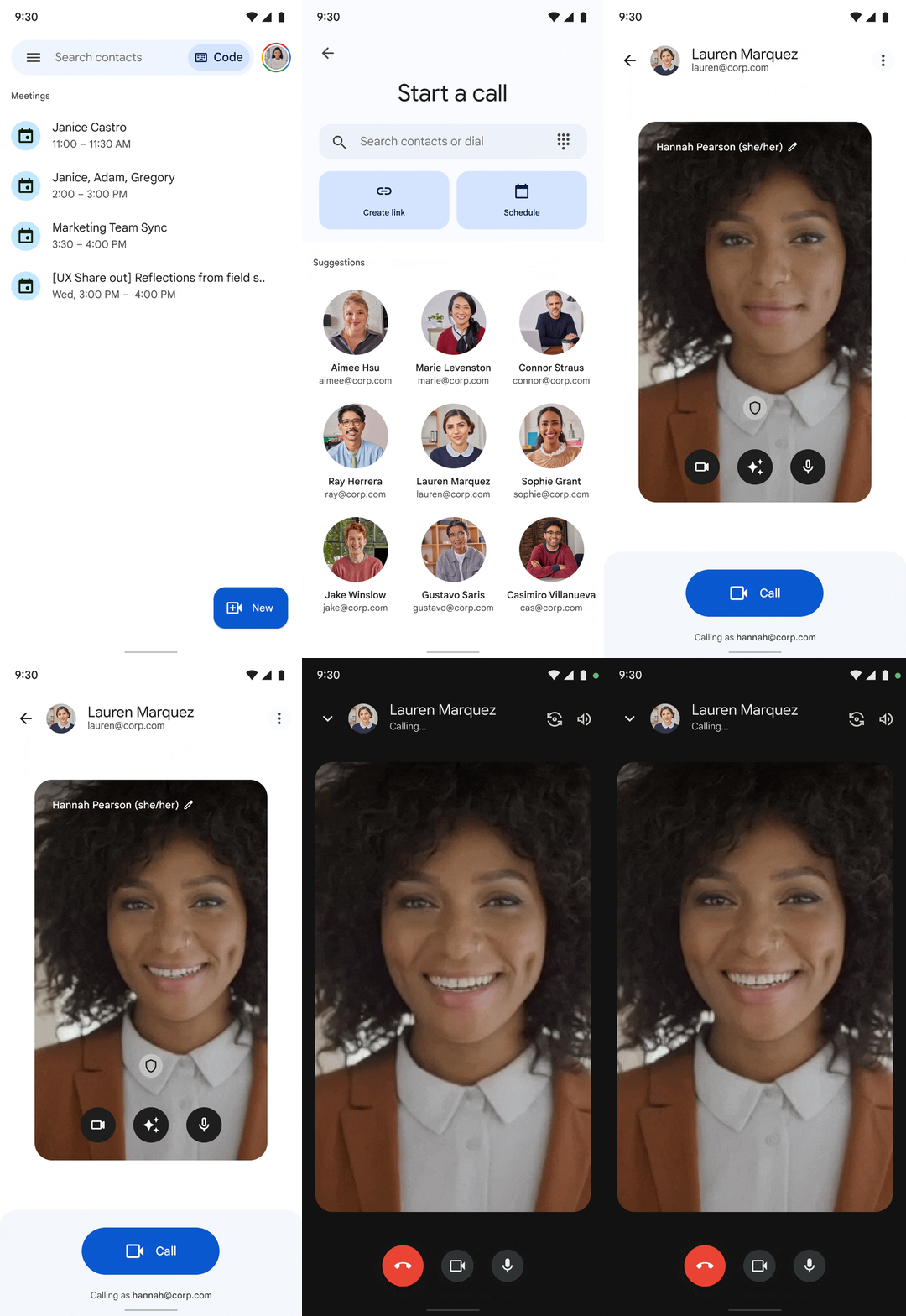
cloud-encrypted 1:1 video calls to other users in your organisation using the Meet mobile app. Previously, you had to create a meeting link ahead of time, which could then be shared in a calendar invite, chat, or email. Now you can place a Meet call on your mobile app directly to a colleague, ringing their mobile device. Within the call, you'll also have access to the latest Meet features including in-meeting chat, virtual backgrounds and visual effects, live closed captions, and more depending on your Workspace edition.
Getting started
Admins:
This feature will be
ON by default and can only be
turned OFF by turning off Meet meetings and calls for your organisation. Alternatively, you can
deploy the Google Meet (Original) app from
Google Play or the
App Store to managed devices if you do not wish for users to have calling capabilities (outbound and inbound calls). Note: We will introduce admin controls to restrict inbound calls next year. We'll provide an update here on the Workspace Updates Blog when more information is available. If you have legacy calling enabled for your users, they will have access to features previously found in Duo (group calls, messages, moments, family mode, etc.) if they have not upgraded to the new Meet app. End users: Meet calls do not include legacy calling features previously found in Duo (group calls, messages, moments, family mode, knock knock) but those continue to be available if you have not upgraded to the new Meet app and are using
legacy calling. Visit the Help Centre to learn how to
make Meet Calls with Google Meet and to learn about the
new Google Meet app.
Rollout pace
iOS:
Android:
Availability
Available to all Google Workspace customers
Resources
by trace-admin | Nov 12, 2023 | News
New updates
There are no new updates to share this week. Please see below for a recap of published announcements.
Previous announcements
The announcements below were published on the Workspace Updates blog earlier this week. Please refer to the original blog posts for complete details.
Google Meet Series One Desk 27 and Acer Chromebase for Meetings devices will automatically adjust your lighting
Currently, Google Meet automatically adjusts your lighting for meetings on the web, helping to improve your video quality in underexposed environments. We're now expanding this functionality to meetings taken on Google Meet Series One Desk 27 and Acer Chromebase for Meetings devices. | Available for all Google Workspace customers using Series One Desk 27 devices and Acer Chromebase for Meetings devices only. | Learn more about
adjusting your lighting. Enhancements to Google Meet viewer mode improve user participation and gives hosts greater flexibility
Viewers can now send emoji reactions during a meeting, which is a lightweight, non-disruptive way to engage and participate in meetings without interrupting the speaker. Meeting hosts and co-hosts will be able to promote a viewer to a meeting contributor while the hosts are using picture-in-picture mode. | Available to Google Workspace Business Standard, Business Plus, Enterprise Essentials, Enterprise Standard, Enterprise Plus, Education Fundamentals, Education Standard, Teaching & Learning upgrade, and Education Plus customers only. | Learn more about
Google Meet viewer mode. Take Google Meet on-the-go with ease
We're introducing a new, simplified mobile experience that will make taking calls on-the-go easier and less distracting. When you join Google Meet from your mobile device, we'll automatically detect whether you're in-motion and prompt you to use On-the-Go mode. | Learn more about
on-the-go in Meet.
1:1 video calling in the Google Meet mobile app is now available
by trace-admin | Nov 12, 2023 | News
What's changing
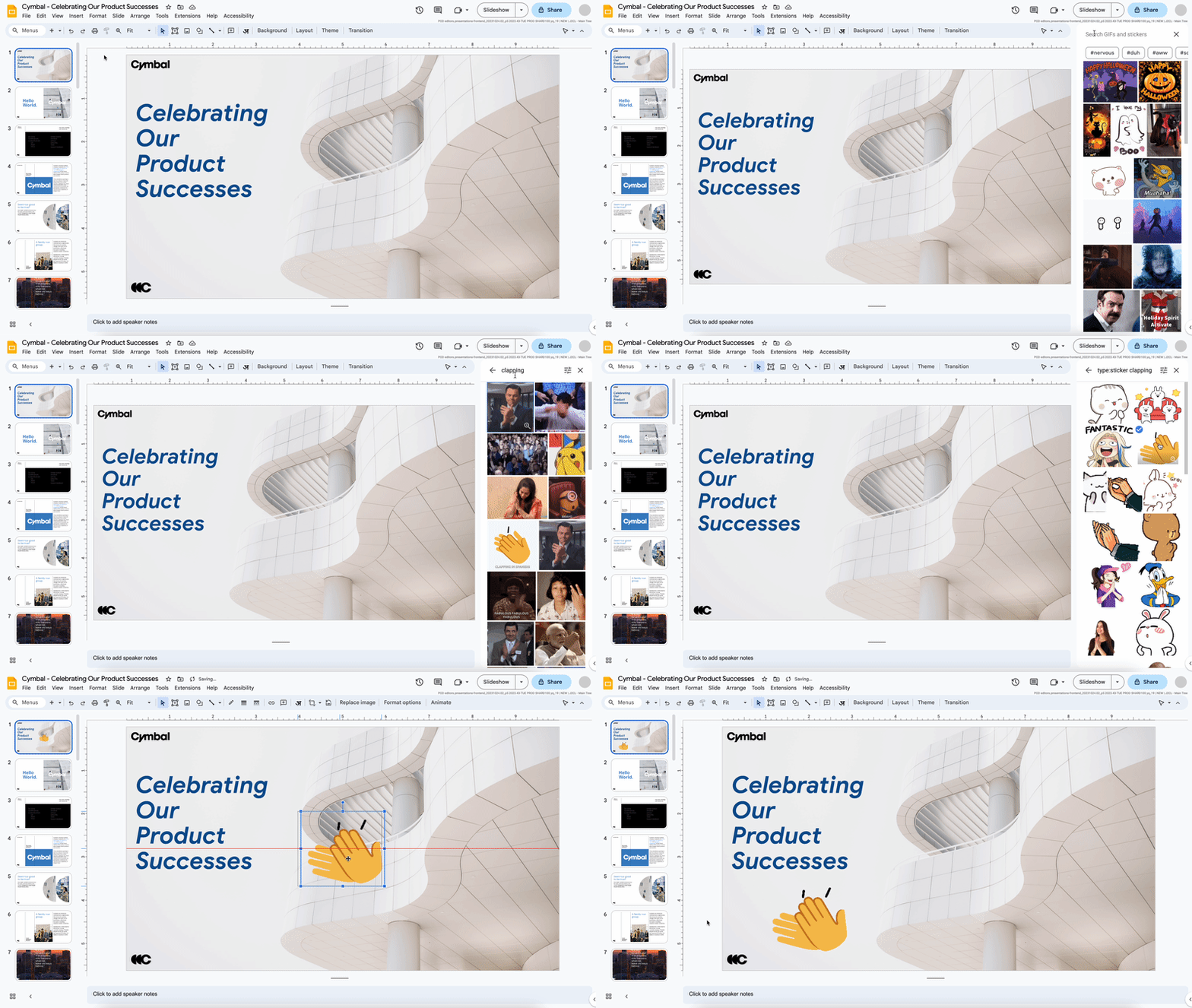
Starting today, we're bringing GIFs and stickers directly into Google Slides. GIFs and stickers empower you to build visual, dynamic, and creative presentations that help you connect with your audience in Slides.
Getting started
Admins: There is no admin control for this feature. End users: To add GIFs to your slides, create a new presentation or open an existing presentation > go to Insert > Image > GIFs and stickers > search for GIFs and/or stickers > click on one or several to insert into slides. Visit the Help Centre to learn more about
inserting or deleting images & videos.
Rollout pace
Availability
Available to all Google Workspace customers and users with personal Google Accounts
Resources
by trace-admin | Nov 12, 2023 | News
What's changing
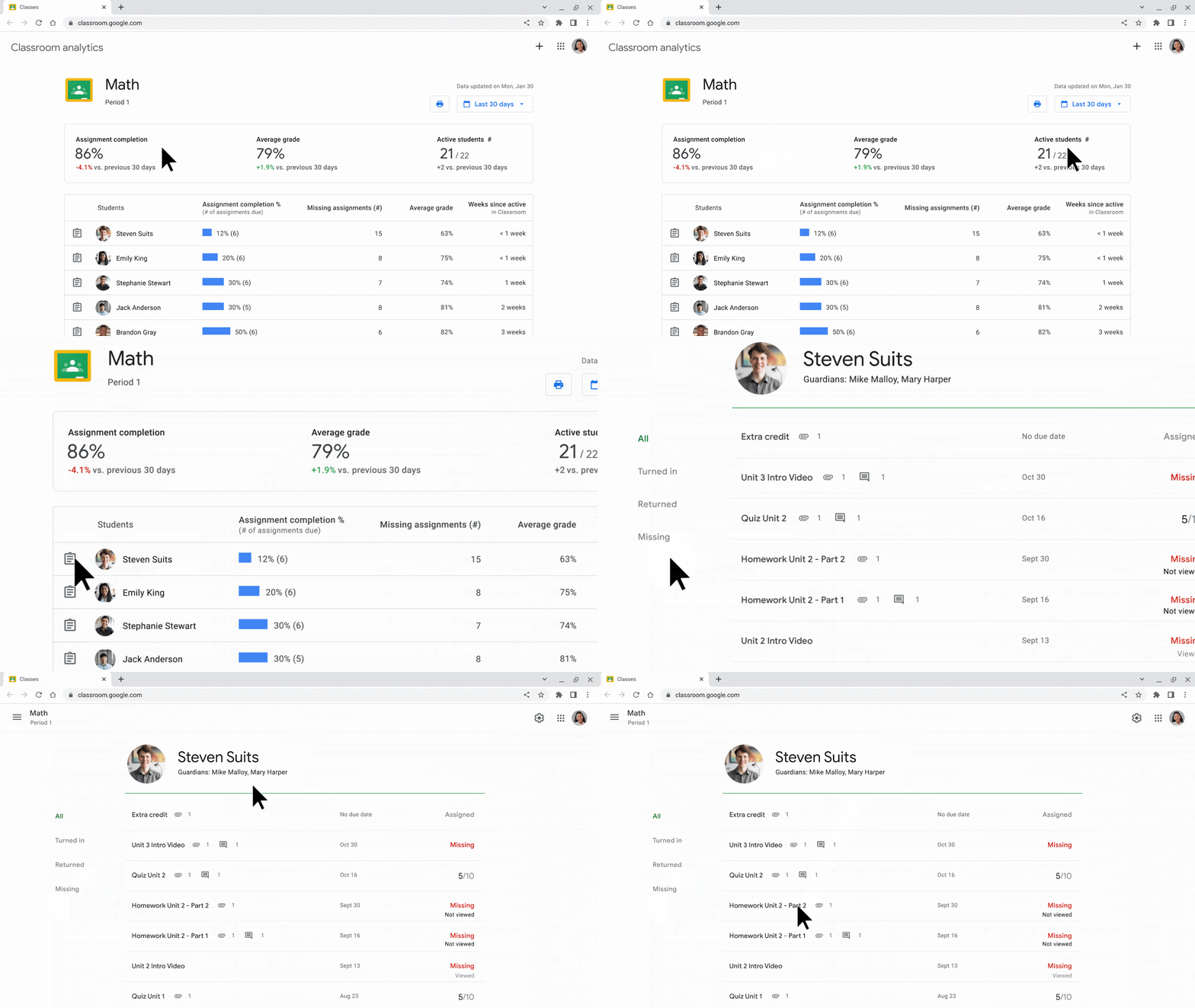
We're introducing analytics in Google Classroom, providing a centralised view of Classroom data and insights for educators and education leaders.
Designated education leaders and support staff now have direct visibility into student performance and engagement in the classroom, including if assignments are being completed, how grades are trending, and how Classroom features are being adopted. Education leaders will see a bird's eye view of insights, with the ability to easily drill down further to identify which students, classes, and schools may need support.
Educators will also be able to see the same type of data for the classes they teach, providing them with a centralised snapshot of how each student in their class is trending. For example, if an educator sees that a student has low assignment completion this month, they can drill down to the list of missing assignments and follow up to see how to best support this student.
Who's impacted
Admins and end users
Why it matters
This feature provides relevant insights that are immediately actionable, so education leaders and educators can make informed decisions around how to best support student success.
Getting started
Admins: Super Admins automatically have access to Classroom analytics and must
enable Classroom analytics for designated education leaders to access data on the entire organisation or limited to specific organisational units. Educators will automatically be able to see class-level analytics for their classes. End users:
Education leaders and support staff:
If enabled by your admin, you can access Classroom analytics directly from the Classroom homepage. Visit the Help Centre to
learn more about analytics dashboards for education leaders and support staff. Teachers:
You can automatically access class analytics from the class page header or on a class card in the Classroom homepage. Visit the Help Centre to
learn more about class analytics for educators.
Rollout pace
Availability
by trace-admin | Nov 12, 2023 | News
What's changing
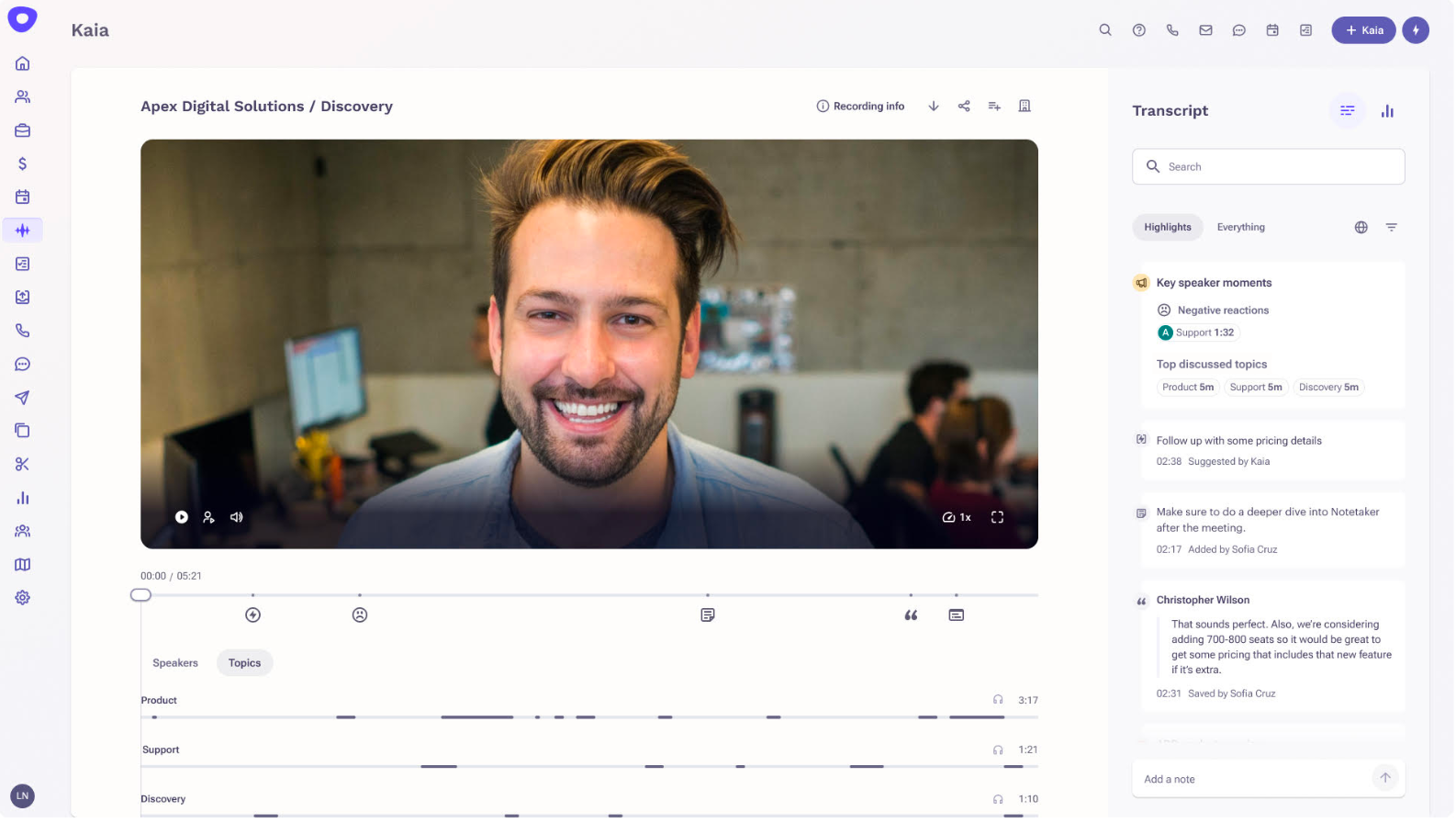
Programmatically create and configure Meet calls. Retrieve information about past meetings, such as the meeting times and attendees. Access meeting artifacts, such as transcripts and video recordings. Subscribe to real time updates on meetings, such as when a participant joins or leaves.
The API will give partners and customers the ability to create and configure Meet video conferences, allow their end users to join a conference, and post real-time updates from within their own applications.
Using the Meet API, Outreach is ingesting meeting recordings and transcripts into its AI-powered conversation intelligence tool, Kaia, to deliver rich insights to their teams.
Who's impacted
Developers
Why you'd use it
Incorporating your product with the Google Meet API streamlines workflows and provides your product with Meet information that easily enhances your product offering. For example, partners such as Hubspot, Outreach, Salesloft and Salesforce currently integrate the Meet API to pull meeting recordings and artifacts into their conversational intelligence tools for analysis and sales coaching.
Additionally, integrating with the Google Meet API enables you to link your app with Meet's video conferencing capabilities, allowing users to access a secure video conferencing product from their own UI by the click of a button. Brandlive, a leading webinar and event platform, uses the Google Meet API as a way to create and configure video sessions for larger sessions and smaller breakout conversations.
Additional details
Getting started
Rollout pace
Availability
Available to all Google Workspace customers
by trace-admin | Nov 12, 2023 | News
What's changing
We recently introduced numerous enhancements across Google Chat, and today we're excited to announce the general availability of three features highlighting a new integrated experience.
The redesigned navigation panel brings direct messages and spaces together and introduces shortcuts, a new framework to help you stay on top of your messages.
To reduce friction while navigating between messages, home helps you quickly catch up on any new activity across all conversations in a single location. Additionally, you can narrow down your view by filtering for unread messages.
Mentions give you visibility into the messages addressed specifically to you. Within this single destination for important, actionable messages, you can see and navigate to the messages that @-mention you.
In addition to these improvements to the user experience, we're updating the icon for Google Chat over the coming weeks. The new icon has a cohesive look with other popular Workspace products and reflects the central role of business messaging and collaboration in Workspace.
Who's impacted
End users
Why you'd use it
These features are designed to help you stay on top of the busy flow of communication and make it easier to prioritise and find the conversations that are most important to you.
Additional details
The direct message and spaces sections will be listed separately, but are scrollable and collapsible in one unified list.
The list of messages where you have been @-mentioned are sorted by recency.
Each row represents the message within the thread that mentions you. If you are mentioned multiple times in a conversation, each mention will show up as one row. Unread messages are highlighted in light blue and include a blue dot. Clicking on a message in the Home or Mentions view will bring you directly to the conversation or thread where you can reply.
Getting started
Availability
Available to all Google Workspace customers and users with personal Google Accounts
Resources
by trace-admin | Nov 12, 2023 | News
What's changing
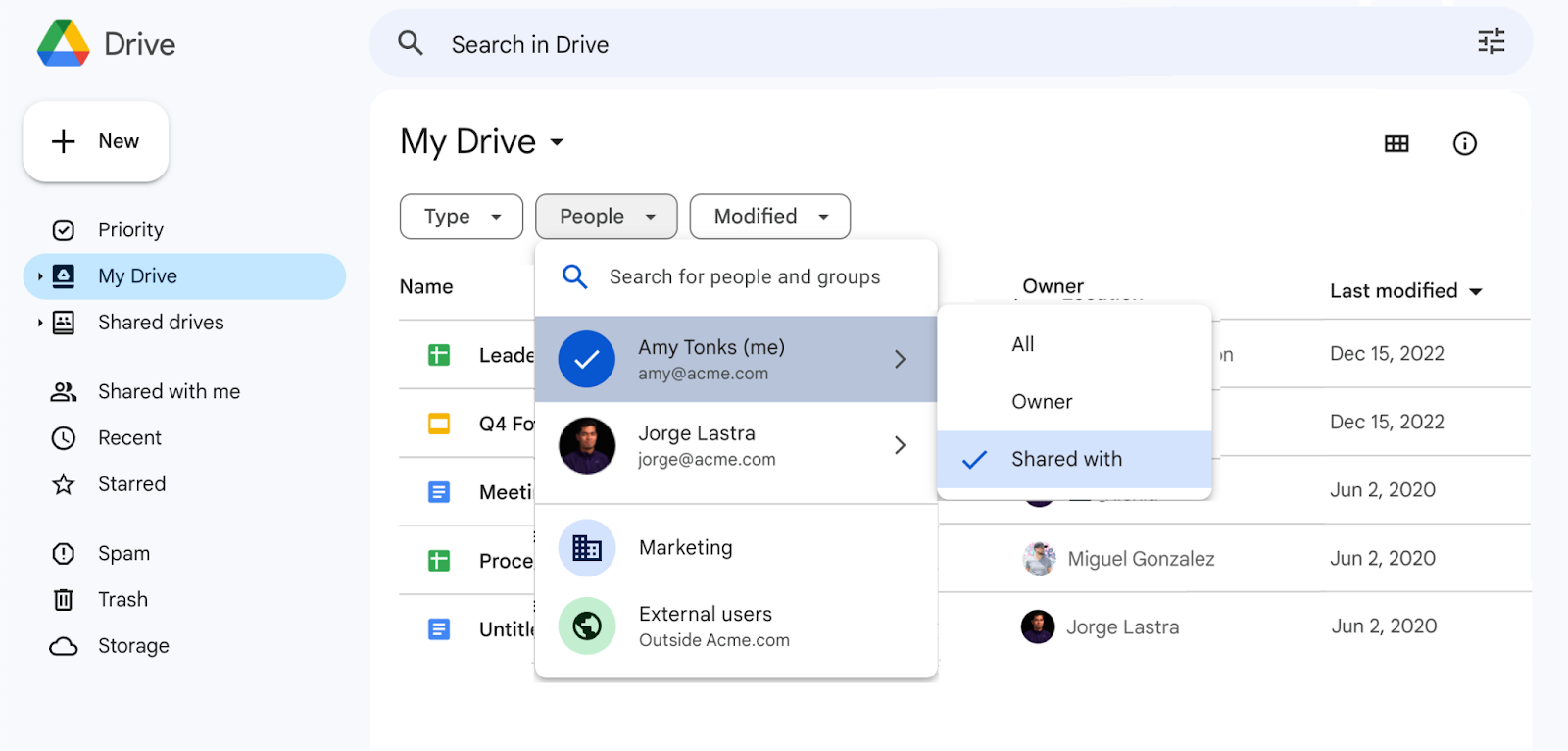
We're adding a new filter to Google Drive that lets you see which files or folders have been shared with specific people or groups.
Whether you're trying to share a file with more audiences or reduce oversharing, this feature will give you greater visibility into who has access to files within and outside of your organisation.
Getting started
Admins: There is no admin control for this feature. The groups that appear in the People filter are based on the
target audiences set up at the domain level by admins. End users: To find files shared with a person or group in drive.google.com: Navigate to My Drive, Shared drives, Shared with me, or RecentClick on "People" filterSearch for a person or group who the files are shared with in the filterSelect "Shared with"View the filtered list of filesTo find files shared outside of your organisation: Navigate to My Drive, Shared drives, Shared with me, or RecentClick on "People" filterSelect "External users"View the filtered list of filesTo find files you own that are shared with a specific person or group: Navigate to My Drive, Shared drives, Shared with me, or RecentClick on "People" filterSearch for yourself and select "Owner"Click on "People" filterSearch for a person or group who the files are shared with in the filterView the filtered list of files.
Rollout pace
Availability
Available to all Google Workspace customers and users with personal Google Accounts
by trace-admin | Nov 12, 2023 | News
What's changing
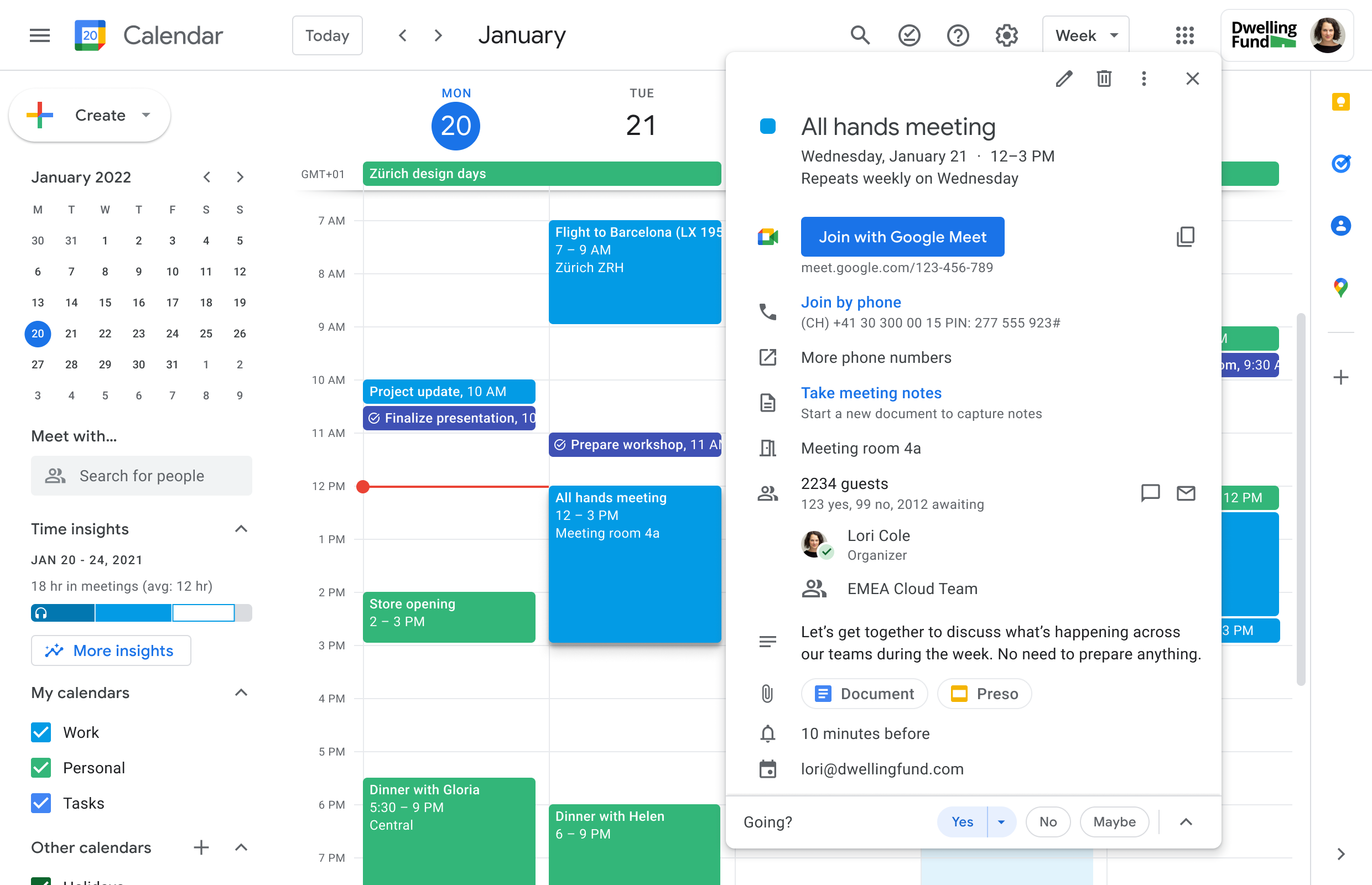
We're making several changes which will make scheduling large scale meetings (up to 100k guests per event) easier and guide schedulers through the process with more context. Once you've created and saved a Calendar event which contains a large group of attendees, you can open the event to check on the invitation progress. As groups are successfully added, they will appear in the guest list and you will see an "invitation in progress" message as invitations are being sent.
Note the "invitation in progress" message as invitations are being sent.
As groups are successfully added, they will appear in the guest list
You'll see these updates when using Calendar on the web and as such we recommend using Calendar on the web to schedule larger events.
Who's impacted
End users
Why it's important
Coordinating events with a large number of attendees can be complex - including ensuring that all attendees have been successfully invited. We've introduced these updates to help you more confidently schedule large group events. Specifically, you will now have clarity whether the event was successfully saved and invitations sent to all participants, or still in progress. If the scheduling fails, you'll be informed of the exact status including who has been invited and who has not, to make it easy for you to fix the issue. We hope this improved experience helps you confidently schedule larger meetings, like all-hands meetings or town halls.
Additional details
If there's a problem inviting guests, you'll see an error message when you open the Calendar event, as well as a notification via email. In both cases, we'll share more context regarding the error and how to fix it. For example, we'll let you know if you've exceeded the Calendar event limit of 100k guests and recommend that you add smaller groups or duplicate the event to accommodate more attendees.
Getting started
Admins: There is no admin impact or action required for this update.End users: You'll notice these improvements automatically. Visit the Help Centre to learn more about inviting groups to calendar events.
Rollout pace
Rapid Release domains: Gradual rollout (up to 15 days for feature visibility) starting on November 10, 2023
Scheduled Release domains: Extended rollout (potentially longer than15 days for feature visibility) starting on November 20, 2023
Availability
Available to all Google Workspace customers
Resources
by trace-admin | Nov 12, 2023 | News
What's changing
We're updating the homepage of the Google Drive mobile app on Android and iOS mobile devices to help you more easily find the right file much faster.
An updated suggested view will allow you to see even more recommended files at once, such as those that have recently been opened, shared or edited.
The Suggested view
In addition, we're replacing the notifications view with
activity view, which recently launched on the web. Here you can see items that need your attention such as
pending access requests, recent comments, and awaiting approvals, all in one place.
Getting started
Admins: There is no admin control for this feature. End users: There is no end user setting for this feature. If you do not want to use the home tab, the app will simply open up on whatever tab you last used, such as Shared or Files.
Rollout pace
Android:
iOS:
Availability
Available to all Google Workspace customers and users with personal Google Accounts
by trace-admin | Nov 12, 2023 | News
3 New updates
Unless otherwise indicated, the features below are available to all Google Workspace customers, and are fully launched or in the process of rolling out. Rollouts should take no more than 15 business days to complete if launching to both Rapid and Scheduled Release at the same time. If not, each stage of rollout should take no more than 15 business days to complete.
Timeline view in Google Sheets now available on Android & iOS
In 2022, we introduced an interactive timeline view that allows you to track projects in Google Sheets. We're excited to announce that you can now view your timelines on Android and iOS. | Rolling out to
Rapid Release domains now; launch to
Scheduled Release domains planned for November 15, 2023. | Timeline viewing is available to all Google Workspace customers and users with personal Google Accounts. | Learn more about
timeline view in Sheets.
Adding timezone support for existing smart chips in Google Docs
Improved toolbars in the Google Docs, Sheets and Slides apps on Android devices
We're introducing enhanced toolbars in the Google Docs, Sheets and Slides apps that are optimised for Android tablets and foldables, and ultimately improve the editing experience across the apps.
In Docs, there is a new mode switcher that allows you to switch between editing, suggestion, and viewing modes. In Slides, you will have access to an ever-present toolbar while in editing mode. In Sheets, a cell will be selected by default upon opening the app.
Mode switching in the Google Docs app
Previous announcements
The announcements below were published on the Workspace Updates blog earlier this week. Please refer to the original blog posts for complete details.
Add GIFs and stickers in Google Slides
We're bringing GIFs and stickers directly into Google Slides to empower you to build visual, dynamic, and creative presentations that help you connect with your audience in Slides. | Learn more about
GIFs and Stickers in Slides.
Make more informed decisions using Classroom analytics
We're introducing analytics in Google Classroom, providing a centralised view of Classroom data and insights for educators and education leaders. | A Google Workspace for Education Plus license is required to access this feature for both education leaders and educators. | Learn more about
assigning licences in the Help Center and about
Classroom analytics.Google Meet API now available in Developer Preview
The Google Meet API will give partners and customers the ability to create and configure Meet video conferences, allow their end users to join a conference, and post real-time updates from within their own applications.
Google Workspace Developer Preview ProgrammeLearn more about
Google Meet API.
Streamlining the user experience in Google Chat to help you find what you need much faster
A redesigned navigation panel brings direct messages and spaces together and introduces shortcuts, a new framework to help you stay on top of your messages. To reduce friction while navigating between messages, home helps you quickly catch up on any new activity across all conversations in a single location. Finally, mentions give you visibility into the messages addressed specifically to you. | Learn more about the
new Google Chat. Filter by people or groups in Google Drive
We're adding a new filter to Google Drive that lets you see which files or folders have been shared with specific people or groups. | Learn more about
filters in Drive.
Improvements for scheduling large scale meetings on the web
We're making several changes which will make scheduling large scale meetings (up to 100k guests per event) easier and guide schedulers through the process with more context. Once you've created and saved a Calendar event which contains a large group of attendees, you can open the event to check on the invitation progress. | Learn more about
large scale meetings in Calendar.
Introducing a new homepage in the Google Drive app
We're updating the homepage of the Google Drive mobile app on Android and iOS mobile devices to help you more easily find the right file much faster. An updated suggested view will allow you to see even more recommended files at once, such as those that have recently been opened, shared or edited. In addition, we're replacing the notifications view with activity view, which recently launched on web. | Learn more about the
homepage in Drive.
Scheduled Release Domains:
Rapid and Scheduled Release Domains:

.gif)
%20-%20Google%20Classroom.gif)