by trace-admin | Nov 19, 2023 | News
Email signatures are small blocks of text that are automatically added to the end of outgoing emails.
Here are the steps to create a signature in Google Workspace:
- Access to Gmail:
- Log in to your Google Workspace account.
- Open Gmail.
- Access Settings:
- Click on the gear icon in the top right-hand corner to access "Settings".
- Open Subscription Settings:
- In the "Settings" tab, navigate to the "View all settings" section or something similar.
- Scroll down until you find the "Subscription" section.
- Create or Edit a Signature:
- Click on "Create new" to add a new subscription or select an existing subscription to edit.
- In the edit field, enter the text of your signature. You can include your name, job title, contact details, company logo, links to social media, etc.
- Format the signature:
- Use the formatting options available (such as font, size, colour, alignment) to personalise the appearance of your signature.
- You can add images (such as logos) by clicking on the image icon in the formatting toolbar.
- Insert links (optional):
- To add a link, select the text or image you want to link and click on the link icon to add the URL.
- Save Changes:
- After creating and formatting your signature, scroll to the bottom of the page and click on "Save changes".
- Configure Signatures by Default:
- You can choose whether you want the signature to appear on all new messages and/or replies/forwards.
- Apply for Google Workspace Users (Administration):
- If you are a Google Workspace administrator, you can define signatures for users via the Google Workspace Admin Console. This allows you to create uniform signatures throughout the organisation.
Remember that the signature should be professional and reflect the information you want to communicate consistently in all your email messages.

by trace-admin | Sep 26, 2023 | Google Workspace configuration
Configuring the SPF (Sender Policy Framework) record is essential for validating and authenticating the mail servers that are allowed to send emails on behalf of your domain. This helps prevent email forgery and phishing activity. Here's how you can set up an SPF record for Google Workspace:
Configure SPF Registration for Google Workspace:
- Access your domain providerLog in to the account where you registered your domain. This could be with organisations such as GoDaddy, Namecheap or others.
- Go to DNS management: Find and access the DNS management section or something with a similar name.
- Find the TXT Records section: Inside DNS management, find the section where you can modify or add TXT records. The SPF is defined as a TXT record.
- Add the Google Workspace SPF recordIf you don't already have an SPF record, you will need to create one. If you already have an SPF record, you should modify it to include Google Workspace servers.To configure SPF for Google Workspace, add (or modify) the TXT record with the following value:
v=spf1 include:_spf.google.com ~all
v=spf1Indicates the start of the SPF record.include:_spf.google.com: Authorises the servers associated with the domain _spf.google.com (Google's email servers) to send emails on behalf of your domain.~allThis means that any server that is not specified in the SPF rule (in this case, Google's servers) should be treated with suspicion, but is not strictly forbidden from sending emails.
- Save changes: After adding or modifying the record, be sure to save or confirm the changes.

by trace-admin | Sep 26, 2023 | Google Workspace configuration
The MX records (Mail Exchange) are an essential part of a domain's DNS (Domain Name System) records. They specify the mail servers responsible for receiving email messages for a specific domain.
In simpler terms, when someone sends an email to "[email protected]", the mail servers that send that message consult the MX records of "yourdomain.com" to determine which server or servers they should forward that message to.
Within the context of email configuration, MX records are fundamental, as they ensure that emails sent to your domain are correctly directed to the appropriate email servers. If MX records are incorrectly configured or missing, emails destined for your domain may not be delivered or may be delivered to the wrong server.
Configure MX Records for Google Workspace:
- Access your domain providerLog in to the account where you registered your domain.
- Access DNS managementFind and access the DNS management section or something similar.
- Locate the MX Records sectionWithin DNS management, find the section where you can modify or add MX records.
- Delete existing MX recordsIf you already have some MX records defined, it is recommended that you delete them to avoid mail routing conflicts.
- Add MX records from Google WorkspaceYou will enter a series of addresses provided by Google. The values you need to add are:
- Priority: 1, Address:
ASPMX.L.GOOGLE.COM
- Priority: 5, Address:
ALT1.ASPMX.L.GOOGLE.COM
- Priority: 5, Address:
ALT2.ASPMX.L.GOOGLE.COM
- Priority: 10, Address:
ALT3.ASPMX.L.GOOGLE.COM
- Priority: 10, Address:
ALT4.ASPMX.L.GOOGLE.COM
Make sure you enter these values exactly as they are listed, including the priorities.
- Save changes: After adding all the records, make sure you save or confirm the changes.
- Check the configuration in Google WorkspaceGo back to your Google Workspace account and go to the section where you started the MX record configuration process. Here you can check that the records have been configured correctly.
- Wait for itRemember that changes to DNS records can take between a few hours and 48 hours to propagate across the Internet, so you may not see the results immediately.
Once you have completed these steps, emails sent to your domain will be routed through the Google Workspace servers.
by | Nov 17, 2023 | News
What's changing
In conjunction with
recent updates to search in Google Chat, we're introducing enhanced search query suggestions, a feature already available on
mobile, that helps you find the right message, person, file, or space in Chat on the web.
When searching in Chat, you will now see query suggestions based on historical search activity, sorted by relevance. The top suggestion will also appear in the search box and you can press "Tab" to autofill the query. You can also delete a suggested query by hovering over it and clicking on the "x" icon next to it.
Getting started
Rollout pace
Availability
Available to all Google Workspace customers and users with personal Google Accounts
Resources
by | Nov 17, 2023 | News
4 New updates
Unless otherwise indicated, the features below are available to all Google Workspace customers, and are fully launched or in the process of rolling out. Rollouts should take no more than 15 business days to complete if launching to both Rapid and Scheduled Release at the same time. If not, each stage of rollout should take no more than 15 business days to complete.
Enhancing Google Drive usability on large screen Android devices
Building upon improvements to the Google Workspace
experience on large screen Android devices, we're excited to announce additional enhancements that bring our tablet experience more inline with our web experience. Specifically, you'll notice:
Above the main doclist, users will now see a tappable folder hierarchy for their current view. This allows a user to keep track of where they are in Drive and easily navigate out of nested folders. Per-file data columns to show when a file was last modified and how much storage is used by each file. A colour palette that matches the
Google Material Design 3 guidelines. Rolling out to
Rapid Release domains now; launch to
Scheduled Release domains planned for November 27th, 2023. | Available to all Google Workspace customers and users with personal Google Accounts. | Learn more about using
Google Drive.
Expanding Google Drive log events to additional Google Workspace editions
Drive log events, a feature that enables admins to access an audit and investigation page to run searches related to Drive log events, is now available for Google Workspace Cloud Identity Free and Cloud Identity Premium editions. | Rolling out now to
Rapid Release and Scheduled Release domains at an extended pace (potentially longer than 30 days for feature visibility). | Learn more about
Drive log events.
Easily convert hyperlinked text to smart chips using the tab key in Google Sheets
Building upon the
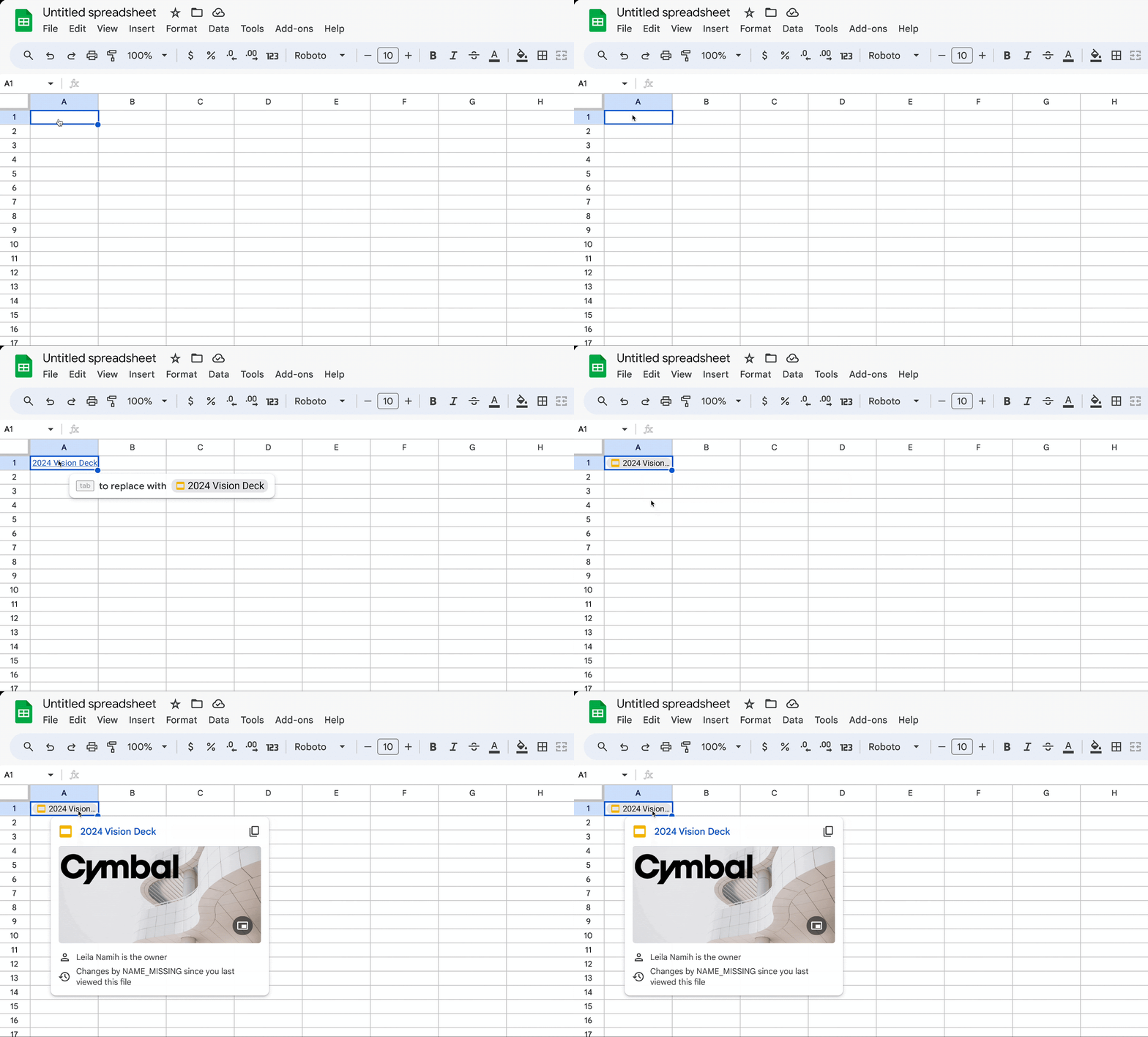
tab to convert feature in Google Sheets, when your hyperlinked text matches the text of a smart chip in Sheets, you will now be prompted to convert an inserted file, people, calendar event, Youtube or place link into a smart chip. For example, if the hyperlinked text is a file name, Sheets will automatically recommend converting it to a file chip. | Rolling out now to
Rapid Release and Scheduled Release domains at a gradual pace (up to 15 days for feature visibility). | Available to all Google Workspace customers and users with personal Google Accounts. | Learn more about
inserting smart chips in Google Sheets.
More languages available for Google Meet captions
You can now use captions in Google Meet in Finnish & Hebrew. You can use captions to view subtitles as everyone speaks during a meeting - captions are only visible to you. Note that because this is a newly supported language, it will be denoted with a "beta" tag as we continue to optimise performance. See our Help Centre for a complete
list of supported languages for captions in Meet. We've also removed the "beta" tag from the following languages, as they have been validated and are out of beta:
English (UK) French (Canada) Thai Vietnamese Polish Romanian Turkish Available now to all Google Workspace customers and users with personal Google accounts. | Learn more about
using captions in Google Meet.
Previous announcements
The announcements below were published on the Workspace Updates blog earlier this week. Please refer to the original blog posts for complete details.
Take action on Google Drive requests and comments directly in Google Chat
AppSheet smart chips for Google Docs
You can now insert smart chips for AppSheet content into documents, allowing you to access AppSheet data directly into Docs. | Learn more about
AppSheet smart chips.
View full screen tasks lists on Google Calendar
Star important messages in Google Chat
Read and write out of office and focus time events using the Calendar API
In addition to reading and writing working location data, we're expanding the Calendar API functionality to encompass out of office and focus time data. | Learn more about
using the Calendar API.
Improved search query suggestions in Google Chat web
Rapid Release Domains:
Scheduled Release Domains:
Rapid and Scheduled Release Domains:
by | Nov 17, 2023 | News
What's changing
In addition to reading and writing working location data, we're expanding the Calendar API functionality to encompass out of office and focus time data. Developers can use the API to read and write this information and synchronise users' availability with external systems. For example, you can use the API in conjunction with HR systems to automatically add OOO entries to a user's calendar when they submit vacation time. Or the API can be used to automatically block focus time on a user's calendar to complete training courses.
Reading and writing out of office and focus time is helpful in a variety of situations such as: Creating and updating OOO and Focus Time events (
Events.Insert,
Events.Update,
Events.Patch). Specifying OOO and Focus Time specific features, such as auto-declining meetings, and setting do-not-disturb statuses. Selecting any combination of event types to read from a calendar (
Events.List).
Further, reading and writing this information eliminates the need for users to enter the same information into multiple systems, helping to cut down on manual churn.
Who's impacted
Developers
Why you'd use it
Out of office and focus time event support joins support for working location, which was
announced earlier this year, to round out API functionality for calendar events. Each specific event type can be synced throughout your organisation's IT ecosystem, creating seamless user journeys and helping to connect users with resources and each other. This includes things such as:
Mapping working location data to better adapt on-site resources and update other third-party surfaces, such as hot desk booking tools. Automatically blocking OOO based on vacation or PTO requests.Blocking off focus time events to give users time to go through onboarding or other company training programmes.
Additional details
Prior to this update, if you requested to read a user's calendar via API v3, out of office and focus time events were returned with
[email protected] in the organiser field, and without their specific features. With this update, these events will return with all their properties and the specific user as organizer. Please check your code to ensure it does not make implicit assumptions about the previous API return values, and use the
eventType parameter to perform different operations with regular, OOO, Focus Time, or Working Location events
Getting started
Rollout pace
Rapid Release and Scheduled Release domains: Extended rollout (potentially longer than 15 days for feature visibility) starting on November 16, 2023
Availability
The Calendar API is available to all.
Out of Office events are available to Google Workspace Essentials, Enterprise Essentials, Frontline, Enterprise Starter, Enterprise Standard, Enterprise Plus, Nonprofits, Business Starter, Business Standard, Business Plus, Education Fundamentals, Education Standard, and Education Plus customers.
Focus Time events are available to Google Workspace Enterprise Starter, Enterprise Standard, Enterprise Plus, Nonprofits, Business Standard, Business Plus, Education Fundamentals, Education Standard, and Education Plus customers.
Resources
by | Nov 16, 2023 | News
What's changing
Following the recent announcement of
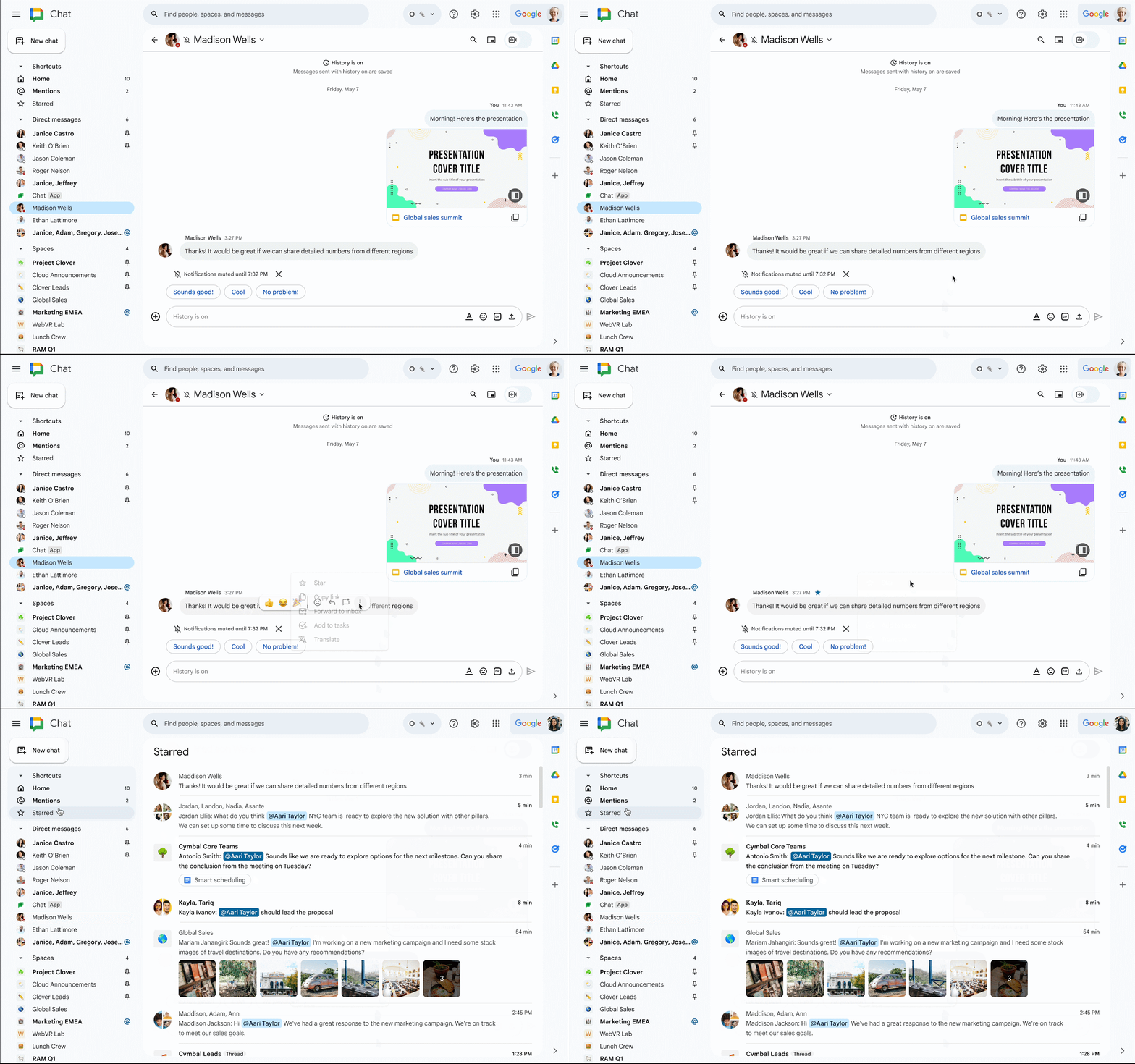
home and mentions in Google Chat, we're excited to introduce starred on web, an additional shortcut in the redesigned navigation panel that helps you stay on top of your most important messages in Chat.
Who's impacted
End users
Why you'd use it
This feature enables you to "star" any messages in Chat for easy access via the starred shortcut in the navigation panel, and can be useful when you need to come back to a message later.
Additional details
Starring messages is unavailable in existing spaces organised by conversation topic (legacy threaded).
Getting started
Admins: There is no admin control for this feature. End users:To star a message, hover over the message and click the star icon or click on the three dot overflow menu to display the star option.You can unstar a message from the original message or unstar messages from the shortcut. Starred messages will be available on mobile in 2024. Visit the Help Centre to learn
how to star messages in Chat.
Rollout pace
Rapid Release domains: Extended rollout (potentially longer than 15 days for feature visibility) starting on November 16, 2023
Scheduled Release domains: Extended rollout (potentially longer than 15 days for feature visibility) starting on November 30, 2023
Availability
Available to all Google Workspace customers and users with personal Google Accounts
Resources
by | Nov 16, 2023 | News
What's changing
We recently completed the migration of
Reminders from Google Calendar and Google Assistant to Google Tasks in order to provide an easy way to view and manage all your to-dos in one place. To build upon this, we're providing you with a full screen desktop experience to view all tasks together. Starting today, you will be able to see all your tasks and task lists in a single full screen view on Calendar web.
Who's impacted
End users
Why it matters
In addition to an optimised desktop layout, this update makes it easier for you to stay on top of and organise your tasks.
Getting started
Admins: There is no admin control for this feature. End users: To view full screen tasks on Calendar web, go to
Calendar.google.com > click on the task icon in the top bar. Visit the Help Centre to learn more about
Google Tasks.
Rollout pace
Availability
Available to all Google Workspace customers and users with personal Google Accounts
Resources
by | Nov 15, 2023 | News
What's changing
In Google Docs, you can
already insert smart chips for Docs, Sheets and Slides files, date chips, Calendar event chips, and more. Beginning today, you can now insert smart chips for AppSheet content. These smart chips allow you to access AppSheet data directly into Docs - you'll be able to view and take action on the data, including triggering automations, without having to leave Docs.
Rollout pace
This feature is available now.
Availability
Available to Google Workspace customers with AppSheet licences.
Resources
by | Nov 15, 2023 | News
What's changing
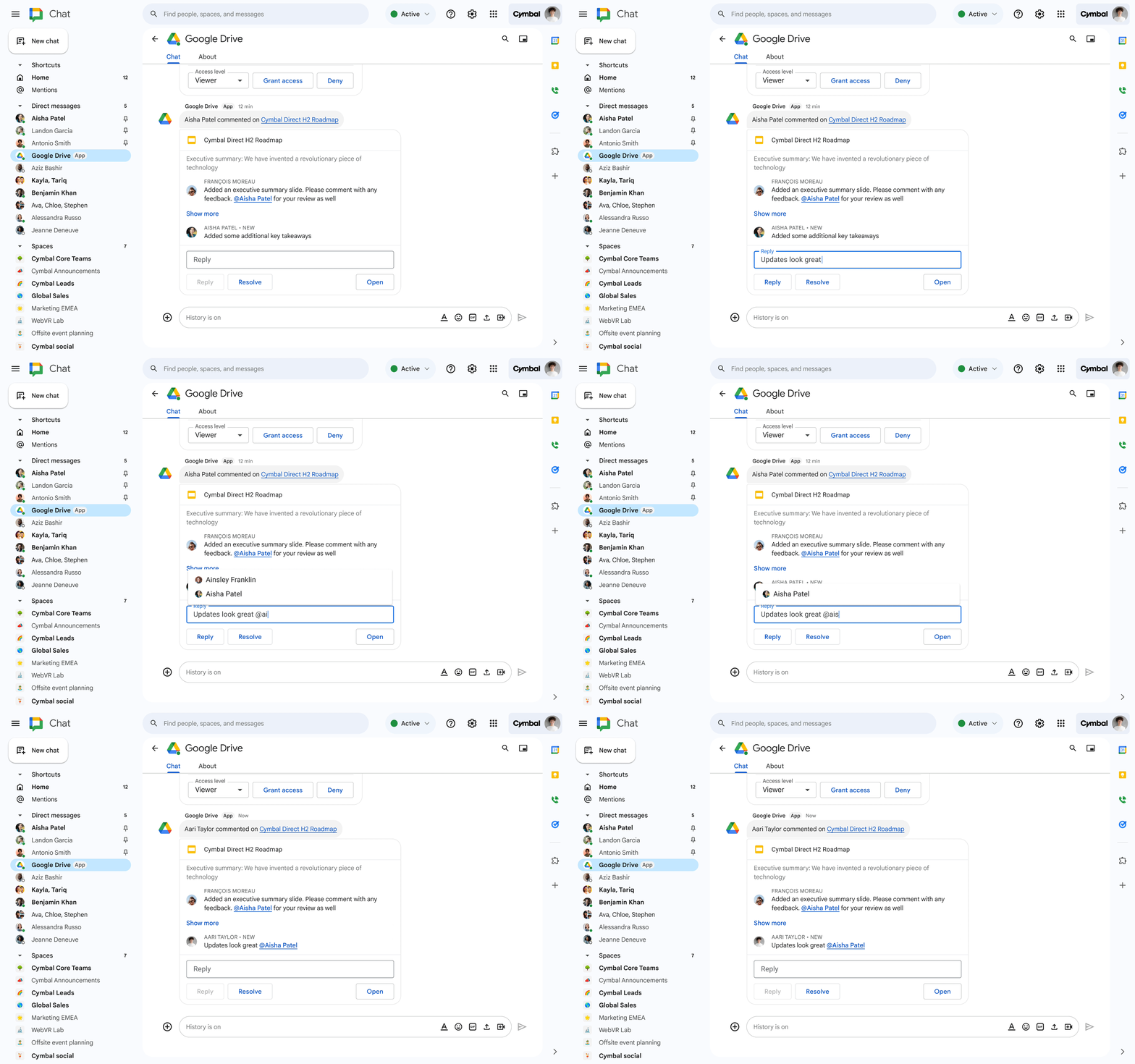
Currently, you can use the Google Drive Chat app to get read-only notifications in Chat about activity in Drive, such as comments and share requests. Starting today, we're adding the following improvements:
Reply to and resolve comments in Google Docs, Sheets and Slides directly from Chat Show more of the comment thread so you can have more context while replying @mention your colleagues easily while replying to comments With these updates, you can collaborate more easily on Docs, Sheets and Slides without ever leaving Chat.
Getting started
Rollout pace
Availability
Available to all Google Workspace customers and users with personal Google Accounts
Resources