por | Jan 11, 2024 | Noticias
What’s changing
Google Meet is now supported on Logitech’s Rally Bar and Rally Bar Mini Android-based appliances for collaboration rooms and spaces of just about any size. After initial setup, admins can easily enroll, manage, and monitor these devices using the Google admin console. Google Meet on Logitech Android-based devices is supported on CollabOS v1.11 as a video conferencing provider.
The following Logitech Android devices now support Google Meet:
Logitech Rally Bar Logitech Rally Bar Mini
Tap IP
Additional details
As part of this launch, we are also providing admins with a new capability to
protect their room devices using a passcode. This ensures that only authorized users are able to access and change the room’s device settings. This feature is only available for Logitech Rally Bar and Rally Bar Mini in appliance mode, where Rally Bar’s built-in computer supports Google Meet without the need for an additional computer or a user’s laptop. Visit the Help Center to learn more about
setting up Logitech devices as Meet Hardware and
enrolling your devices.
Getting started
Admins: Logitech Rally Bar and Rally Bar Mini appliances will need to be updated to CollabOS 1.11 in order to select Google Meet as the conferencing partner application. Once the device is updated to CollabOS 1.11 and the conferencing partner is set to Google Meet, follow the on-device prompts to enroll the device onto the Google Meet hardware admin console. Visit the Help Center to learn more about
setting up Logitech devices as Meet Hardware.Google Meet on Logitech Android appliances require Google Meet hardware licenses, please reach out to a Google Meet hardware reseller.
End users: No action required. Once a Logitech Rally Bar and Rally Bar Mini have been successfully enrolled, you can join Google Meet meetings normally.
Rollout pace
This update is available as part of Logitech’s CollabOS 1.11 release. For more information, please reach out to your Logitech account team or reseller.
Availability
Available on Logitech Rally Bar and Rally Bar Mini customers. Support for additional Logitech devices will be added over time. Available to all Google Workspace customers.
Resources
por | Jan 11, 2024 | Noticias
What’s changing
Since introducing the new sharing dialog for Google Drive, Docs, Sheets, Slides, and Forms in
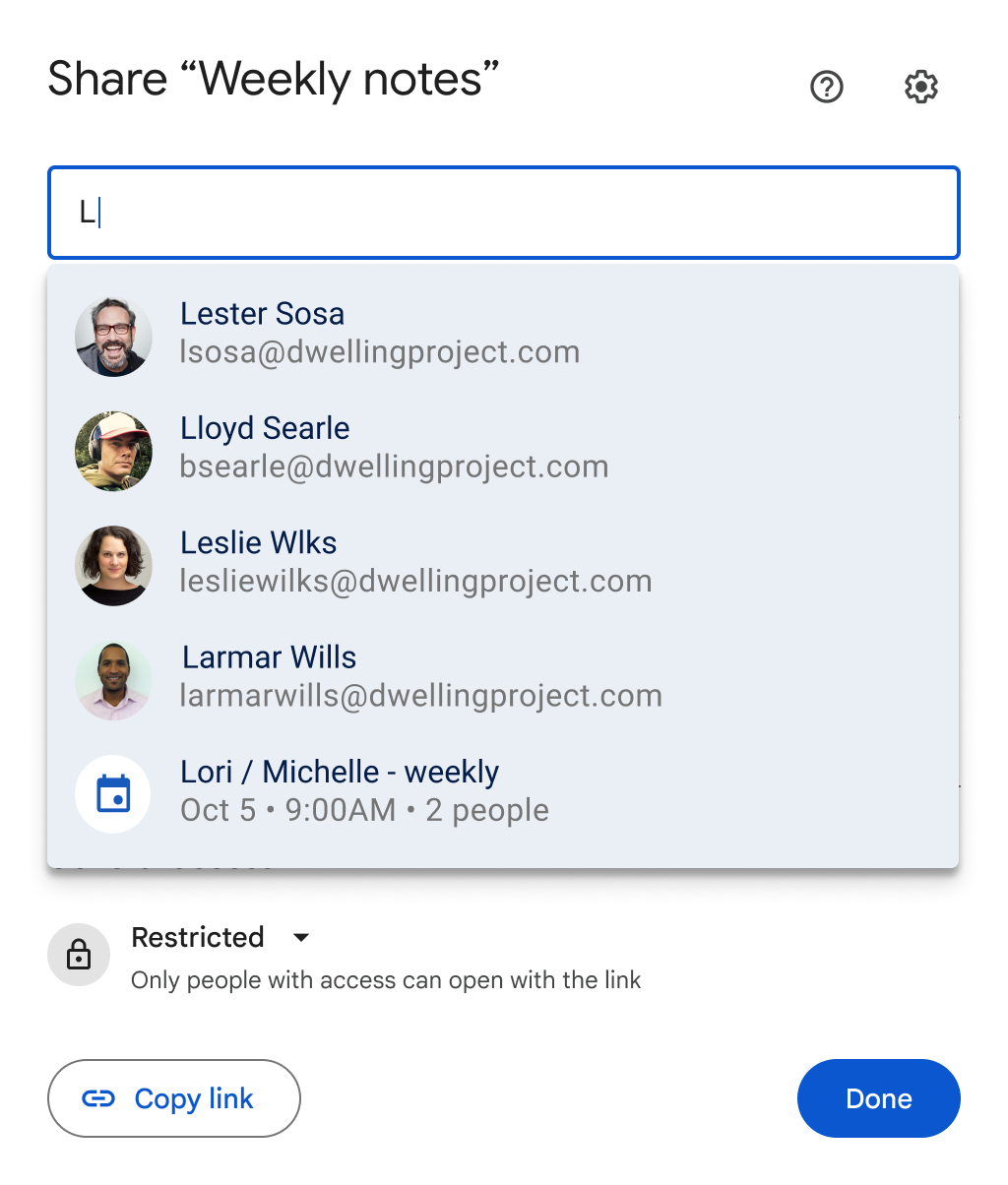
2020, we’ve made several enhancements to make sharing effortless across Workspace. Today, we’re excited to announce the option to share any file with all meeting participants on a Google Calendar invite via the sharing dialog within a file.
As a file owner or editor, go to the Share button in a file > type in the title of a calendar event > select the event > confirm the correct list of meeting attendees are added > select the users’ access level > click Share.
If you’d like to link the file to the calendar invite, you can select “Attach to calendar event” before clicking Share.
Who’s impacted
End users
Why you’d use it
We know sharing files is critical to building a collaborative environment. With this new feature, users can easily share files with meeting attendees before a meeting, ensuring everyone is prepared and able to collaborate on the same file.
Additional details
If you attach a file directly to a Calendar invite, you will see a pop-up asking if you’d like to share the file with the meeting attendees.
Getting started
Admins: There is no admin control for this feature. End users: To share a file to a calendar event, you must be the file owner or editor and be a participant on the meeting that you’re sharing to on your calendar. Visit the Help Center to learn more about
sharing files from Google Drive. Rollout pace
Availability
Available to all Google Workspace customers and users with personal Google Accounts
Resources
por | Jan 16, 2024 | Noticias
What’s changing
Who’s impacted
Admins and end users
Why you’d use it
Integrating third-party collaboration tools is a key component of the new digital whiteboarding experience in Google Workspace. Specifically, we’ve heard from our customers that whiteboarding tools like
Lucidspark by Lucid Software help their teams work better together with features like infinite canvas, templates, and diagramming. Today, Lucidspark can already be
launched inside a Meet call from your laptop. Now, you also have the option to use Lucidspark on the Board 65 and Desk 27 devices within a Meet call.
Later this year we’ll introduce support for launching
FigJam and
Miro directly from Board 65 and Desk 27 devices. We’ll provide an update here on the Workspace Updates blog with more information at that time. For more information on the future of digital whiteboarding in Workspace, please
refer to our initial announcement.
Getting started
Rollout pace
Availability
Available to all Google Workspace customers with Google Meet Board 65 and Desk 27 devices
por | Jan 9, 2024 | Noticias
What’s changing
We’re making some updates to the Google Drive metrics in the Admin Console
Apps reports and the
Reports API. As a result of these improvements, admins who analyze metrics will have more reporting clarity and can better understand activity trends within their domain. Specific changes include:
Metric dates will shift from Pacific Daylight Time (PDT) to Pacific Standard Time (PST).Moving files between team drives and directly sharing items inside shared drives will now be included in the sharing metrics.Sharing items with embedded content will now be counted as a single action in the sharing metrics, versus being counted twice. Metrics that calculate the number of owned items added or removed will no longer include activity for changing permissions that do not impact a user’s ability to access a file.
Who’s impacted
Admins
Getting started
Admins: Admins with Drive Audit-enabled SKUs can access the metrics in the Admin Console > Reporting > Apps Reports or through the
Reports API. End users: There is no end user setting for this feature.
Rollout pace
Availability
Metrics are available to customers on Drive Audit-enabled SKUs with access to the Admin Console and Reports API. This includes: Google Workspace Business Starter, Business Standard, Business Plus, Essentials Starter, Enterprise Essentials, Enterprise Essentials Plus, Enterprise Standard, Enterprise Plus, Frontline Starter, Frontline Standard, Education Fundamentals, Education Standard, Education Plus, the Teaching and Learning Upgrade, Nonprofits, Cloud Identity and Cloud Identity Premium customers
Resources
por | Jan 5, 2024 | Noticias
New updates
There are no new updates to share this week. Please see below for a recap of published announcements.
Previous announcements
The announcements below were published on the Workspace Updates blog earlier this week. Please refer to the original blog posts for complete details.
Updates for managed iOS devices with the release of Chrome 120
In the coming weeks, we’ll be introducing several improvements to Chrome-on-iOS that will help admins more seamlessly apply policies and preferences across their users’ managed devices. This launch will align with the planned release of
Chrome 120. | Learn more about
updates for managed iOS devices.
Improvements to Google Meet ultra-low latency live streaming
We’re introducing several improvements for the overall experience of the ultra-low latency viewing experience for video meetings that are streamed within an organization. | Live streaming is available for Google Workspace Enterprise Standard, Enterprise Plus, Enterprise Essentials Plus, the Teaching and Learning Upgrade, and Education Plus customers only. Live streamed meetings can be viewed by Google Workspace Business Starter, Business Standard, Business Plus, Enterprise Starter, Enterprise Standard, Enterprise Plus, Education Fundamentals, Education Standard, the Teaching and Learning Upgrade, Education Plus, Essentials Starter, and Essentials users only. | Learn more about
Google Meet ultra-low latency live streaming.Convert Google Forms into practice sets in Google Classroom
Teachers can now import a Google Form into practice set questions, and benefit from the assistive features, such as suggested resources and hints, in-the-moment support for students and insights. | Available to Google Workspace Education Plus and the Teaching and Learning Upgrade only. | Learn more about
importing questions from Google Forms.
Rapid Release Domains:
Scheduled Release Domains:
Rapid and Scheduled Release Domains:
por | Jan 5, 2024 | Noticias
What’s changing
Last year, we announced a new tool in Google Classroom called practice sets that enables educators to transform new and existing content into engaging and interactive assignments. Students get real-time feedback on answers as they complete practice sets and then teachers receive performance insights and snapshots into student progress.
Since launching, we’ve given
teachers more control over the resources for students in practice sets and today we’re excited to announce an additional way to save teachers time when creating assignments. We know teachers have already invested a lot of time creating quiz assignments using Google Forms, and with this update, they can simply import a Google Form into practice set questions, and benefit from the assistive features, such as suggested resources and hints, in-the-moment support for students and insights.
Getting started
Rollout pace
This feature is now available.
Availability
Available to Google Workspace Education Plus and the Teaching and Learning Upgrade
Resources
por | Jan 3, 2024 | Noticias
What’s changing
Earlier this year, we
announced a new ultra-low latency viewing experience for video meetings that are streamed within an organisation. Since launch, we’ve introducing several improvements for the overall experience:
Meeting hosts can now
add or start live streaming from any ongoing Meet call, even if it wasn’t initially planned to be live streamed.
To start a live stream, at the bottom right select Activities > Live Streaming
Live stream viewers can now see the size of the audience (call participants and viewers) in the top left live stream indicator.
The join screen now has a quick-access button, which meeting participants can use to join a live stream if they prefer that experience over the regular call.Video feed will start even faster when joining live streams with large audiences.Viewing live streams from the Google Meet mobile app on Android and iOS devices is now supported. These improvements will be available for Google Meet on web and meeting room hardware. Support for the Meet mobile app is outlined below in the “Rollout” section.
Getting started
Rollout pace
Join live streams from the Google Meet mobile apps:
iOS
Rapid Release domains: Gradual rollout (up to 15 days for feature visibility) beginning on January 3, 2024, with anticipated completion by January 8, 2024
Scheduled Release domains: Gradual rollout (up to 15 days for feature visibility) beginning on January 8, 2024, with anticipated completion by January 18, 2024
All other updates mentioned in this post are available now.
Availability
Live streaming is available for Google Workspace Enterprise Standard, Enterprise Plus, Enterprise Essentials Plus, the Teaching and Learning Upgrade, and Education Plus customers.
Live streamed meetings can be viewed by Google Workspace Business Starter, Business Standard, Business Plus, Enterprise Starter, Enterprise Standard, Enterprise Plus, Education Fundamentals, Education Standard, the Teaching and Learning. Upgrade, Education Plus, Essentials Starter, and Essentials users.
Not available to users with personal Google accounts.
por | Jan 3, 2024 | Noticias
What’s changing
In the coming weeks, we’ll be introducing several improvements to Chrome-on-iOS that will help admins more seamlessly apply policies and preferences across their users’ managed devices. This launch will align with the planned release of
Chrome 120. Specifically, these improvements are:
Cross-device policy application: Whether it’s a company-owned or personal device, Chrome User Policies can be applied when a user signs into the Chrome browser with their managed account. This ensures a consistent and secure browsing experience across all devices.Management notice for end-users: Managed end-users will begin seeing a management notice, informing them that their organization manages the account they are signing into. This transparency not only fosters trust but also keeps users informed about the security measures in place to protect their data. Admin console integration: Admins can easily activate this functionality through the Admin console under the “Chrome on iOS” Browser setting. This centralized control allows admins to tailor policies to meet the specific needs of their organization, ensuring a customized and secure browsing environment for all users.
Getting started
Admins: In the Admin console, navigate to Chrome browser > Settings > Chrome on iOS to start applying policies and preferences. Visit the Help Center to learn more about
setting Chrome policies for users or browsers.
End users: Visit the Help Center to learn more about how your iOS device is managed.
We’ll remind you that your account is managed upon login and when you’re logged in.
Rollout pace
End user notifications
Admin console integration
Availability
Available to all Chrome Browser Cloud Management and Google Workspace customers
Resources
por | Dez 20, 2023 | Noticias
What’s changing
We’re making some changes to how certain Google Meet hardware information can be accessed:
The following fields will no longer be
exported from the Meet Devices list page of the Admin console (Devices > Google Meet hardware > Devices): assignedCalendarGeneratedResourceName assignedRoomResourceName assignedRoomBuilding assignedRoomFloor If you receive
email alerts when a hardware issue is detected, those emails will no longer include the “Asset location” value. This information can still be found by going to the device detail page under the Calendar card or by querying the
resources.calendars.list method in the Admin SDK API using the resource calendar email.
Getting started
Rollout pace
Availability
This update impacts all Google Workspace customers with Meet Hardware devices.
Resources
por | Dez 10, 2023 | Noticias
What’s changing
We’re introducing a beta that gives Google Forms creators more granular control over who can respond to their forms via sharing settings.
Previously, forms creators had two sharing options: restrict responses to users within their domain (and trusted domains) or
make forms public (i.e. anyone with the URL can respond). With this new option, form creators can limit response access to specific users, groups, or
target audiences—similar to how file owners can restrict the sharing of Google Docs, Sheets, Slides or Sites in Drive.
Who’s impacted
Admins, end users and developers
Why you’d use it
This feature is useful in any scenario where you’d like to control who can respond to a form. For example, teachers can use this to ensure a quiz is only accessible to select students who receive the link. Similarly, business leaders can better collect feedback from specific organizational units and prevent the form from collecting email addresses or from being forwarded.
Getting started
Admins: For a limited time, you can sign your organization up for the beta using this
form. Upon signing up, users within the Google group signed up for the beta should see the new feature within 2-3 weeks. End users: All new forms created by users who are allowlisted will be enabled into this feature. Form creators must publish their form to enable responders to view the form or submit a response. Form creators can see who has access to the form and share response access to specific users, groups, or target audiences. Visit the Help Center to learn more about
creating a form in Google Forms. Users with personal Google Accounts or Workspace Individual subscribers can sign up using this
form. Availability
Available to all Google Workspace customers and users with personal Google Accounts Note: The
target audiences feature mentioned above is only available for the Google Drive and Docs and Google Chat services. Supported editions for this feature on Drive, Docs & Chat include: Business Plus, Enterprise Standard, Enterprise Plus, Education Standard, Education Plus, Enterprise Essentials and Enterprise Essentials Plus. Supported editions for this feature on Drive & Docs only include: Business Standard, Nonprofits and G Suite Business.
Resources