par | 11 janvier 2024 | Nouvelles
Ce qui change
Google Meet est désormais pris en charge par les appareils Android Rally Bar et Rally Bar Mini de Logitech pour les salles de collaboration et les espaces de toutes tailles. Après la configuration initiale, les administrateurs peuvent facilement inscrire, gérer et surveiller ces appareils à l'aide de la console d'administration Google. Google Meet sur les appareils Logitech sous Android est pris en charge par CollabOS v1.11 en tant que fournisseur de visioconférence.
Les appareils Logitech Android suivants prennent désormais en charge Google Meet :
Logitech Rally Bar Logitech Rally Bar Mini
Tapez sur IP
Pour commencer
Administrateurs : Les appareils Logitech Rally Bar et Rally Bar Mini devront être mis à jour vers CollabOS 1.11 afin de sélectionner Google Meet comme application partenaire de conférence. Une fois que l'appareil est mis à jour vers CollabOS 1.11 et que le partenaire de conférence est défini sur Google Meet, suivez les invites sur l'appareil pour inscrire l'appareil à la console d'administration du matériel Google Meet. Visitez le Centre d'aide pour en savoir plus sur
configuration des périphériques Logitech en tant que matériel de rencontreGoogle Meet sur les appareils Logitech Android nécessite des licences matérielles Google Meet, veuillez contacter un revendeur de matériel Google Meet.
Utilisateurs finaux : Aucune action n'est requise. Une fois que les Logitech Rally Bar et Rally Bar Mini ont été inscrits avec succès, vous pouvez participer aux réunions Google Meet comme d'habitude.
Rythme de déploiement
Cette mise à jour est disponible dans le cadre de la version CollabOS 1.11 de Logitech. Pour plus d'informations, veuillez contacter votre équipe Logitech ou votre revendeur.
Disponibilité
Disponible pour les clients Logitech Rally Bar et Rally Bar Mini. La prise en charge d'autres appareils Logitech sera ajoutée au fil du temps. Disponible pour tous les clients de Google Workspace.
Ressources
par | 11 janvier 2024 | Nouvelles
Ce qui change
Depuis l'introduction du nouveau dialogue de partage pour Google Drive, Docs, Sheets, Slides et Forms en
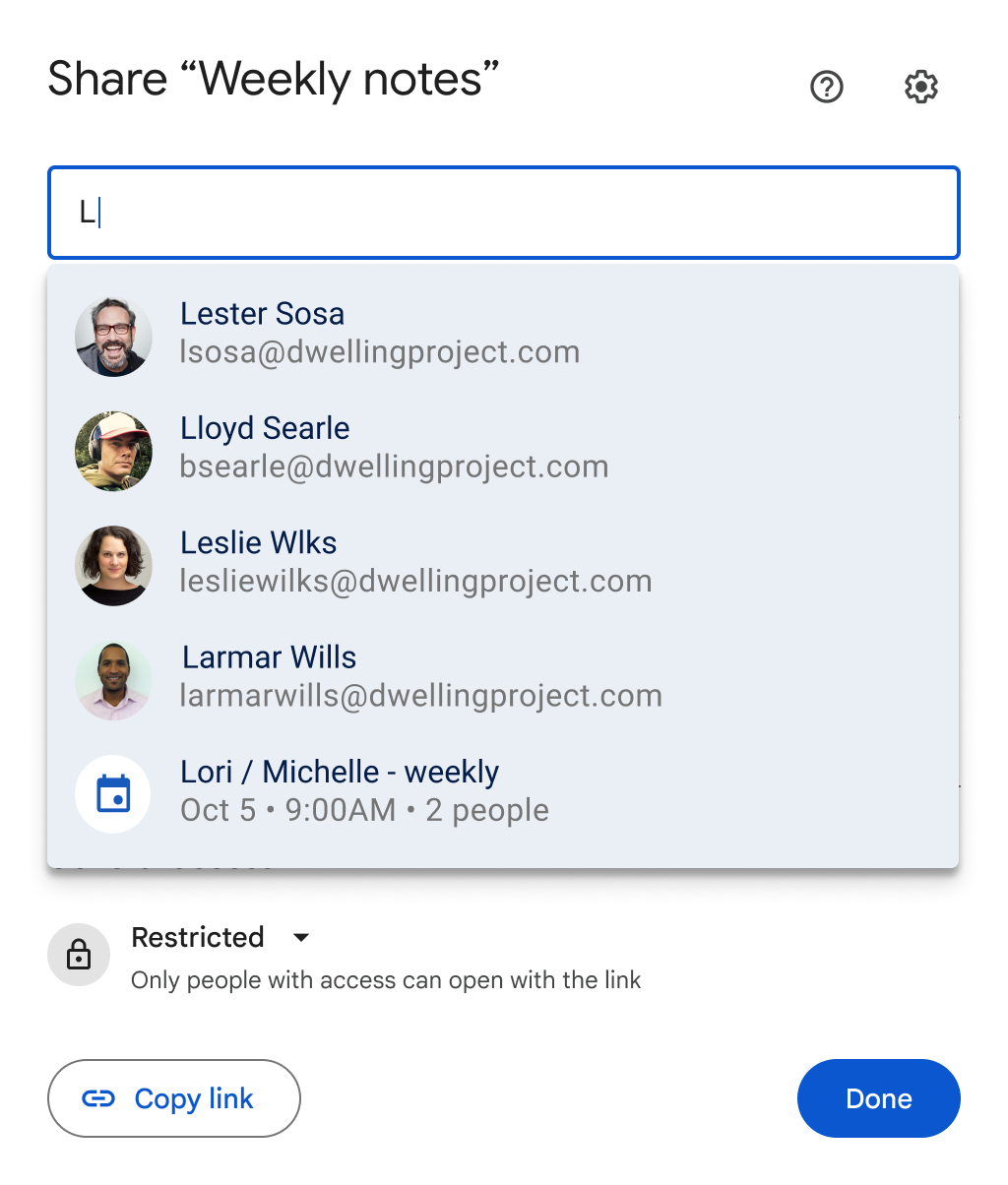
2020Au cours des derniers mois, nous avons apporté plusieurs améliorations pour faciliter le partage dans Workspace. Aujourd'hui, nous sommes ravis d'annoncer la possibilité de partager n'importe quel fichier avec tous les participants à une réunion sur une invitation Google Calendar via la boîte de dialogue de partage d'un fichier.
En tant que propriétaire ou éditeur du fichier, cliquez sur le bouton Partager dans un fichier > tapez le titre d'un événement du calendrier > sélectionnez l'événement > confirmez que la liste des participants à la réunion est correcte > sélectionnez le niveau d'accès des utilisateurs > cliquez sur Partager.
Si vous souhaitez lier le fichier à l'invitation du calendrier, vous pouvez sélectionner "Joindre à l'événement du calendrier" avant de cliquer sur Partager.
Qui est concerné ?
Utilisateurs finaux
Pourquoi l'utiliser ?
Nous savons que le partage de fichiers est essentiel à la mise en place d'un environnement collaboratif. Grâce à cette nouvelle fonctionnalité, les utilisateurs peuvent facilement partager des fichiers avec les participants à une réunion avant celle-ci, ce qui garantit que tout le monde est préparé et capable de collaborer sur le même fichier.
Détails supplémentaires
Si vous joignez un fichier directement à une invitation du calendrier, une fenêtre contextuelle s'affichera pour vous demander si vous souhaitez partager le fichier avec les participants à la réunion.
Pour commencer
Administrateurs : il n'y a pas de contrôle administratif pour cette fonctionnalité. Utilisateurs finaux : pour partager un fichier vers un événement du calendrier, vous devez être le propriétaire ou l'éditeur du fichier et être un participant à la réunion vers laquelle vous partagez sur votre calendrier. Consultez le centre d'aide pour en savoir plus sur
partager des fichiers à partir de Google Drive. Rythme de déploiement
Disponibilité
Disponible pour tous les clients de Google Workspace et les utilisateurs disposant d'un compte Google personnel.
Ressources
par | 16 janvier 2024 | Nouvelles
Ce qui change
Qui est concerné ?
Administrateurs et utilisateurs finaux
Pourquoi l'utiliser ?
L'intégration d'outils de collaboration tiers est un élément clé de la nouvelle expérience de tableau blanc numérique dans Google Workspace. Plus précisément, nos clients nous ont dit que les outils de tableau blanc tels que
Lucidspark par Lucid Software aider leurs équipes à mieux travailler ensemble grâce à des fonctionnalités telles que le canevas infini, les modèles et la création de diagrammes. Aujourd'hui, Lucidspark peut déjà être
lancé à l'intérieur d'un appel à la rencontre depuis votre ordinateur portable. Désormais, vous avez également la possibilité d'utiliser Lucidspark sur les appareils Board 65 et Desk 27 dans le cadre d'un appel Meet.
Dans le courant de l'année, nous introduirons un support pour le lancement de
FigJam et
Miro directement à partir des appareils Board 65 et Desk 27. Nous ferons une mise à jour ici sur le blog Workspace Updates avec plus d'informations à ce moment-là. Pour plus d'informations sur l'avenir du tableau blanc numérique dans Workspace, veuillez cliquer ici.
se référer à notre annonce initiale.
Pour commencer
Rythme de déploiement
Disponibilité
Disponible pour tous les clients de Google Workspace disposant d'appareils Google Meet Board 65 et Desk 27
par | 9 janvier 2024 | Nouvelles
Ce qui change
Nous avons mis à jour les mesures de Google Drive dans la console d'administration.
Rapports sur les applications et le
Rapports API. Grâce à ces améliorations, les administrateurs qui analysent les métriques disposeront de rapports plus clairs et pourront mieux comprendre les tendances de l'activité dans leur domaine. Les changements spécifiques sont les suivants :
Les dates des mesures passent de l'heure d'été du Pacifique (PDT) à l'heure normale du Pacifique (PST).Le déplacement de fichiers entre les lecteurs de l'équipe et le partage direct d'éléments dans les lecteurs partagés sont désormais inclus dans les mesures de partage.Le partage d'éléments avec du contenu intégré est désormais comptabilisé comme une seule action dans les mesures de partage, au lieu d'être comptabilisé deux fois. Les indicateurs qui calculent le nombre d'éléments ajoutés ou supprimés n'incluront plus l'activité de modification des autorisations qui n'ont pas d'impact sur la capacité d'un utilisateur à accéder à un fichier.
Qui est concerné ?
Administrateurs
Pour commencer
Administrateurs : Les administrateurs ayant des UGS activées pour l'audit d'entraînement peuvent accéder aux mesures dans Admin Console > Reporting > Apps Reports ou par l'intermédiaire de l'application
Rapports API. Utilisateurs finaux : Il n'y a pas de paramètre utilisateur final pour cette fonction.
Rythme de déploiement
Disponibilité
Les indicateurs sont disponibles pour les clients sur les UGS compatibles avec Drive Audit et ayant accès à la console d'administration et à l'API de rapports. Ceci inclut : Google Workspace Business Starter, Business Standard, Business Plus, Essentials Starter, Enterprise Essentials, Enterprise Essentials Plus, Enterprise Standard, Enterprise Plus, Frontline Starter, Frontline Standard, Education Fundamentals, Education Standard, Education Plus, la mise à niveau Teaching and Learning, Nonprofits, Cloud Identity et Cloud Identity Premium.
Ressources
par | 5 janvier 2024 | Nouvelles
Nouvelles mises à jour
Il n'y a pas de nouvelles mises à jour à partager cette semaine. Vous trouverez ci-dessous un récapitulatif des annonces publiées.
Annonces précédentes
Les annonces ci-dessous ont été publiées sur le blog Workspace Updates en début de semaine. Veuillez vous référer aux articles de blog originaux pour plus de détails.
Mises à jour pour les appareils iOS gérés avec la sortie de Chrome 120
Dans les semaines à venir, nous apporterons plusieurs améliorations à Chrome-on-iOS qui aideront les administrateurs à appliquer de manière plus transparente des politiques et des préférences sur les appareils gérés par leurs utilisateurs. Ce lancement coïncidera avec la sortie prévue de
Chrome 120En savoir plus sur
pour les appareils iOS gérés.
Améliorations apportées à la diffusion en direct à très faible latence de Google Meet
Nous apportons plusieurs améliorations à l'expérience globale de l'affichage à très faible latence pour les réunions vidéo diffusées au sein d'une organisation. La diffusion en direct est disponible uniquement pour les clients Google Workspace Enterprise Standard, Enterprise Plus, Enterprise Essentials Plus, la mise à niveau Enseignement et apprentissage et Education Plus. Les réunions diffusées en direct peuvent être visualisées uniquement par les utilisateurs de Google Workspace Business Starter, Business Standard, Business Plus, Enterprise Starter, Enterprise Standard, Enterprise Plus, Education Fundamentals, Education Standard, Teaching and Learning Upgrade, Education Plus, Essentials Starter et Essentials. | En savoir plus sur
Google Meet : diffusion en direct à très faible latence.Convertir les formulaires Google en jeux d'exercices dans Google Classroom
Les enseignants peuvent désormais importer un formulaire Google dans les questions d'exercices et bénéficier des fonctionnalités d'assistance, telles que les ressources suggérées et les conseils, l'assistance en temps réel pour les étudiants et les aperçus. | Disponible uniquement pour Google Workspace Education Plus et la mise à niveau Enseignement et apprentissage. | En savoir plus sur
l'importation de questions à partir de Google Forms.
Domaines à libération rapide :
Domaines de libération programmée :
Domaines de la mise à disposition rapide et de la mise à disposition programmée :
par | 5 janvier 2024 | Nouvelles
Ce qui change
L'année dernièreDans le cadre d'une nouvelle fonctionnalité, nous avons annoncé un nouvel outil dans Google Classroom, les jeux d'exercices, qui permet aux enseignants de transformer des contenus nouveaux ou existants en devoirs interactifs et attrayants. Les élèves obtiennent un retour d'information en temps réel sur leurs réponses lorsqu'ils complètent les exercices, tandis que les enseignants reçoivent des informations sur les performances et des instantanés sur les progrès des élèves.
Depuis notre lancement, nous avons donné
les enseignants ont davantage de contrôle sur les ressources destinées aux élèves dans les ensembles de pratiques et nous sommes heureux d'annoncer aujourd'hui un nouveau moyen de faire gagner du temps aux enseignants lors de la création de devoirs. Nous savons que les enseignants ont déjà consacré beaucoup de temps à la création de devoirs à l'aide de formulaires Google. Grâce à cette mise à jour, ils peuvent simplement importer un formulaire Google dans les questions des jeux d'entraînement et bénéficier des fonctionnalités d'assistance, telles que les ressources suggérées et les conseils, l'assistance instantanée pour les élèves et les commentaires.
Pour commencer
Administrateurs : Les ensembles d'exercices sont activés par défaut, mais les administrateurs doivent ajouter des enseignants à la liste des enseignants.
groupe d'enseignants vérifié afin qu'ils puissent recevoir un ensemble d'exercices partagés par d'autres enseignants dans leur espace de travail Google. Utilisateurs finaux : Pour accéder aux jeux d'exercices, rendez-vous dans Google Classroom > Jeux d'exercices > Créer (ou
practicesets.classroom.google.com). Visitez le centre d'aide pour en savoir plus sur
Ensembles de pratiques. L'importation de formulaires dans les ensembles de pratiques est activée par défaut. Visitez le centre d'aide pour en savoir plus sur
importation de questions à partir de Google Forms.
Rythme de déploiement
Cette fonctionnalité est désormais disponible.
Disponibilité
Disponible pour Google Workspace Education Plus et la mise à niveau Enseignement et apprentissage
Ressources
par | 3 janvier 2024 | Nouvelles
Ce qui change
En début d'année, nous avons
a annoncé une nouvelle expérience de visualisation à très faible latence pour les réunions vidéo diffusées au sein d'une organisation. Depuis le lancement, nous avons apporté plusieurs améliorations à l'expérience globale :
Les organisateurs de réunions peuvent désormais
ajouter ou démarrer la diffusion en direct de tout appel à la rencontre en cours, même s'il n'était pas prévu à l'origine qu'il soit diffusé en direct.
Pour lancer une diffusion en direct, sélectionnez Activités > Diffusion en direct en bas à droite.
Les spectateurs de flux en direct peuvent désormais voir la taille de l'audience (participants à l'appel et spectateurs) dans l'indicateur de flux en direct situé en haut à gauche.
L'écran de connexion comporte désormais un bouton d'accès rapide que les participants à la réunion peuvent utiliser pour rejoindre un flux en direct s'ils préfèrent cette expérience à l'appel normal.Le flux vidéo démarre encore plus rapidement lorsque l'on rejoint des flux en direct avec un large public.La visualisation des flux en direct à partir de l'application mobile Google Meet sur les appareils Android et iOS est désormais prise en charge. Ces améliorations seront disponibles pour Google Meet sur le web et dans les salles de réunion. La prise en charge de l'application mobile Meet est décrite ci-dessous dans la section "Déploiement".
Pour commencer
Administrateurs : Visitez notre centre d'aide pour plus d'informations.
activer ou désactiver la diffusion en direct pour Meet et comment préparer votre réseau. Utilisateurs finaux : si votre administrateur l'autorise, utilisez le Centre d'aide pour en savoir plus sur les sujets suivants
diffusion en direct d'une réunion vidéo. Téléspectateurs : sur l'ordinateur, vous pouvez participer à des flux comme auparavant. Les réactions, les sondages et les questions-réponses en direct fonctionnent comme dans une réunion vidéo Meet classique. Sur mobile, vous pouvez désormais rejoindre des flux dans l'application Meet, avec quelques restrictions de fonctionnalités.
En savoir plus. Animateurs de flux en direct : Les flux en direct sont programmés et gérés comme auparavant.
Rythme de déploiement
Participez à des diffusions en direct à partir des applications mobiles Google Meet :
iOS
Domaines à libération rapideMise en œuvre progressive (jusqu'à 15 jours pour la visibilité des fonctionnalités) à partir du 3 janvier 2024, avec une fin prévue pour le 8 janvier 2024.
Domaines de diffusion prévusMise en œuvre progressive (jusqu'à 15 jours pour la visibilité des fonctionnalités) à partir du 8 janvier 2024, avec une fin prévue pour le 18 janvier 2024.
Toutes les autres mises à jour mentionnées dans ce billet sont disponibles dès maintenant.
Disponibilité
La diffusion en direct est disponible pour les clients Google Workspace Enterprise Standard, Enterprise Plus, Enterprise Essentials Plus, Teaching and Learning Upgrade et Education Plus.
Les réunions diffusées en direct peuvent être visionnées par les utilisateurs de Google Workspace Business Starter, Business Standard, Business Plus, Enterprise Starter, Enterprise Standard, Enterprise Plus, Education Fundamentals, Education Standard, Teaching and Learning. Upgrade, Education Plus, Essentials Starter et Essentials.
Non disponible pour les utilisateurs disposant d'un compte Google personnel.
par | 3 janvier 2024 | Nouvelles
Ce qui change
Dans les semaines à venir, nous apporterons plusieurs améliorations à Chrome-on-iOS qui aideront les administrateurs à appliquer de manière plus transparente des politiques et des préférences sur les appareils gérés par leurs utilisateurs. Ce lancement coïncidera avec la sortie prévue de
Chrome 120. Plus précisément, ces améliorations sont les suivantes
Application de politiques sur plusieurs appareils : qu'il s'agisse d'un appareil appartenant à l'entreprise ou d'un appareil personnel, les politiques d'utilisation de Chrome peuvent être appliquées lorsqu'un utilisateur se connecte au navigateur Chrome à l'aide de son compte géré. Avis de gestion pour les utilisateurs finaux : les utilisateurs finaux gérés commenceront à voir un avis de gestion, les informant que leur organisation gère le compte sur lequel ils se connectent. Cette transparence favorise non seulement la confiance, mais informe également les utilisateurs des mesures de sécurité mises en place pour protéger leurs données. Intégration à la console d'administration : les administrateurs peuvent facilement activer cette fonctionnalité via la console d'administration sous le paramètre "Chrome sur iOS" du navigateur. Ce contrôle centralisé permet aux administrateurs d'adapter les politiques aux besoins spécifiques de leur organisation, garantissant ainsi un environnement de navigation personnalisé et sécurisé pour tous les utilisateurs.
Pour commencer
Administrateurs : dans la console d'administration, accédez au navigateur Chrome > Paramètres > Chrome sur iOS pour commencer à appliquer des règles et des préférences. Consultez le centre d'aide pour en savoir plus sur
définir des politiques Chrome pour les utilisateurs ou les navigateurs.
Utilisateurs finaux : Visitez le centre d'aide pour en savoir plus sur la façon dont votre L'appareil iOS est géré.
Nous vous rappellerons que votre compte est géré lors de la connexion et lorsque vous êtes connecté.
Rythme de déploiement
Notifications à l'utilisateur final
Intégration de la console d'administration
Disponibilité
Disponible pour tous les clients de Chrome Browser Cloud Management et de Google Workspace
Ressources
par | 20 décembre 2023 | Nouvelles
Ce qui change
Nous apportons quelques modifications à la manière dont certaines informations relatives au matériel Google Meet peuvent être consultées :
Les champs suivants ne seront plus
exporté de la page de la liste des dispositifs de rencontre de la console d'administration (Dispositifs > Matériel Google Meet > Dispositifs) : assignedCalendarGeneratedResourceName assignedRoomResourceName assignedRoomBuilding assignedRoomFloor Si vous recevez
alertes par courrier électronique lorsqu'un problème matériel est détecté, ces courriels ne contiendront plus la valeur "Asset location". Cette information peut toujours être trouvée en allant sur la page des détails de l'appareil sous la carte Calendrier ou en interrogeant le fichier
ressources.calendriers.liste dans l'API Admin SDK à l'aide de l'email du calendrier des ressources.
Pour commencer
Administrateurs : visitez le centre d'aide pour en savoir plus sur les points suivants
connectivité et alertes périphériques. Utilisateurs finaux : Il n'y a pas d'impact ou d'action requise de la part des utilisateurs finaux.
Rythme de déploiement
Disponibilité
Cette mise à jour concerne tous les clients de Google Workspace disposant d'appareils Meet Hardware.
Ressources
par | 10 décembre 2023 | Nouvelles
Ce qui change
Nous lançons une version bêta qui permet aux créateurs de formulaires Google d'exercer un contrôle plus précis sur les personnes autorisées à répondre à leurs formulaires via les paramètres de partage.
Auparavant, les créateurs de formulaires disposaient de deux options de partage : restreindre les réponses aux utilisateurs de leur domaine (et aux domaines de confiance) ou
rendre les formulaires publics (c'est-à-dire que toute personne possédant l'URL peut répondre). Grâce à cette nouvelle option, les créateurs de formulaires peuvent limiter l'accès aux réponses à des utilisateurs, des groupes ou des personnes spécifiques.
publics cibles-Tout comme les propriétaires de fichiers peuvent restreindre le partage de Google Docs, Sheets, Slides ou Sites dans Drive.
Qui est concerné ?
Administrateurs, utilisateurs finaux et développeurs
Pourquoi l'utiliser ?
Cette fonction est utile dans tous les cas où vous souhaitez contrôler qui peut répondre à un formulaire. Par exemple, les enseignants peuvent l'utiliser pour s'assurer qu'un quiz n'est accessible qu'aux étudiants sélectionnés qui reçoivent le lien. De même, les chefs d'entreprise peuvent mieux recueillir les réactions d'unités organisationnelles spécifiques et empêcher le formulaire de collecter des adresses électroniques ou d'être transféré.
Pour commencer
Administrateurs : pour une durée limitée, vous pouvez inscrire votre organisation à la version bêta en utilisant le lien suivant
forme. Dès leur inscription, les utilisateurs du groupe Google inscrit à la version bêta devraient bénéficier de la nouvelle fonctionnalité dans un délai de 2 à 3 semaines. Utilisateurs finaux : tous les nouveaux formulaires créés par des utilisateurs inscrits sur la liste d'autorisation seront pris en charge par cette fonctionnalité. Les créateurs de formulaires doivent publier leur formulaire pour permettre aux destinataires de le consulter ou d'envoyer une réponse. Les créateurs de formulaires peuvent voir qui a accès au formulaire et partager l'accès aux réponses avec des utilisateurs, des groupes ou des publics cibles spécifiques. Consultez le centre d'aide pour en savoir plus sur
créer un formulaire dans Google Forms. Les utilisateurs disposant d'un compte Google personnel ou les abonnés à l'espace de travail individuel peuvent s'inscrire à l'aide de ce formulaire.
forme. Disponibilité
Disponible pour tous les clients de Google Workspace et les utilisateurs disposant d'un compte Google personnel.
publics cibles mentionnée ci-dessus n'est disponible que pour les services Google Drive et Docs et Google Chat. Les éditions prises en charge pour cette fonctionnalité sur Drive, Docs et Chat sont les suivantes : Business Plus, Enterprise Standard, Enterprise Plus, Education Standard, Education Plus, Enterprise Essentials et Enterprise Essentials Plus. Les éditions prises en charge pour cette fonctionnalité sur Drive et Docs uniquement sont les suivantes : Business Standard, Nonprofits et G Suite Business.
Ressources