par | Nov 29, 2024 | Nouvelles
2 Nouvelles mises à jour
Sauf indication contraire, les fonctionnalités ci-dessous sont disponibles pour tous les clients de Google Workspace et sont entièrement lancées ou en cours de déploiement. Les déploiements ne devraient pas prendre plus de 15 jours ouvrables s'ils sont lancés à la fois pour les clients de Google Workspace et pour les clients de Google Workspace. Mise à disposition rapide et programmée en même temps. Si ce n'est pas le cas, chaque étape du déploiement ne devrait pas prendre plus de 15 jours ouvrables.
Drag and drop contacts in the addressee fields when composing an email on your Android device
When writing an email in the Gmail app on your Android device, you can now drag and drop contacts in the addressee fields. This makes it easier for you to move an email address between the “to,” “cc,” and “bcc” fields. | Rollout to
Domaines de mise à disposition rapide (Rapid Release) et domaines de mise à disposition programmée (Scheduled Release) is complete. | Available to all Google Workspace customers, Workspace Individual Subscribers, and users with personal Google accounts.
Expanding row limits in Connected Sheets for Looker
Au début de l'année, we increased the maximum number of rows of results returned from BigQuery to 100,000 for pivot tables. This week, we’re expanding this to Connected Sheets for Looker by increasing the maximum number of rows of results returned from Looker to 100,000 for pivot tables. With this update, users can analyze even more results in Sheets from the petabytes of data in Looker. | Rolling out to
Domaines de la mise à disposition rapide et de la mise à disposition programmée now. | Available to all Google Workspace customers, Workspace Individual Subscribers, and users with personal Google accounts. | Visit the Help Center to learn more about
Connected Sheets for Looker.
Annonces précédentes
Les annonces ci-dessous ont été publiées sur le blog Workspace Updates en début de semaine. Veuillez vous référer aux articles de blog originaux pour plus de détails.
The Gemini mobile app is now available for Google Workspace users
The Gemini mobile app for Android and iOS devices is now available for Google Workspace users accessing Gemini as a core service. | Learn more about the
Gemini mobile app.
Introducing huddles: instant-on, audio-first meetings in Google Chat
In continuing our effort to make Google Chat your home for team collaboration, we’re excited to introduce a fast and flexible way to connect: huddles. Powered by Google Meet, huddles let you start an audio-first meeting, making real-time collaboration easier than ever. Once the huddle has started, you can resize or drag the window, add video, or share your screen for a fuller meeting experience while multitasking in Chat. | Learn more about
huddles in Chat.
Déploiements terminés
Domaines à libération rapide :
Domaines de la mise à disposition rapide et de la mise à disposition programmée :
par | Nov 27, 2024 | Nouvelles
Ce qui change
In continuing our effort to make Google Chat your home for team collaboration, we’re excited to introduce a fast and flexible way to connect: huddles.
Powered by Google Meet, huddles let you start an audio-first meeting, making real-time collaboration easier than ever. Once the huddle has started, you can resize or drag the window, add video, or share your screen for a fuller meeting experience while multitasking in Chat.
Huddles provide a seamless collaboration experience across Chat and Meet, and can be useful in a variety of scenarios, such as two colleagues syncing quickly to discuss a project they’ve been messaging about in their Chat stream.
Qui est concerné ?
Utilisateurs finaux
Pourquoi l'utiliser ?
Huddles help to reduce meeting fatigue for hybrid workers, and eliminates the need for lengthy discussions over email or in Chat. Instead of jumping out of the conversation and into a meeting, huddles integrates directly and smoothly into the Chat experience. The format of huddles also supports multi-tasking while in Chat as you can easily resize or share your screen.
Détails supplémentaires
The Meet video button that’s currently in the compose bar of Chat is moving to the Chat header, giving you multiple options such as the ability to call, start a huddle, or share a Meet link through a single entry point.
Pour commencer
- Administrateurs : If Meet is turned OFF for users in your domain, they will not be able to create Huddles, but they can join Huddles. Visit the Help Center to learn more about turning on Meet meetings and calls for your organization.
- Utilisateurs finaux:
- Huddles are available in direct messages, group messages and spaces.
- To start a huddle in Chat, click the Video icon in the top right corner of your chat message > select Start a huddle.
- Huddles start audio only as default but you can turn video on at any moment.
- When you’re requested to join a huddle, you will see a chat chip in your message thread that says [user] has started a huddle, click “Join” to enter the huddle. You will also see the huddles toggle in the Chat header for that conversation.
- Visitez le centre d'aide pour en savoir plus sur huddles in Google Chat.
Rythme de déploiement
- Domaines à libération rapide: Extended rollout (potentially longer than 15 days for feature visibility) starting on November 27, 2024, with expected completion by December 20, 2025
- Domaines de diffusion prévus: Gradual rollout (up to 15 days for feature visibility) starting on January 6, 2025
Disponibilité
Disponible pour Google Workspace :
- Entreprises Starter, Standard, and Plus
- Entreprise Starter, Standard, and Plus
- Frontline Starter and Standard
- Essentials, Enterprise Essentials, and Enterprise Essentials Plus
- Nonprofits
Ressources
par | Nov 19, 2024 | Nouvelles
Ce qui change
Since introducing
tableaux dans Google Sheets, we’ve made numerous improvements to ensure users are equipped with the tools they need to accelerate spreadsheet building.
Table references, a way to refer to a table or parts of a table in a formula, are just one example of how tables reduce time spent manually formatting data.
Today, we’re excited to announce updates to table references that enhance discoverability and usability. Specifically, users will now see:
- Improved table reference availability, which allows users to reference the items below across both single (e.g., =Table2[[#ALL],[Column 1]]) and multiple columns (e.g., =Table2[[#ALL],[Column 1]:[Column 2]] ):
- Full table columns, including column headers, data, and footers (#ALL)
- Table headers (#HEADERS)
- Table footers (#TOTALS)
- Table data, excluding headers and footers (#DATA)
- Formula suggestions, which help you identify formulas that could be more robust. For example, if a user types a working formula that overlaps with a table range, a table reference suggestion will show.
- Formula corrections for table references, which show a formula correction with a proper table reference when a formula is written incorrectly.
Pour commencer
- Disponible pour tous les clients de Google Workspace, les abonnés de Google Workspace Individual et les utilisateurs disposant d'un compte Google personnel.
Ressources
par | Nov 19, 2024 | Nouvelles
Quick summary
In 2022, we
introduced automatic framing for select Google Workspace editions. Beginning today, we’re pleased to announce that we’re expanding this functionality to all users, as well as introducing an improved experience while using a virtual background. This feature will be on by default.
Depending on their camera placement, some meeting participants might be less visible than others. With automatic framing, Google Meet will automatically center your video before joining a meeting to help ensure equal visibility for all participants. The automatic framing happens only once, so there are no motion distractions that can divert attention from the content of the meeting. Additionally, Meet will now continuously keep you centered when using a virtual background, ensuring your background is fixed and not constantly reframing which can be distracting.
Meet frames you in the center of the screen to improve your visibility
Pour commencer
- Administrateurs : There is no admin control for this feature.
- Utilisateurs finaux : This feature will be ON by default and can be turned off by the user.
- Visitez le centre d'aide pour en savoir plus sur turning video framing on or off for your account. Note when no virtual background is used, you can manually reframe the video at any time by hovering over your video tile and clicking reframe.
Rythme de déploiement
Disponibilité
- Disponible pour tous les clients de Google Workspace, les abonnés individuels à Workspace et les utilisateurs disposant d'un compte Google personnel.
Ressources
par | Nov 19, 2024 | Nouvelles
Ce qui change
We’re introducing a new workflow that allows educators to request access to unconfigured third-party apps on behalf of their students.
Admins can allow educators and users who are over 18 years of age to request access to apps for themselves or on behalf of others (proxy requests). For example, admins may create a group of trusted users who are responsible for vetting third party apps and allow them to make proxy requests on behalf of students.
Educators can view a list of apps they have recently accessed with their Google Workspace account and request access for their students.
Admins can review and take action on these requests in the Admin console by going to Security > API Controls > App Access Control. Requests will be denoted with a “Proxy” label when the request is made on behalf of another user.
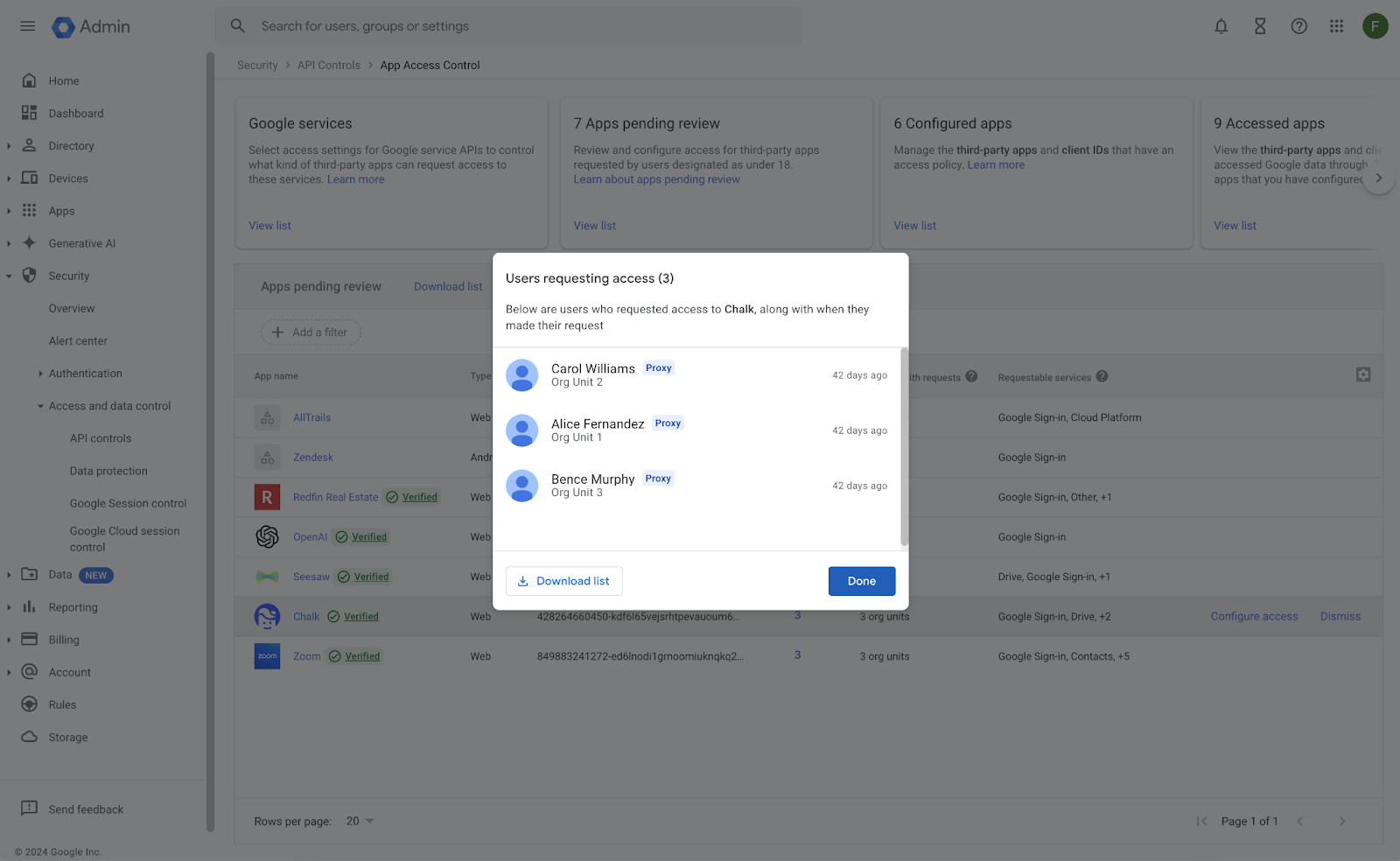
Once admins have configured access, they can opt to notify users and/or users who made proxy requests via email about the outcome of their request.
Qui est concerné ?
Administrateurs et utilisateurs finaux
Pourquoi c'est important
Administrators can now allow a group of trusted users to vet and request third party app access on behalf of other users. This allows admins to better control who requests access and create a more streamlined process for app approvals.
Rythme de déploiement
Disponibilité
- Available for Google Workspace Education Fundamentals, Standard, Plus, and the Teaching & Learning Upgrade
Ressources



.gif)


