par | Nov 19, 2024 | Nouvelles
Ce qui change
Today, we’re excited to introduce a new collection of building blocks designed to help you manage important business workflows in Docs, including team task management, project tracking, hiring, and more.
- Task trackers quickly add and track tasks at a glance with titles, assignees, due dates, and status, in a cleanly organized format. Additionally, users can add their own columns for more personalization, and new tasks with an assignee and title can be synced with Google Tasks individually or by syncing the whole table at once:
- Use a Contact list to organize contact information for applicants, sales contacts, team members, project assignments and more. Contact lists offer a structured table format that breaks out critical contact information into glanceable columns that are clear and easier to read:
- Decision logs centralize open questions, aid in decision-making, and organize final decisions in an easily-digestible table. With decision logs, teams can quickly align around a single source of truth with clear owners:
Get started with building blocks by clicking the buttons at the top of a newly created document or via Insert > Building blocks. In addition, a new Docs sidebar, accessible by going to Insert > Building blocks > View more ou by clicking “More” at the top of a new document, makes it easier to browse, find, and preview building blocks in context:
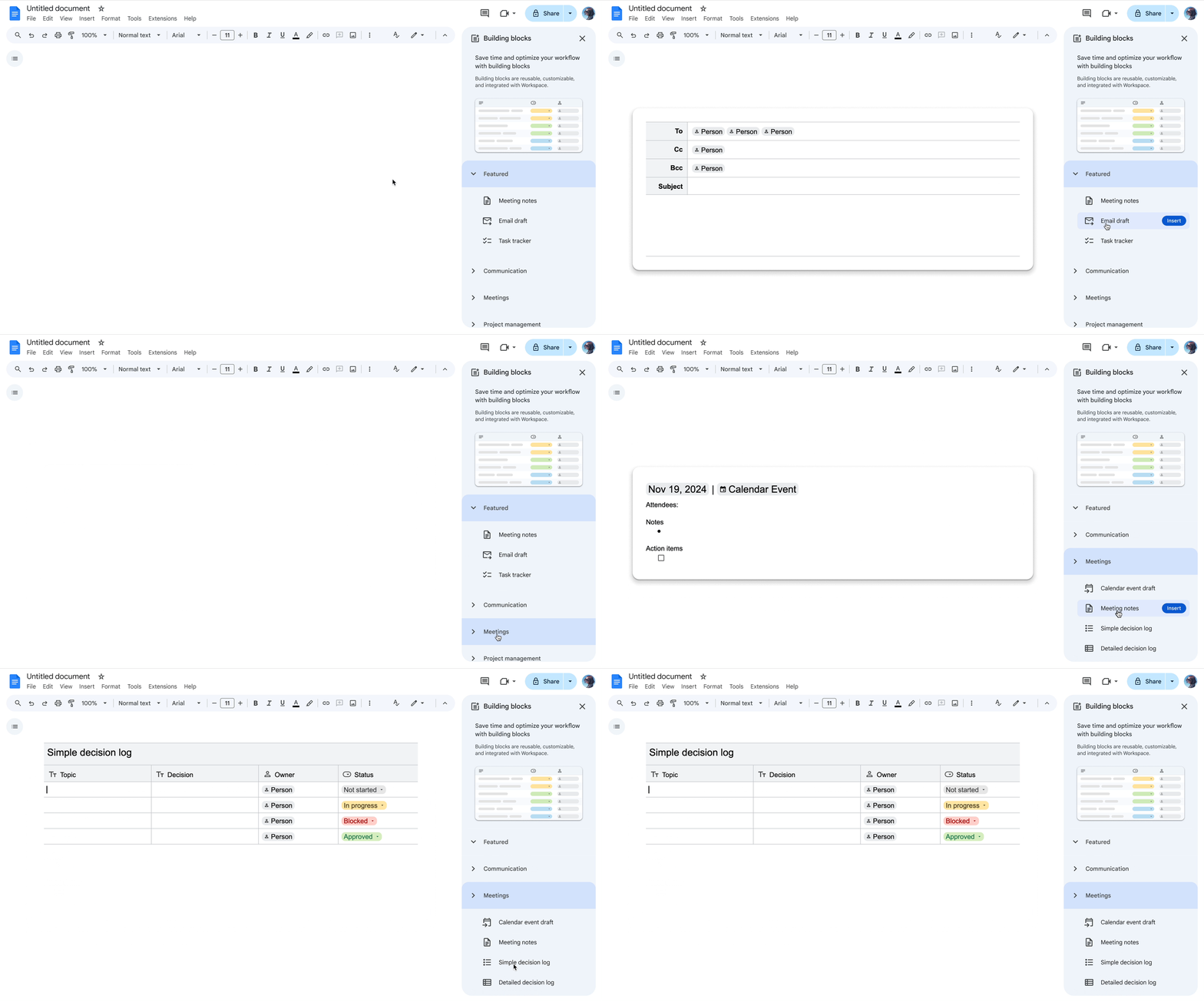
Lastly, we’re improving table building blocks by adding table title rows, a formatted, full-width row with heading styling. Table title rows allow you to clearly call out a visually appealing table name and saves you time from formatting manually. The new column types will set a data type (dates, dropdown chips, files or people) and provide friendly warnings when table content does not match, ensuring your table data is accurate and organized.
Pour commencer
Rythme de déploiement
- Domaines à libération rapide: Extended rollout (potentially longer than 15 days for feature visibility) starting on November 19, 2024, with expected completion by December 5, 2024
- Domaines de diffusion prévus : Gradual rollout (up to 15 days for feature visibility) starting on December 12, 2024
Disponibilité
- Disponible pour tous les clients de Google Workspace, les abonnés individuels à Workspace et les utilisateurs disposant d'un compte Google personnel.
- Note: the Task Tracker building block is available to Google Workspace customers and Workspace Individual Subscribers only.
Ressources
par | Nov 19, 2024 | Nouvelles
Ce qui change
Users can currently
send & share files such as images, PDFs and videos in Google Chat messages and use the
Shared tab to access all conversation-related artifacts including files, links and media. However, only one image can be uploaded in a single Chat message on web at a time.
To improve upon this functionality, provide a highly-requested feature, and match the mobile experience, we’re excited to announce that users can now upload and send up to 20 multimedia files (photos and videos) in one Chat message. Dragging and dropping multimedia files into the compose bar from your desktop is also supported.
Pour commencer
- Domaines à libération rapide: Extended rollout (potentially longer than 15 days for feature visibility) starting on November 19, 2024, with expected completion by December 3, 2024
- Domaines de diffusion prévus: Full rollout (1–3 days for feature visibility) starting on December 12, 2024
Disponibilité
- Disponible pour tous les clients de Google Workspace, les abonnés individuels à Workspace et les utilisateurs disposant d'un compte Google personnel.
Ressources
par | Nov 21, 2024 | Nouvelles
Ce qui change
Today, Google Drive developers rely on the
drive.file scope and the Google Picker API to optimize user experience and safety when creating their applications.
To make it faster and easier for users to provide applications access to specific Drive files, the
Google Picker API will introduce a new method to the
Class view called setFileIds(fileIds). This method lets application developers present users with a picker that is pre-navigated to the specified file IDs the application is seeking access to, allowing faster consent for your users and a more continuous experience for your application.
Pour commencer
- Administrateurs : There is no admin control for this feature.
- Développeurs : If you have a user interaction such as a chat interface where a user already provided the FileId that they want to open using your application, you can now provide that FileId via the View class and Google will prompt the user to grant you OAuth access directly to that file or files.
- Utilisateurs finaux : There is no end user setting for this feature.
Rythme de déploiement
Disponibilité
- Disponible pour tous les clients de Google Workspace et les abonnés individuels à Workspace
Ressources
par | Nov 21, 2024 | Nouvelles
Ce qui change
As we continue to
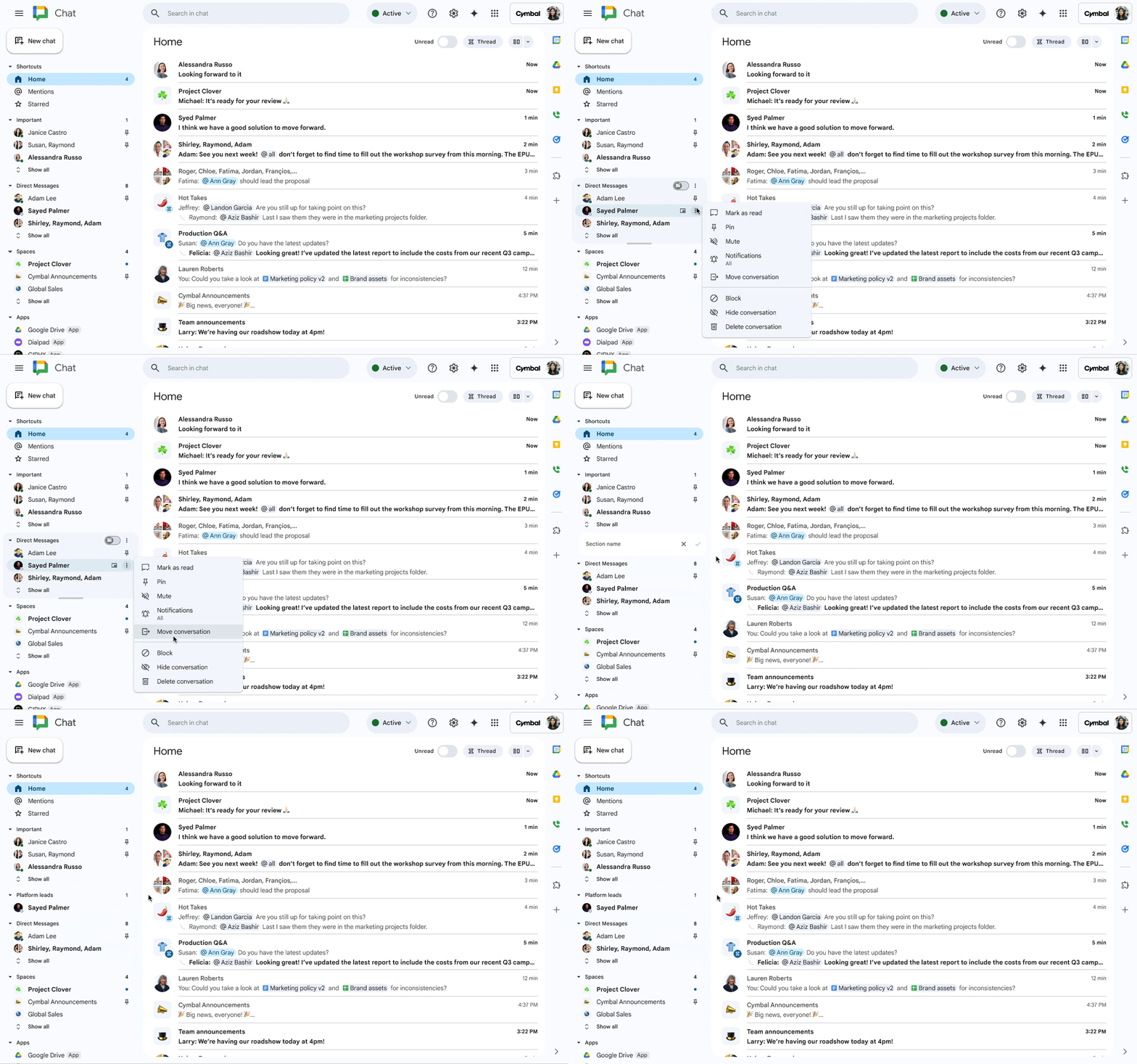
enhance the user experience in Google Chat over the last year, we’re excited to announce that users can now organize Chat conversations into custom sections. A highly requested feature, custom sections are useful for scenarios in which users want similar conversations about a topic or project to be in the same location in the left-hand menu of Chat.
To make a custom section, go to the direct messages or spaces section in Chat > hover over the three dot menu > select Create new section > name the custom section > hit enter. You can add conversations from a direct message or space to a custom section by:
- Dragging and dropping it in from another section
- Hovering over a conversation > clicking the three dot menu > selecting Move conversation > Move to [Name of the custom section]
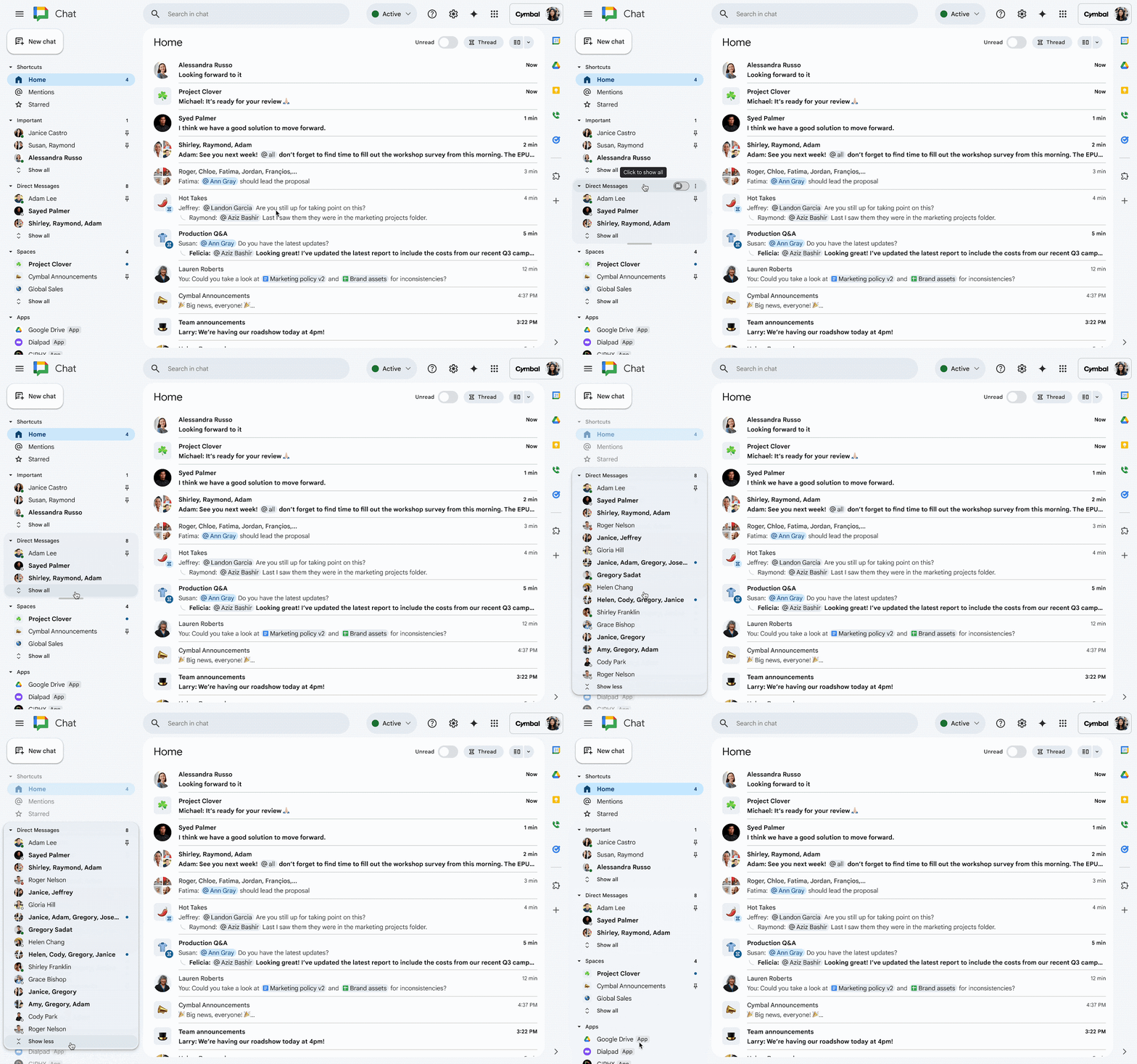
Previously the direct messages and spaces sections in the left-hand menu were independent, individually-scrollable lists. With this update, users can navigate specific sections of their conversations by scrolling across all of their sections as one unified conversation list, view top conversations across each section, and find older conversations within each section by expanding via “Show all.”
For each section, users can also:
- Modify the size (height) of each section
- Reorder a section in the left-hand menu based on preference by moving it up or down
- Toggle an unread button ON (or OFF) to instantly find new messages within each section that need their attention
- Start a new direct message or space message from the three dot menu next to the unread toggle
In addition, users will now be able to find their Chat apps more quickly with a new dedicated Apps section.
Qui est concerné ?
Utilisateurs finaux
Pourquoi l'utiliser ?
This complete revamp of the left navigation experience on Chat will help users find messages more easily based on their own organizational preferences.
Pour commencer
- Administrateurs : There is no admin control for this feature.
- Utilisateurs finaux:
- By default, the conversation list is organized by direct messages, spaces, and apps, with each section set to show active conversations only.
- While the new Chat experience is visible on mobile, users can only create and manage sections on the desktop version of chat.google.com or Chat in Gmail.
- Visitez le centre d'aide pour apprendre à utiliser Google Chat.
Rythme de déploiement
- Domaines à libération rapide: Extended rollout (potentially longer than 15 days for feature visibility) starting on November 21, 2024, with expected completion in early January 2025
- Domaines de diffusion prévus: Gradual rollout (up to 15 days for feature visibility) starting on January 6, 2025
Disponibilité
- Disponible pour tous les clients de Google Workspace, les abonnés individuels à Workspace et les utilisateurs disposant d'un compte Google personnel.
Ressources
par | Nov 22, 2024 | Nouvelles
Ce qui change
Asus is launching new hardware room kits certified for Google Meet that now offer daisy chain capabilities. Developed with AVer, this refreshed room kit portfolio will work in video conferencing rooms and spaces of just about any size. After initial setup, admins can easily enroll, manage, and monitor these devices using the Google Workspace admin console.
The kits are composed of the following components:
- Compute: We’re refreshing existing ASUS kits with a new ASUS Google Meet compute system. This new Meet compute system is slimmer and easier to deploy than previous versions, offering a longer device lifespan until September 2030.
- Controller: Mimo Myst controller
- Audio: AVer Fone 540 speakermic (with expansion mics available for larger rooms)
- Camera:
- AVer Cam340+ for small and medium rooms
- AVer Cam 520 Pro3 for large rooms
- This device also features built-in third-party room framing, which helps ensure the room is optimally framed. You can turn on this framing from the device by selecting Control camera > Framing by Aver.
Pour commencer
- Administrateurs : Asus room kits for Google Meet require Google Meet hardware licenses. The updated Asus Google Meet hardware kits for Google Meet are available today – contact your reseller to learn more. This device should be rebooted after installation and runs on M126 – visit the Help Center to check the latest status on M126.
- Utilisateurs finaux : Once an Asus room kit has been successfully enrolled, you can join Google Meet meetings normally and take advantage of our embedded interoperability to join Zoom et Webex calls.