por | Dez 18, 2023 | Noticias
What’s changing
If you haven’t used Standard view recently, you’ll notice we’ve made numerous usability improvements, including enhancements for people that prefer or require the precision of navigating the user interface by keyboard or screen reader. Accessibility of Standard view has significantly improved over the last few years and we’re committed to continuing to improve the accessibility experience and making new features accessible going forward.
Getting started
Admins: There is no admin control for this feature. You can use Gmail on your browser in Basic HTML view through February 2024. After this, Gmail automatically changes to Standard view. End users: Once Basic HTML view is disabled, users will automatically be redirected to the Standard Gmail view which provides the latest in Gmail security and features. Users on old browsers may need to update their browser to use the Standard view. On mobile, users can also download the official Gmail app. Visit the Help Center to learn more about
using Gmail with a screen reader.
Rollout pace
This impacts all Google Workspace customers and users with personal Google Accounts
Resources
por | Dez 15, 2023 | Noticias
2 New updates
Unless otherwise indicated, the features below are available to all Google Workspace customers, and are fully launched or in the process of rolling out. Rollouts should take no more than 15 business days to complete if launching to both Rapid and Scheduled Release at the same time. If not, each stage of rollout should take no more than 15 business days to complete.
We have begun enforcing 2-step verification for all admin accounts
Two-step verification (2SV) is a critical security measure that has been proven to reduce password-based hijacking by
more than 50%. We are committed to protecting the security of our users and are taking additional steps to help customers guard against data compromise and prevent account takeovers.
We have begun enforcing 2SV for all admin accounts and will continue this enforcement on an ongoing basis. As of December 2023, this change is already in effect for some customers. When this goes into effect for your organization, you will receive the following notifications:
30 days prior to enforcement in your domain: Super admins will receive various email and in-app notifications informing them of the forthcoming enforcement, encouraging them to verify their admins’ 2SV status. Once enforcement goes into effect in your domain: All admins will receive email and in-app notifications upon signing into their accounts for the next thirty days. If they do not enable 2SV within this time period, they will be locked out and will need to follow these steps to
recover an administrator account.
Dynamic groups limit increased to 500
We’re increasing the number of dynamic groups a customer can have from 100 to 500. Dynamic groups are defined as groups whose membership is managed automatically based on specific criteria, such as a user’s department or location. This increase gives admins more flexibility to create dynamic groups as needed and cuts down on manual group management tasks that would otherwise be required. | Rolling out now to
Rapid Release and Scheduled Release domains at a gradual pace (up to 15 days for feature visibility). | Available for Google Workspace Frontline Standard, Enterprise Standard and Enterprise Plus, Education Standard and Education Plus, Enterprise Essentials Plus, and Cloud Identity Premium customers only. | Learn more about
dynamic groups.
Previous announcements
The announcements below were published on the Workspace Updates blog earlier this week. Please refer to the original blog posts for complete details.
Meet Add-ons SDK available in Developer Preview
The
Google Meet Web Add-ons SDK is available through our Developer Preview Program. Developers can use the SDK to bring their app experience right into Meet. End users can install, open, and collaborate in apps right inside a meeting, either as the meeting focal point, or in the sidebar — all without ever leaving Meet. | Learn more about
Meet Add-ons SDK .
Huddly cameras bring continuous framing to Google Meet Series One room kits
As part of our initiative to bring
adaptive framing to Google Meet meeting rooms, we’re proud to announce that you can now access Huddly’s continuous framing capability available as part of the Series One room kit hardware devices. | Available to all Google Workspace customers using Google Meet Series One room kits only. | Learn more about
Google Meet Series One.Record and share your name pronunciation across Google Workspace products
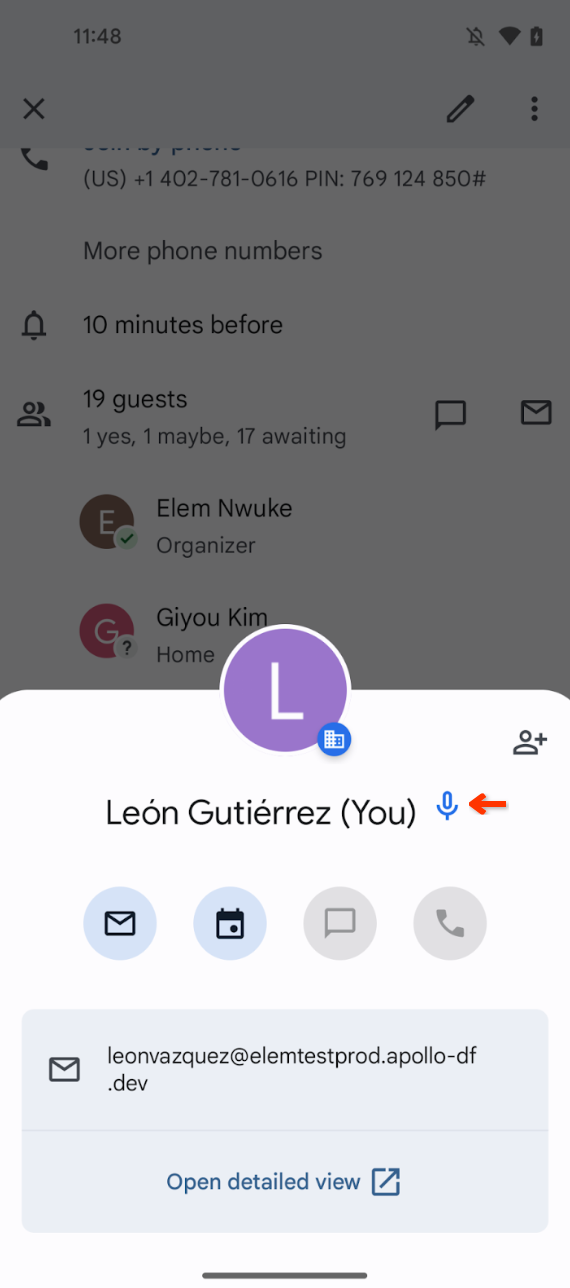
From your Google account settings, you can now record your name and share its pronunciation with other users. The pronunciation can be played from your profile card across various Google Workspace tools such as Gmail or Google Docs on web or mobile devices. | Available to Google Workspace Business Starter, Business Standard, Business Plus, Essentials Starter, Enterprise Essentials, Enterprise Essentials Plus, Enterprise Standard, Enterprise Plus, Frontline Starter, Frontline Standard, and Nonprofits customers only. | Learn more about
name pronunciation. Easy access to people, documents, building blocks and more in Google Docs
Excuse assignments in Google Classroom
Teachers can mark an assignment for a particular student as “Excused” instead of giving it a 0-100 score. This will exclude that particular assignment from the student’s overall grade. | Learn more about
excusing assignments. Introducing interactive questions for YouTube videos in Google Classroom
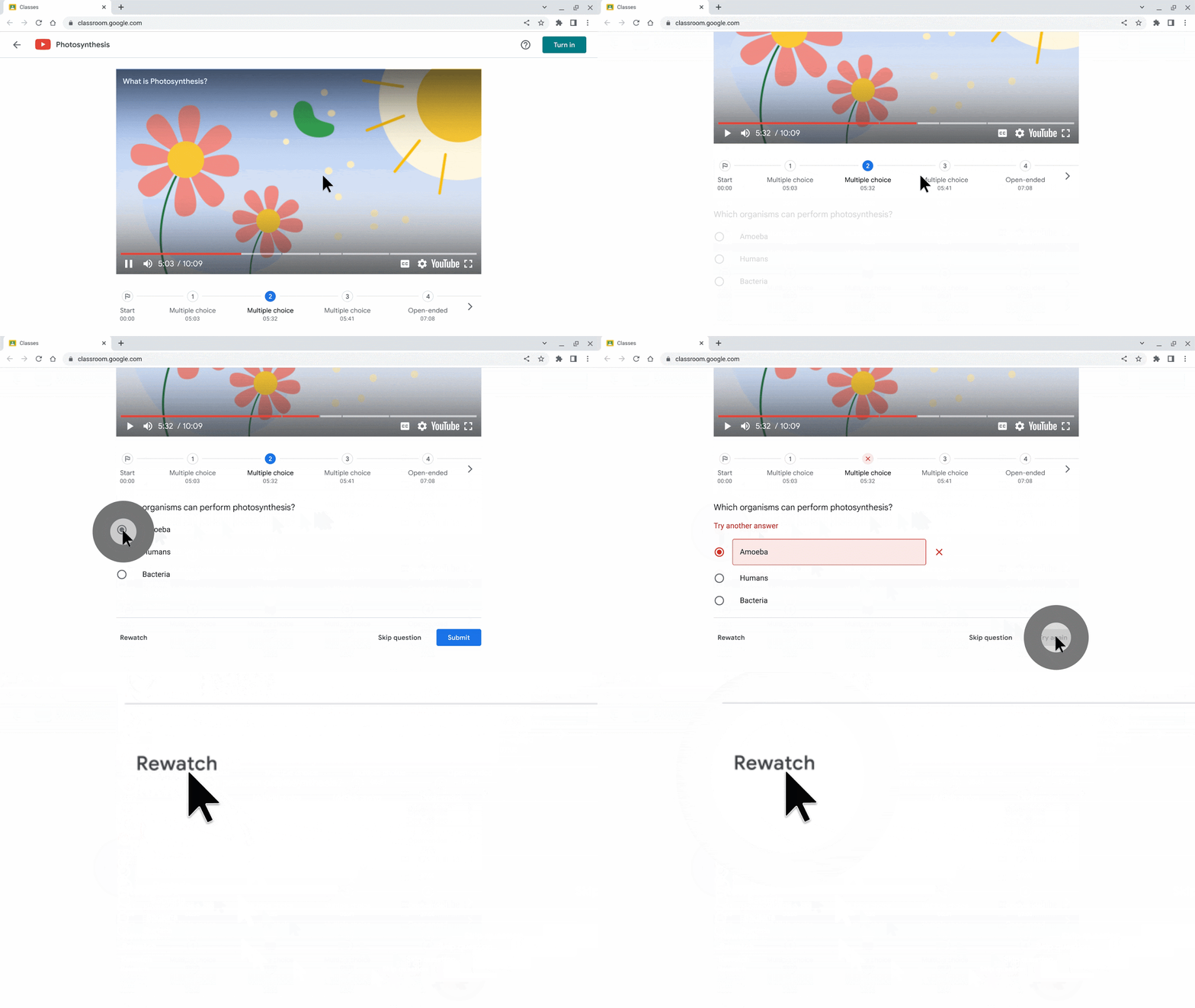
Educators can now turn any YouTube video into an interactive lesson by adding questions for their students to answer throughout the video. | Available to Education Plus and the Teaching and Learning Upgrade only. | Learn more about
interactive videos. Introducing the Bitbucket app for Google Chat
We’re adding Bitbucket for Google Chat. Bitbucket is a Git-based code and CI/CD tool optimized for teams using Atlassian’s Jira. | Learn more about
Bitbucket app for Google Chat. Use “Profile Discovery” to display basic information only in search results, available in open beta
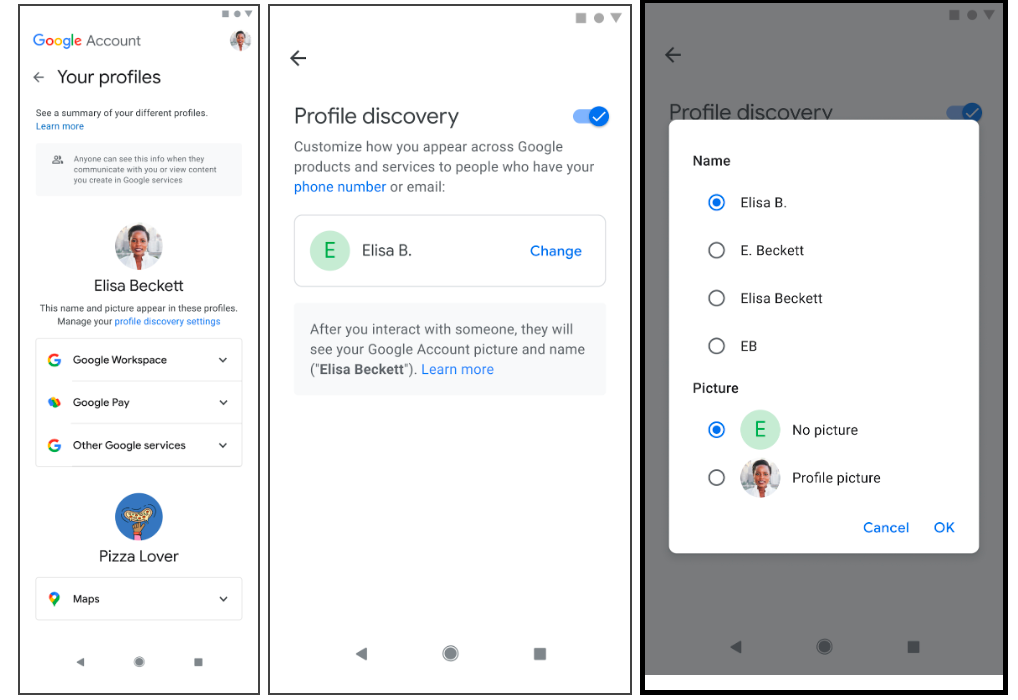
Google Workspace admins can now turn on “Profile discovery” for their users. When turned on, users can customize how they appear across Google products to people who search for them by their phone number or email. Specifically, you can choose how you want your name to be displayed and how your profile picture will be displayed. | Learn more about
Profile Discovery.
Rapid Release Domains:
Scheduled Release Domains:
Rapid and Scheduled Release Domains:
por | Dez 12, 2023 | Noticias
What’s changing
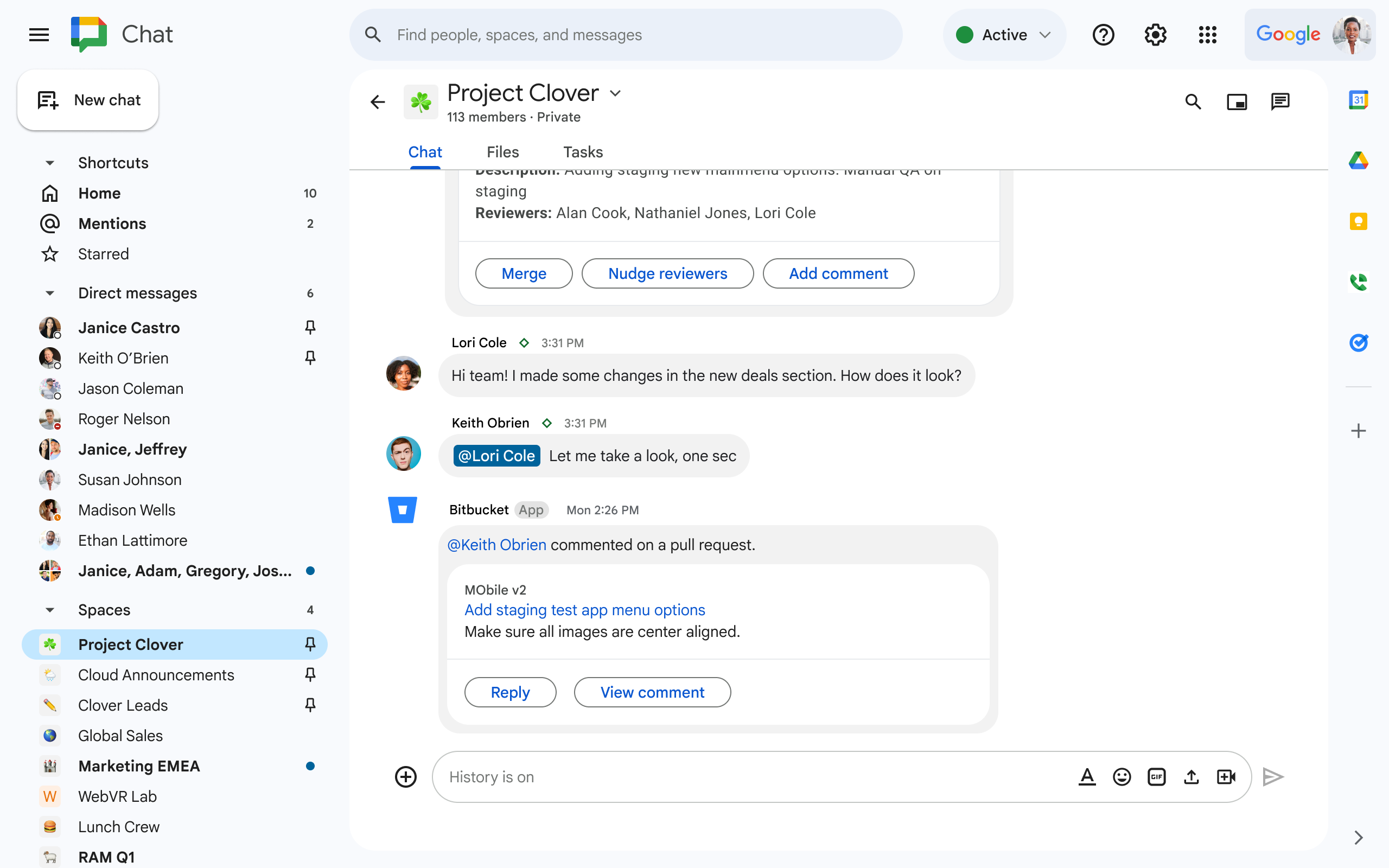
Bitbucket is a Git-based code and CI/CD tool optimized for teams using Atlassian’s Jira. The Bitbucket app for Google Chat will allow you to receive messages when events occur in your Bitbucket repositories, as well as perform quick actions, such as viewing and approving pull requests.
Getting started
This app is available now for all users.
Availability
Available to all Google Workspace customers and users with personal Google Accounts
Resources
por | Dez 12, 2023 | Noticias
What’s changing
Google Workspace admins can now turn on “Profile discovery” for their users. When turned on, users can customize how they appear across Google products to people who search for them by their phone number or email. Specifically, you can choose how you want your name to be displayed and how your profile picture will be displayed.
This feature is available in open beta, which means no additional sign-up is required to use the feature.
In the Admin console, under Directory Settings > Profile editing, you can turn “Profile discovery” on or off for your users.
To help people recognize you, we’ll share basic information needed to confirm your identity. After you interact with someone, they’ll typically see your full name, profile picture, and more from your Google Account.
Getting started
por | Dez 12, 2023 | Noticias
What’s changing
Educators can now turn any YouTube video into an interactive lesson by adding questions for their students to answer throughout the video.
The interactive questions feature turns a passive watching experience into an engaging one, and improves students’ understanding of a subject by providing them with the space to make mistakes, review incorrect answers and assess correct answers at their own pace.
Once students within a class have completed the video activity, educators will have access to a dashboard of key insights based on student engagement levels.
Who’s impacted
Admins and end users
Why you’d use it
While interactive YouTube video assignments will be beneficial to students, it will also help educators identify concepts that need more instruction time, discover students who may need extra support and also shape future lesson plans. Educators are also able to scale individualized support since students will get real-time validation as they answer certain question types in the video activities.
Additional details
You can now use the “Resources” tab in the Classroom left navigation to find and manage all your video activities and
practice sets. Getting started
Rollout pace
Availability
Available to Education Plus and the Teaching and Learning Upgrade
Resources
por | Dez 12, 2023 | Noticias
What’s changing
Following the
expansion of grading systems in Google Classroom, we’re adding an additional feature that gives teachers even more flexibility when it comes to grading for assignments and classwork.
Starting today, teachers can mark an assignment for a particular student as “Excused” instead of giving it a 0-100 score. This will exclude that particular assignment from the student’s overall grade.
We hope this requested feature addresses various class scenarios, such as wanting to drop a student’s lowest assignment, excusing an assignment when a student is absent, or any other circumstance in which an assignment should not be included in a student’s grade.
Getting started
Admins: There is no admin control for this feature. End users: Visit the Help Center to learn more about
excused grading.Rollout pace
Available to all Google Workspace customers and users with personal Google Accounts
Resources
por | Dez 11, 2023 | Noticias
What’s changing
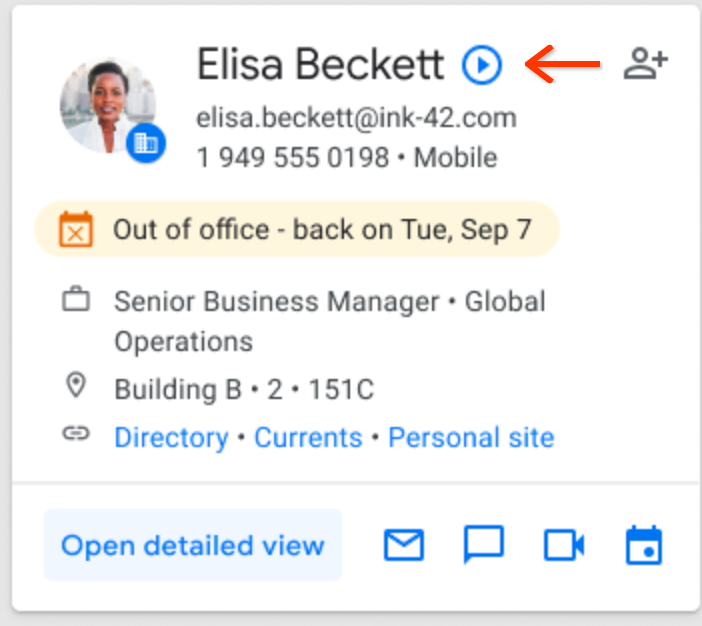
From your Google account settings, you can now record your name and share its pronunciation with other users. The pronunciation can be played from your profile card across various Google Workspace tools such as Gmail or Google Docs on web or mobile devices. We hope this update makes it easier for you to represent yourself and connect with colleagues in Google Workspace.
When you record and share your name pronunciation, it can be viewed across various Workspace products
Getting started
Rollout pace
Availability
Available to Google Workspace Business Starter, Business Standard, Business Plus, Essentials Starter, Enterprise Essentials, Enterprise Essentials Plus, Enterprise Standard, Enterprise Plus, Frontline Starter, Frontline Standard, and Nonprofits customersNot available for Google Workspace Education Fundamentals, Education Standard, Education Plus, the Teaching and Learning Upgrade customers
Resources
por | Dez 11, 2023 | Noticias
What’s changing
Building upon the recently introduced
row of buttons at the top of your newly created Google Docs, we’re adding more ways to quickly find and insert relevant content directly into your document with an additional way to open the @-menu. This is another feature that boosts productivity and saves time by bringing
smart canvas features to the forefront of your workflow.
When moving to a blank line within your Doc, you will see an “@” button with the option to select, search and insert
smart chips, such as people, dates, timers, file chips, building blocks, calendar events, groups and more.
Getting started
Rollout pace
Available to all Google Workspace customers and users with personal Google Accounts
Resources
por | Dez 11, 2023 | Noticias
What’s changing
As part of our initiative to bring
adaptive framing to Google Meet meeting rooms, we’re proud to announce that you can now access Huddly’s continuous framing capability available as part of the Series One room kit hardware devices. Huddly’s new framing solution continuously adjusts to include participants coming and leaving the room. The feature can be turned on by meeting participants directly from the touch controller. Using Huddly framing helps keep those in the meeting room in view no matter where they are, so that they’re more visible to other participants in the meeting which creates a more engaging experience.
To support this change, we’ve:
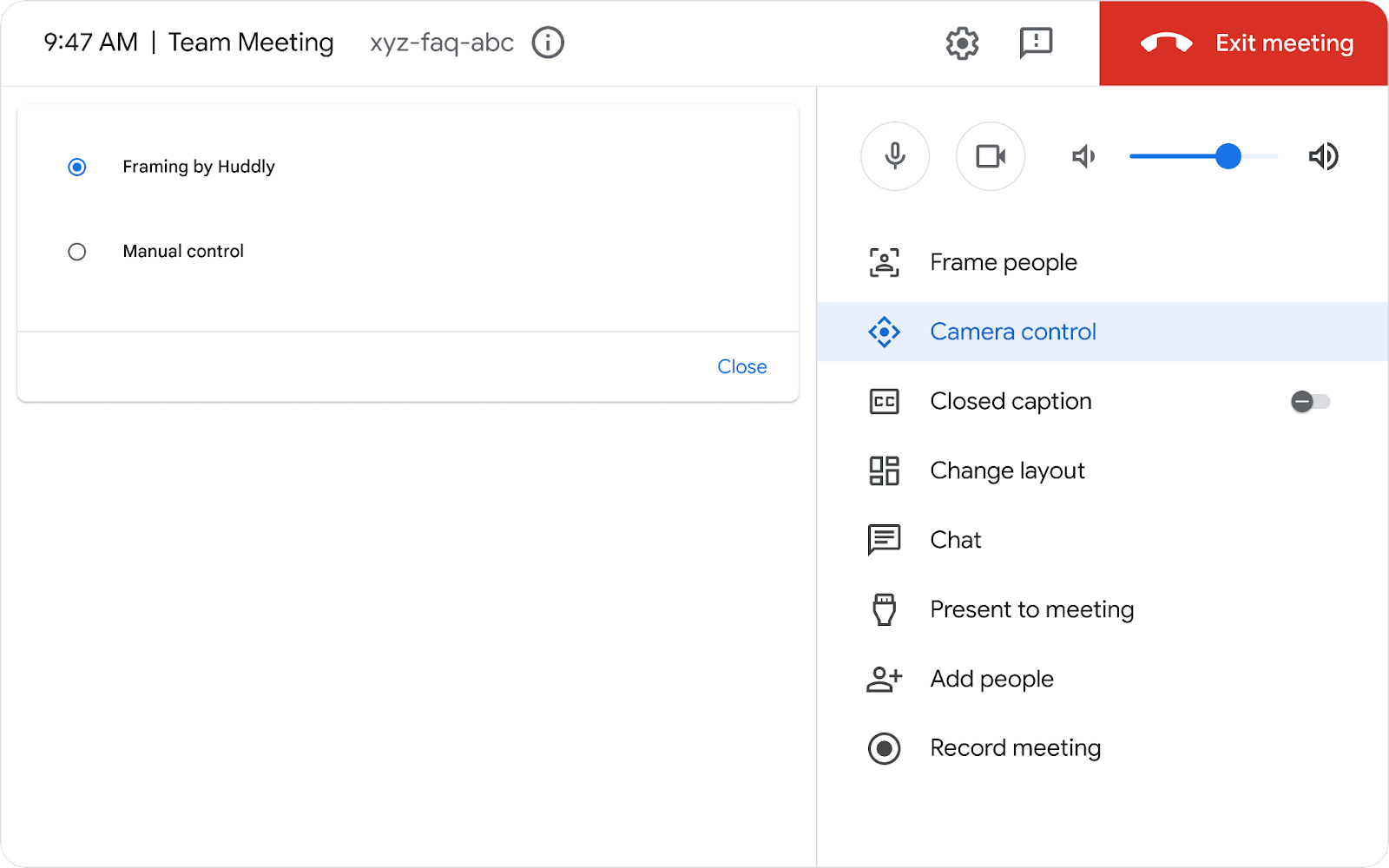
Updated the camera control tab on the touch controller to display all the framing options available in your meeting rooms and allow users to toggle between them. Moved the camera self-view from the manual control component on the touch controller to the TV/monitor display for optimal placement. With meeting spaces becoming more diverse, the display is the most common, accessible interface to all meeting participants. Changed “home” button in manual control to “Reset to Default”
Select “Camera control” and then “Framing by Huddly” to use this feature.
Getting started
Admins: There is no admin control for this feature at this time. We plan to introduce an admin control in the future and will provide more information once it’s available.End users: This feature will be OFF by default. Visit the Help Center to learn more about
using device-based framing and
using the Meet the touchscreen to control audio and video. Note that Huddly continuous framing must be turned on for each meeting and will not carry over to the subsequent meetings.
Rollout pace
Availability
Available to all Google Workspace customers using Google Meet Series One room kits
Learn more
Resources
por | Dez 1, 2023 | Noticias
3 New updates
Unless otherwise indicated, the features below are available to all Google Workspace customers, and are fully launched or in the process of rolling out. Rollouts should take no more than 15 business days to complete if launching to both Rapid and Scheduled Release at the same time. If not, each stage of rollout should take no more than 15 business days to complete.
New ways to use the Google Sheets app on iOS devices
Adding ‘Admin managed apps’ category to Google Workspace Marketplace
We’re excited to announce a new featured app category in the Marketplace:
Admin managed. These Enterprise apps can be installed only by a Google Workspace administrator for their organization. | Available now to all Google Workspace customers. | Learn more about
Featured app categories.
Bulk select in Gmail on Android and iOS devices
We’re introducing a feature that enables you to bulk select a batch of messages in the email threadlist with one tap using the Gmail app on Android and iOS devices. After clicking the select all icon, a batch of messages will be selected, enabling you to easily perform email actions such as deleting multiple messages or marking them as “read”. | This feature is available now on Android devices and is rolling out now to
Rapid Release and Scheduled Release domains on iOS devices. | Available to all Google Workspace customers and users with personal Google Accounts.
Previous announcements
The announcements below were published on the Workspace Updates blog earlier this week. Please refer to the original blog posts for complete details.
Create shareable video presentations in Google Slides
We’re introducing slides recordings, a new Google Slides feature that lets you easily record yourself presenting, and then share the presentation with others to view when it works for them. | Available to Google Workspace Business Standard, Business Plus, Enterprise Starter, Enterprise Essentials, Enterprise Essentials Plus, Enterprise Standard, Enterprise Plus and Education Plus only. | Learn more about
slides recordings. The next evolution of automated data entry in Google Sheets
Expanding message bubbles in Google Chat to iOS devices
In September, we introduced message bubbles in Google Chat on web and Android, enabling users to more easily differentiate incoming versus outgoing messages in the Chat message stream. This week, we’re excited to announce the expansion of message bubbles to iOS devices. | Learn more about
message bubbles.
Updates to the Google Drive scanner on Android & iOS devices
We’re introducing additional enhancements to the Drive scanner on Android devices, which now powers the Google Pixel camera and includes improvements to the scanner experience when capturing content. We’re also expanding the Google Drive scanner and title suggestion feature to iOS devices. | Learn more about
Drive scanner. Introducing a new homepage view in Google Drive
We’ve added a new streamlined homepage for Drive called Home that makes it easier and faster for you to find files that matter most. | Learn more about
Drive home.
Introducing a new mobile experience for Google Chat
Google Vault now supports Google Calendar
Google Vault now supports Calendar, which means customers can take new actions around Calendar data. | Available to Google Workspace Business Plus, Enterprise Essentials, Enterprise Essentials Plus, Enterprise Standard, Enterprise Plus, Education Standard, Education Plus customers or customers with the Vault add-on license only. | Learn more about
Vault supporting Calendar.
More insights to help admins troubleshoot Google Meet hardware issues
In 2022, we introduced
several improvements for managing Google Meet hardware devices. These improvements included surfacing additional information about device issues, such as a description of the issue, when the issue was detected, and more. Now, we’re taking these improvements one step further by providing admins with even more data points. | Learn more about
Google Meet hardware issues.
Monitor insider risk of Google Workspace data with Chronicle
Admins can now more seamlessly integrate their Google Workspace data with Chronicle (
Google’s cloud-native Security Operations platform), to quickly detect, investigate and take action on risky activity and threats. | Available to Google Workspace Enterprise Standard and Enterprise Plus customers only. | Learn more about
Chronicle.
Google Classroom now supports roster import from SIS partners
Educators can now easily import students from their student information system (SIS) to Google Classroom using
OneRoster. This integration saves educators time and helps make class setup much quicker. | Available to Education Plus and the Teaching and Learning Upgrade only. | Learn more about
roster import.
Rapid Release Domains:
Scheduled Release Domains:
Rapid and Scheduled Release Domains: